 Yorimichi Games
How to play the box pushing puzzle
This is a one-player logic puzzle set in a warehouse. You control a worker who walks around the floor and pushes boxes, and your job is to get every box onto one of the marked target squares. There are only two rules: you can push but never pull, and you can push only one box at a time. That is all there is to it – and yet a single careless push can wedge a box against a wall where it will never move again, or block the only corridor you needed. Working out the right order of pushes, a few steps ahead, is what makes these puzzles so satisfying. There are 50 levels, from gentle practice rooms to long, tricky layouts.
Reading the warehouse
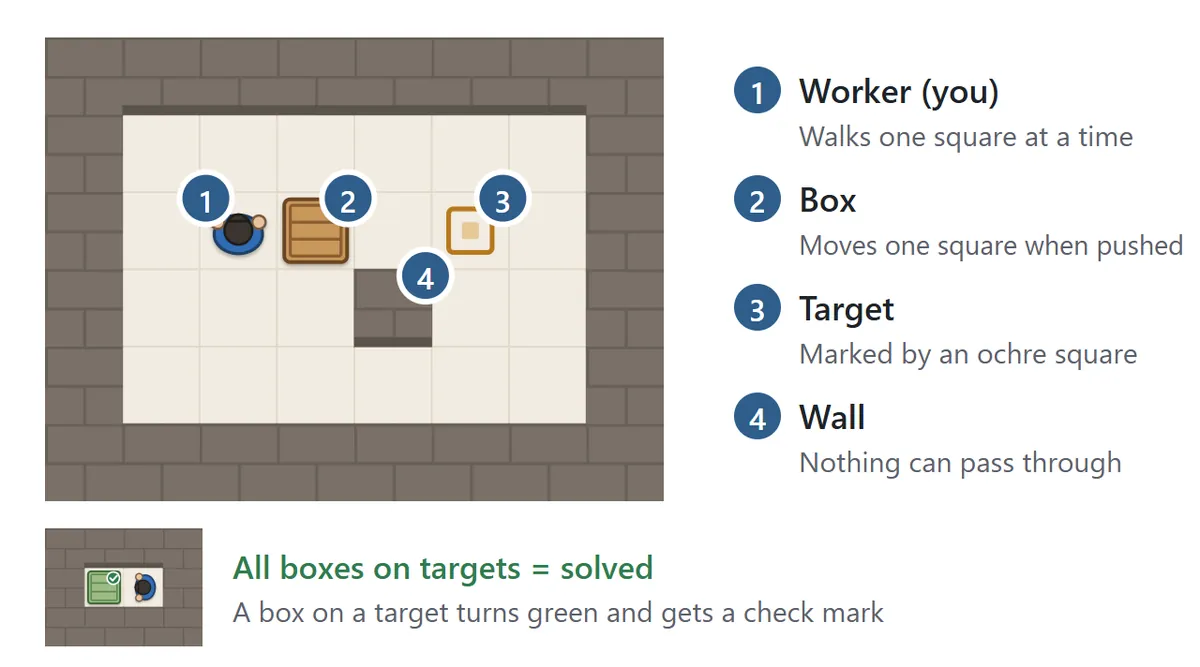
You are looking straight down at the warehouse. The worker in blue overalls is you, and you can step one square up, down, left or right. The brown wooden crates are the boxes, the ochre squares on the floor are the targets, and the brick areas are walls. There are exactly as many targets as boxes, and the level is solved when every box is on a target. A box sitting on a target turns green and gets a small check mark, so you can see your progress at a glance. The bar above the warehouse shows how many boxes are on target, how many steps you have taken (moves) and how many of those steps pushed a box (pushes).
What you can and can’t push
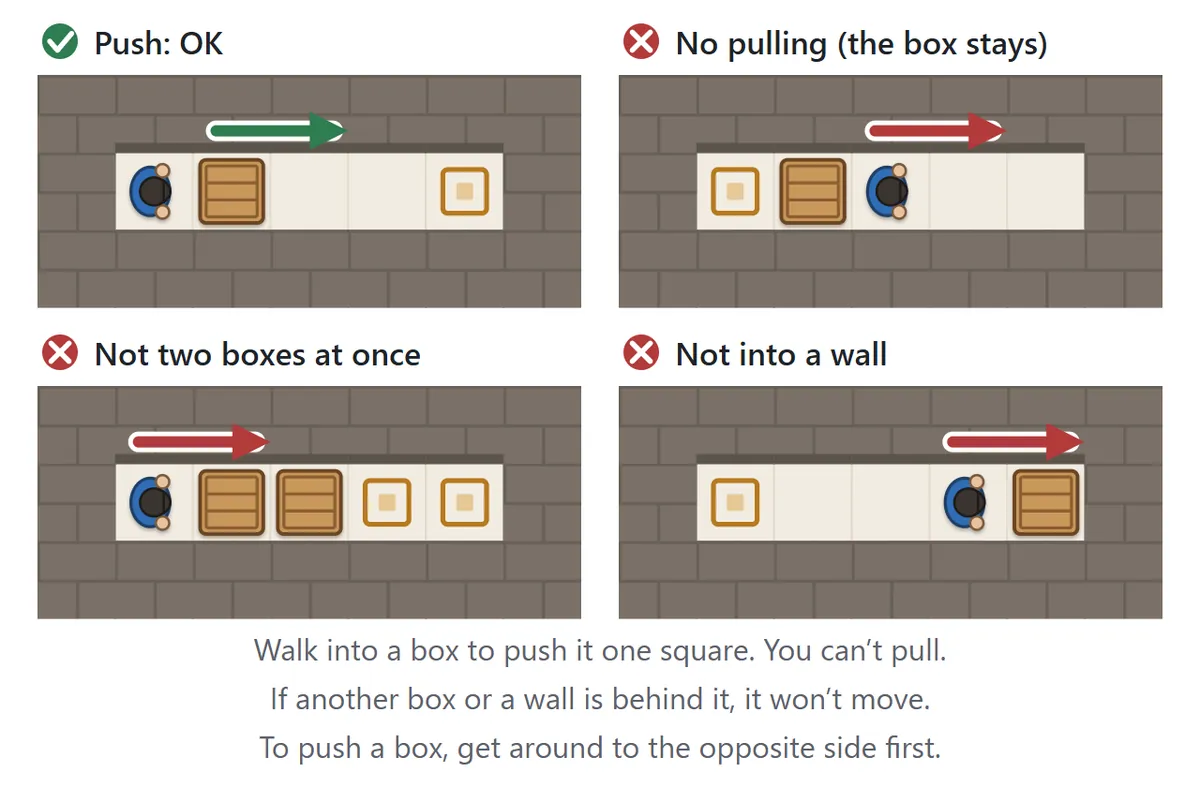
Stand next to a box and walk into it: the box slides one square and you follow it. The easiest way to think about it is that you always have to get around to the opposite side of the box from where you want it to go. If there is a wall or another box behind it, it won’t budge. And since you can’t grab a box, walking away from it simply leaves it where it is.
Controls

Press (or tap) any floor square and the worker walks there on the shortest path, going around boxes and walls. Press a box right next to the worker to push it one square. On a keyboard, use the arrow keys or W, A, S and D to take one step at a time. On a phone or tablet you can also swipe across the board, or use the arrow buttons under it – hold one down to keep walking.
Made a mistake? “Undo” (the Z key) takes back moves one at a time, as far as you like; a walk you started with a single tap is undone in one go. Press “Restart” (the R key) twice in a row to start the level over.
Avoiding dead ends
The single most important skill in a box pushing puzzle is not creating a position where a box can never reach a target. Because boxes can’t be pulled, some pushes are one-way: once a box is in the wrong spot, the level can no longer be solved. When you are starting out, learn these three shapes.
1. Boxes in corners
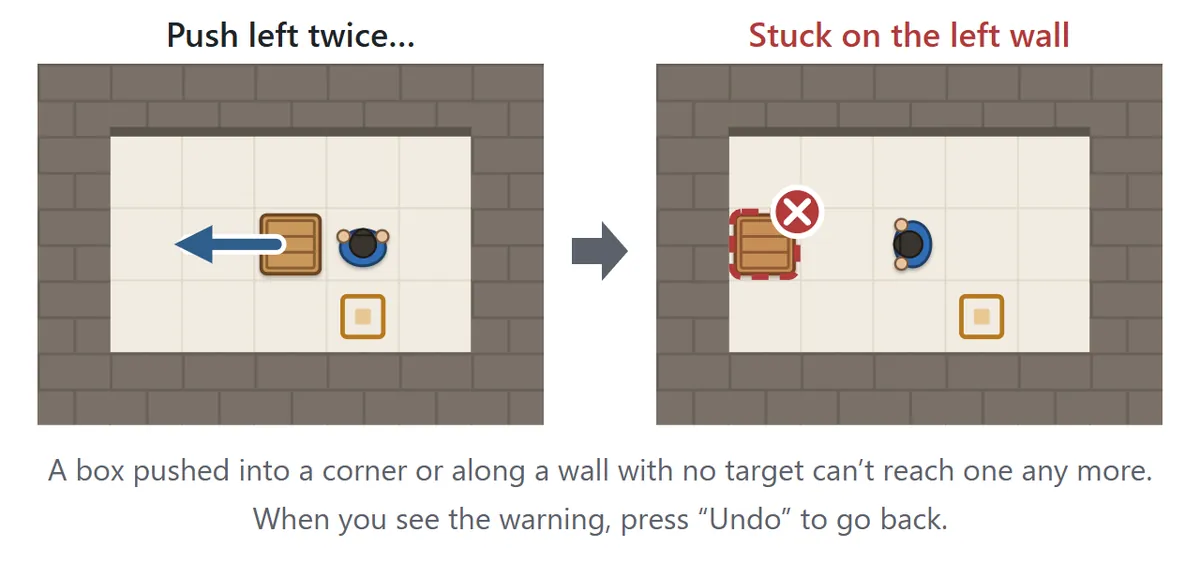
A box pushed into a corner – a square with walls on two sides – can never be pushed again in any direction. That is fine if the corner is a target, but otherwise the box is stuck for good.
2. Walls with no target
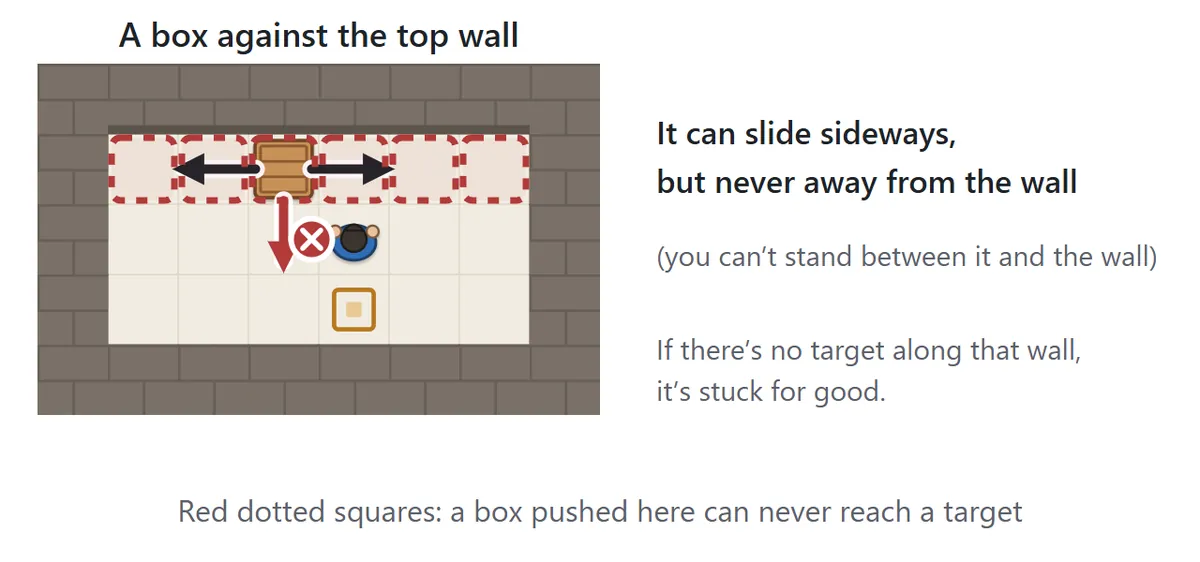
A box touching a wall can never be pushed away from it, because to do that you would have to stand between the box and the wall. It can still slide along the wall, but if there is no target anywhere on that stretch of wall, it will never reach one.
3. Boxes locking each other
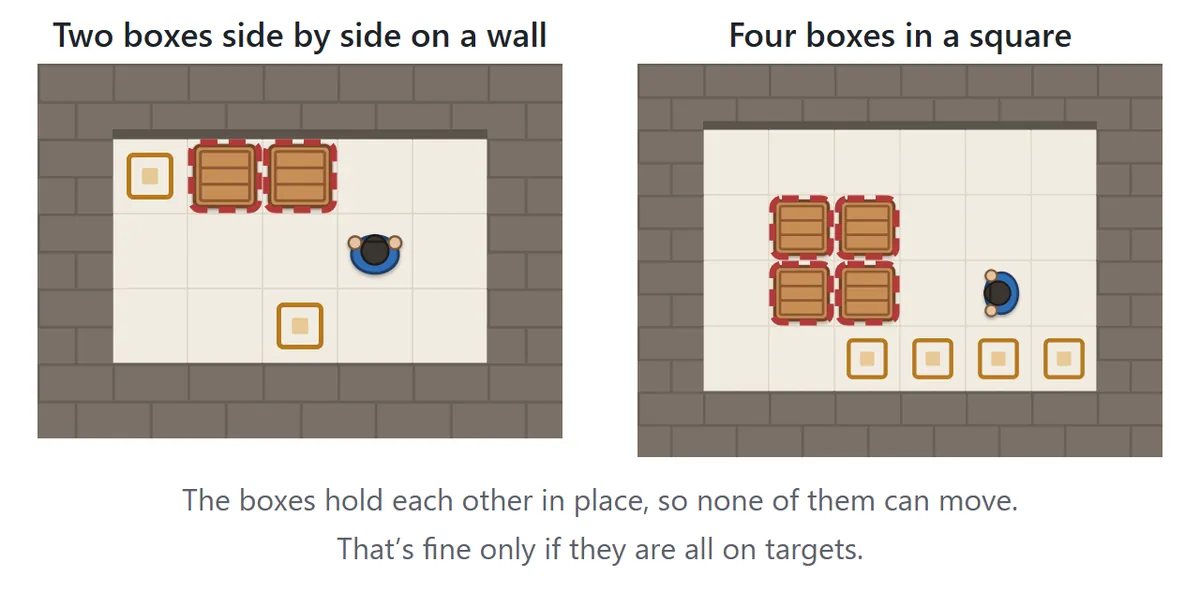
Two boxes side by side against a wall, or four boxes in a 2×2 block, hold each other in place: whichever one you try to push, the other box or the wall stops it. This is only safe if every one of those boxes is already on a target.
With the “Dead-end warning” setting on (it is on by default), boxes caught in one of these shapes get a red dotted outline right after the push. When you see it, press Undo to go back. Some dead ends are not detected, though – for example when boxes seal off part of the warehouse so that you can’t get around to the side you need. If you feel stuck, undo a few moves and try a different order.
Levels and difficulty
| Level | Levels · boxes | What to expect |
|---|---|---|
| Practice | 1–4 · 1–2 | Push straight, walk around a box, avoid a corner, handle two boxes in order |
| Easy | 5–14 · 2 | A bit of walking around, but pushing in order works |
| Normal | 15–28 · 2–3 | You need to plan the push order and where to get around |
| Hard | 29–42 · 3–4 | Often you must park a box somewhere else first |
| Very hard | 43–50 · 4–5 | Long plans where the boxes keep getting in each other’s way |
The levels are ordered by difficulty, but you can start with any of them. Pick a number in the settings above the game to see that warehouse along with its number of boxes and the fewest moves it can be solved in. Solved levels get a check mark next to their number. All 50 levels were designed for this game.
Box pushing puzzle tips and strategy
1. Look at the whole warehouse before you move
Before taking a step, decide roughly which box goes to which target. Start with the parts that are forced: a target that can only be reached through one corridor, or a box with no room to get around it. Those decisions usually fix the rest of the plan.
2. Fill the far targets first
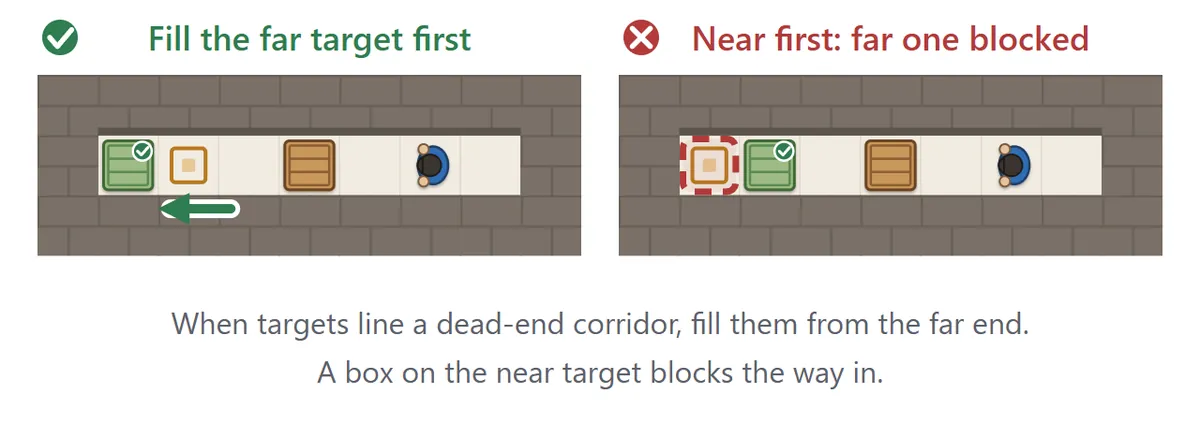
When several targets line a dead-end corridor or the back of a room, fill them from the far end. A box on the nearest target blocks the way to the others.
3. Only push along a wall if that wall has a target
A box pushed against a wall or into a corner can’t come back. Before every push, ask yourself where the box has to go next and where you will need to stand to push it there. If there is no room on the opposite side of the box, it can’t go that way.
4. Keep a way through
If a box blocks a corridor, you can’t get to the other side of it. Until the other boxes are delivered, leave yourself a route to walk and enough space to get around behind each box.
5. Park boxes that are in the way
Harder levels often require moving one box out of the way before you can deliver another. Park it somewhere open near the middle of the room, not against a wall or in a corner, so you can still move it later.
6. Undo freely and experiment
There is no limit on undo. Try a push, see what happens, and take it back if it doesn’t work – that is how you discover the key idea of each level. Once you have solved a level, you can come back and try to match the fewest moves.
FAQ
Can I pull a box back?
No, boxes can only be pushed. If you pushed too far, use Undo to go back to before the push.
How many times can I undo?
As many as you like, all the way back to the start of the level. Undone steps are taken off your move count.
What is the difference between moves and pushes?
Moves count every square the worker walks, including the steps that push a box. Pushes count only the steps that push a box. When you solve a level, you see the fewest moves it can be done in, so you have something to aim for next time. Your best move count is saved for each level.
Can every level be solved?
Yes. All 50 levels were checked by a solver program, which also found the fewest possible moves for each one.
What if I stop halfway?
The level and every step you took are saved automatically. Open the page again on the same device and press “Continue”. Solved levels and personal bests are also stored in your browser on that device.
Is there sound?
The game starts muted. Press “Sound: off” to hear sound effects when you push a box, land one on a target and solve a level.
Where box pushing puzzles come from
Puzzles in which a worker pushes boxes onto storage spots in a warehouse go back to a Japanese computer game from the early 1980s, and the idea soon spread around the world. With just two short rules – push, don’t pull, and one box at a time – designers have found an endless supply of clever levels, and the genre has been part of countless puzzle collections ever since. It is also well known in computer science: as the number of boxes grows, finding the shortest solution becomes extremely hard, which has made these puzzles a favorite test problem for planning and search programs. The levels in this game were all created for it.
More puzzles to try
If you like planning moves ahead, try the Car Escape Puzzle, where you slide cars back and forth to clear a way out for the red car, or the 15 Puzzle, where numbered tiles slide into the gap until they are back in order.