 Yorimichi Games
How to play Flower Puzzle: one of each type
Flower Puzzle is a quiet single-player grouping game played on a fixed garden grid. Your goal is to put every flower into a bouquet of exactly three. Each bouquet must contain one flower marked 1, one marked 2, and one marked 3. The three cells must form a connected shape using their sides. Flowers do not slide, fall, change colour, or grow into another type. You are deciding how to divide an existing arrangement into small mixed bouquets. Every starting puzzle has at least one complete grouping, although there may be several different answers. There is no countdown and no move limit. Take your time to inspect the flowers that would remain after a proposed bouquet. A group that is valid now can still leave an awkward remainder, so clearing the whole garden takes more thought than finding the first three suitable flowers.
The three preview slots below the garden show which types you have selected. A check means one of that type; a cross marks a repeated type. Lines join selected neighbours, and Connected confirms that all three form one group. An empty cell, blank garden space, Escape or Clear selection cancels a selection before confirmation.
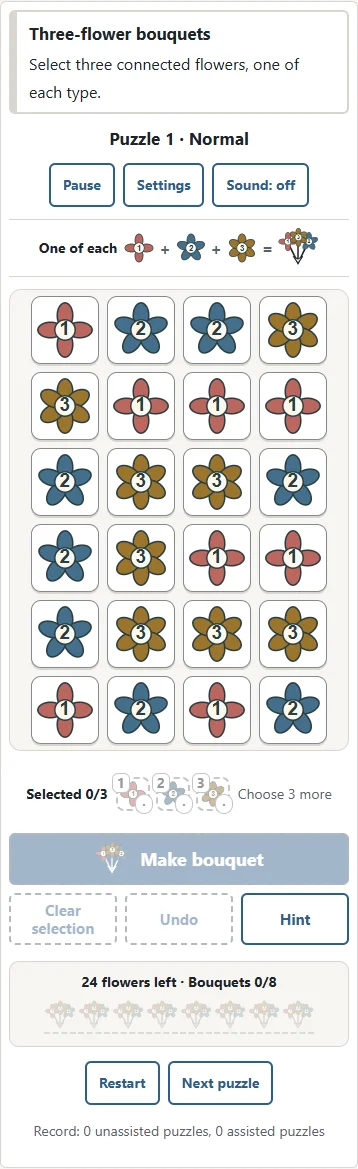
Select three flowers, then make a bouquet
Choose a difficulty and puzzle number, then press Start. Tap or click a flower to select it. Its outline changes, and the selection counter increases. Press the same flower again to deselect it. Once you have selected three connected flowers of different types, the Make bouquet button becomes available. Press that button to confirm. Selecting the third flower alone does not remove anything, so you can check the selection before committing. Clear selection removes all selection outlines without altering the garden. You cannot add a fourth flower to a selection of three; deselect something first or clear the selection. The order of your taps is irrelevant. You may select the two ends of a straight group before selecting its middle, or choose the outer arms of a bent group before its corner. What matters is the final three-cell shape, not the route your pointer followed.
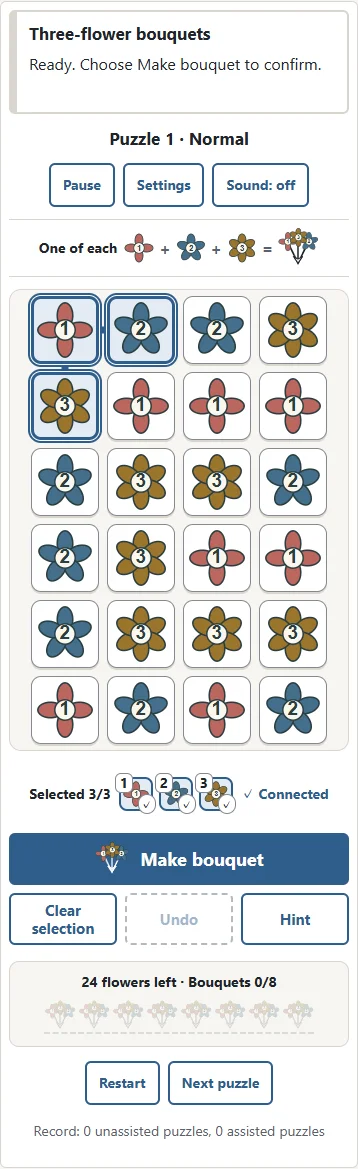
Flower Puzzle rules: sides, shapes and types
A bouquet can be a straight row, a straight column, or an L-shaped group of three cells. These are the connected shapes you can make with three square cells. Side contact counts; diagonal contact does not. Two flowers that only touch at a corner cannot be linked that way. Empty cells are not bridges, and you cannot draw a path through the garden to connect distant flowers. All three selected cells must themselves make one connected group. A bouquet also needs three different types. Two flowers marked 1 and a flower marked 3 are not a valid bouquet, even when their cells are connected. The message above the board explains a repeated type or a disconnected selection. Types are shown by a number, petal shape and colour together: type 1 has four petals, type 2 five, and type 3 six. You can use the numbers without relying on colour alone.
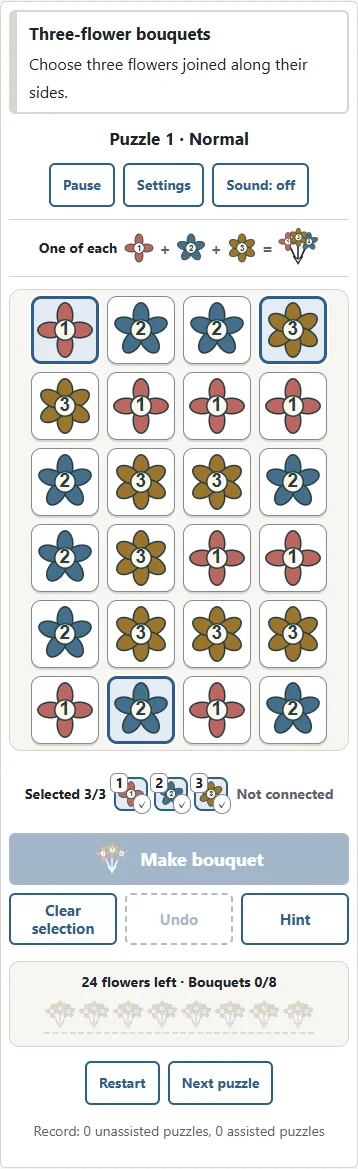
A fixed board: think about the flowers left behind
When a bouquet is confirmed, its three cells become empty. Every other flower stays exactly where it was. No flowers fall into the gaps, no columns close up, and no fresh flowers arrive. The next bouquet must use three flowers that are still present. This makes the remaining shape important. It is possible to make a perfectly valid bouquet and accidentally strand a flower at the edge. It is also possible to leave several legal bouquets while losing every complete solution. Having a number of flowers divisible by three is necessary, but it is not enough. Their types and their positions must also work together. Look beyond the group you are about to remove and ask where each nearby flower could go next. A complete solution divides the original garden into separate bouquets without using any flower twice or leaving a flower outside a bouquet.
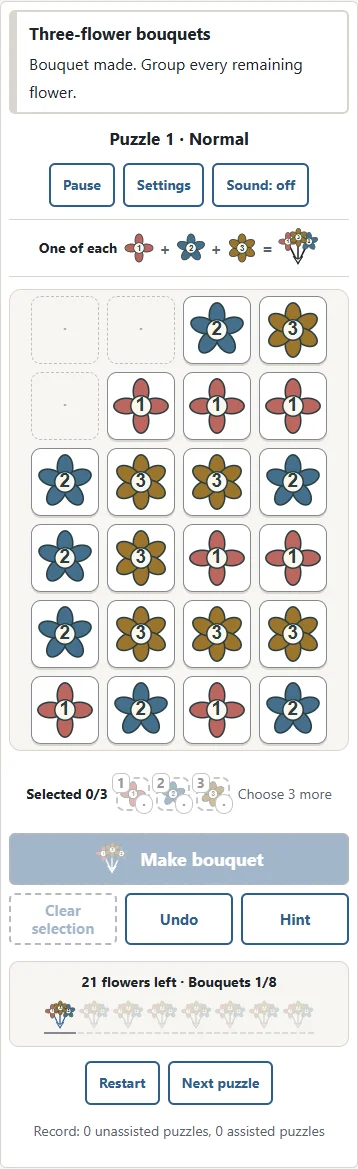
Undo and hints when the garden gets stuck
If no legal bouquets remain, you can keep working rather than losing the puzzle to a game-over screen. Undo restores the last bouquet in its original cells. Use it repeatedly to return to an earlier decision, then try different partners for the same flower. Hint looks for a complete grouping of the flowers currently left on the board. When it finds one, it selects a possible next bouquet from that grouping. You still press Make bouquet yourself; the hint does not play the move for you. If the remainder cannot be cleared, the message tells you to undo and reconsider. A search-limit message is different: it means the hint has stopped searching, not that the puzzle has been proved impossible. Both Undo and Hint are available without spending tokens. A finish using either is recorded as assisted. This is a useful way to learn the shapes while keeping unassisted finishes separate.
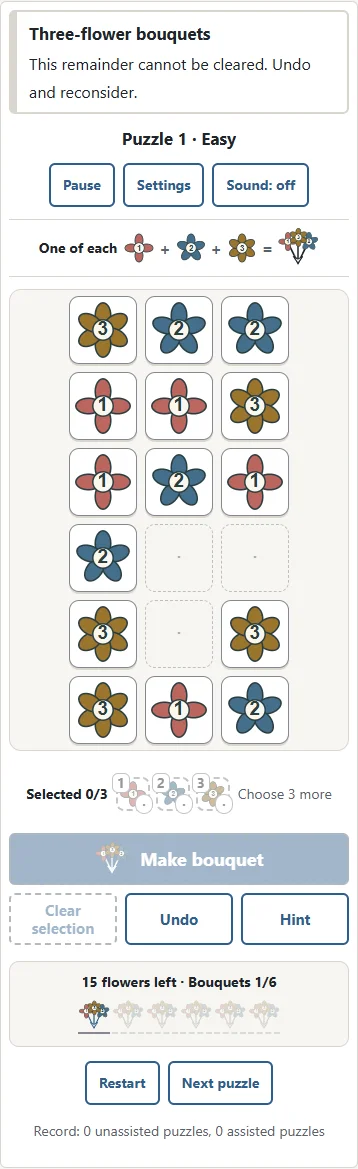
Difficulty, numbered puzzles and the daily garden
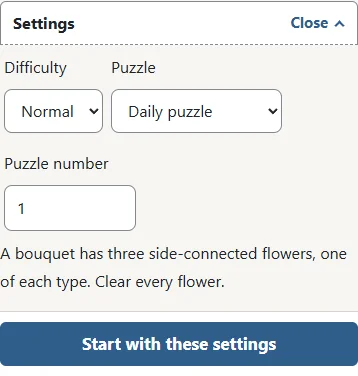
Easy uses a three-column, six-row board with eighteen flowers, so you need six bouquets. Normal uses four columns and six rows, requiring eight bouquets. Hard uses six columns and six rows, requiring twelve. All three levels use the same three types and exactly the same rules. Larger boards give you more overlapping possibilities and more flowers whose future partners may be affected by one choice. Some individual puzzles will feel easier than others within the same level. A difficulty and a puzzle number identify the starting arrangement. Numbers range from 1 to 999999, so you can return to a favourite garden or share its number with someone else. Select Daily puzzle for a garden based on your device date. Match the difficulty as well as the date when comparing daily gardens. A saved daily game remains available after midnight; starting a new daily game uses the new date.
Flower Puzzle strategy: edges and narrow sections
Start by examining corners and edges. A flower near a corner has fewer neighbours than one in the middle, so its possible bouquets may be limited. If a flower fits only one bouquet, keep those partners available. Removing a convenient central bouquet first can take away a partner needed by an edge flower. Narrow sections and single flowers sticking out from a larger group deserve the same attention. Before confirming a bouquet, consider whether its removal will split the remaining garden into separate regions. Each separate region needs a total divisible by three, and it needs equal counts of types 1, 2 and 3. Unequal counts show that the region cannot be completed, but equal counts alone do not prove that it can. Positions still matter. If you reach a dead end, undo rather than repeating the same sequence. Try a different L shape or give a central flower to its less flexible neighbour.
Touch, mouse, keyboard and saving your progress
On a phone or tablet, tap flowers individually. There is no need to drag a line or trace a fast gesture, and you can scroll the page normally. On a computer, use the mouse or move focus through the board with the arrow keys. Enter and Space select or deselect the focused flower. B confirms a bouquet, Escape clears the selection, Z undoes a bouquet, H requests a hint, and P pauses or continues the game. During a pause the flowers are hidden, and continuing returns to the same arrangement. The current game is saved in this browser on this device. The Japanese and English pages share that save, but it does not transfer to another device. Clearing browser storage removes your progress and records. Sound starts off and can be enabled with its button. Restart begins the same numbered puzzle again; Next puzzle starts the following number and replaces the current game.
Flower Puzzle FAQ and the rules of this version
Is there only one answer? No. Some gardens allow more than one complete partition, and every correct partition is accepted. Do the numbers tell me which order to select flowers? No. They identify the three types; you can select them in any order. Do petal counts affect a score? No. Petal shapes help distinguish the flowers, and this version has no scoring combo or speed bonus. Can I finish after using Undo? Yes. Assisted completion is a valid finish and is recorded separately from unassisted completion. Repeating the same puzzle does not create duplicate records, and a later unassisted finish can improve its record. Why does a valid bouquet sometimes cause trouble? Validity describes just those three flowers; completion also depends on every other flower finding suitable partners. Flower-themed games can use many different matching or swapping rules. This version specifically asks you to partition a fixed garden into connected bouquets with one flower of each of the three types.
Difficulty at a glance
| Level | Board | Bouquets |
|---|---|---|
| Easy | 3 × 6 | 6 |
| Normal | 4 × 6 | 8 |
| Hard | 6 × 6 | 12 |