 Yorimichi Games
How to play Tower Defense
A stream of fallen leaves moves along a garden path. Place collection devices on numbered spots and recover the leaves before they reach the exit. This is a small, finite tower defense game with eight waves, two original paths and three kinds of device. You choose where to build, when to upgrade and which leaves to prioritize. The devices work automatically once a wave begins, so there is no need to click individual leaves or race through a sequence of buttons.
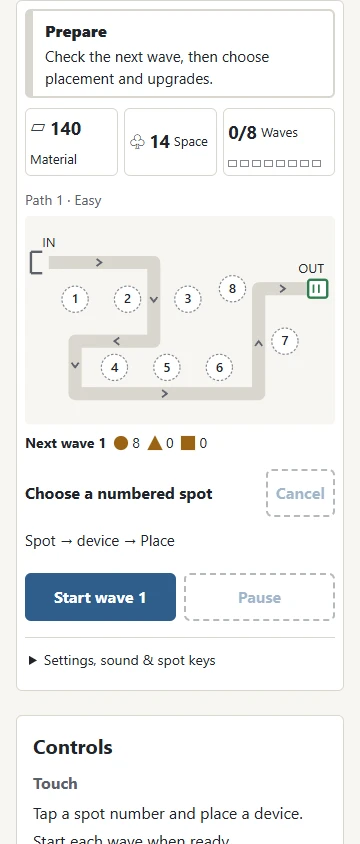
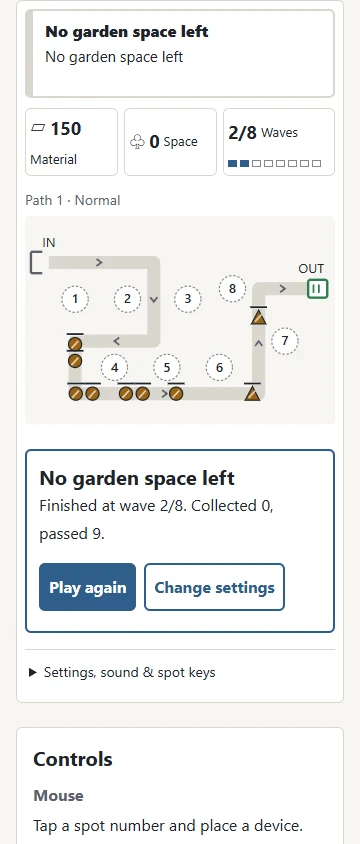
The path starts at IN and ends at OUT. Each leaf that passes the exit uses one unit of garden space. Complete all eight waves with at least one unit of space remaining to finish the garden. If space reaches zero, the game ends immediately, even during the final wave. Spawning the last leaf does not complete a wave: every leaf still on the path must first be collected or pass through the exit.
Start with a plan
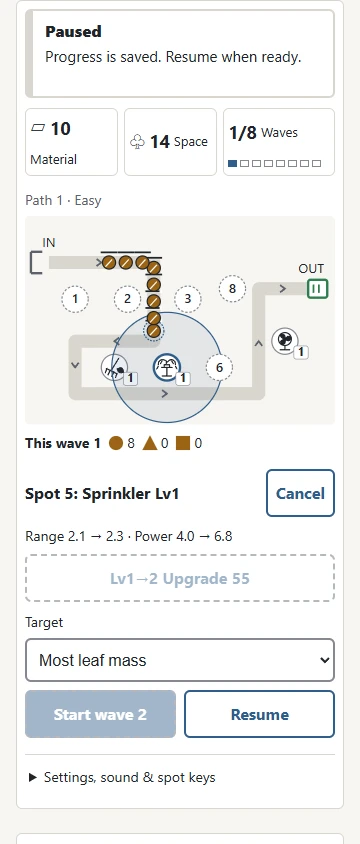
Choose a path and a difficulty in Settings, then press Start. The board is visible before you start, but collection controls become available after starting. There are eight numbered building spots. Select one on the board or use the matching number button below it. Then choose a device to preview its range and the material change. Press Place to pay the shown cost and confirm it. Cancel clears preparation without spending material. Select a built device to see its level, range, collection power and interval between actions. A faint ring shows how much of the path it can reach.
Press Start wave when your arrangement is ready. The next wave never starts automatically. Between waves you have unlimited time to study the forecast and spend material. Building, upgrading and selling are only available between waves. During a wave you can pause and change targeting, but you cannot move a device or add an emergency replacement. Planning the initial coverage is therefore more valuable than reacting quickly to every leaf.

Three devices with different jobs
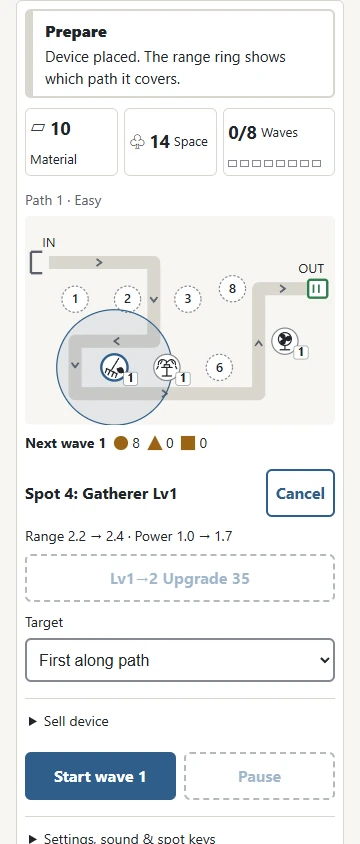
The Fan has a fan-blade picture. It has strong single-leaf collection power and acts at a short interval. It is useful against a leaf with a large amount of material left, or near the exit where a few survivors need individual attention. The Sprinkler shows jets of water. Its action affects the chosen leaf and nearby leaves as well. A group moving close together can be processed with one action, but leaves outside the small area around the target receive no effect.
The Gatherer shows a rake and leaf. Its collection power is low, but it slows affected leaves for a short time. This gives other devices more opportunities to act. Several slowing effects do not stack into an endlessly slower movement rate. Only the longer remaining duration is kept. The device symbols and the leaf shapes distinguish their roles without requiring you to rely on color. All devices have a circular range: a leaf outside that ring is never selected as the primary target.
Read the leaves and the forecast
Circles are ordinary leaves. Triangles move faster. Squares carry more leaf mass and move more slowly. A fast triangle spends less time within each device range, while a square needs several collection actions before it disappears. Later waves contain more leaves and more mass. A small bar above each leaf shows how much mass remains. A shorter bar means that the leaf is closer to collection. A device briefly highlights when it acts. The forecast gives the number of circles, triangles and squares in the next wave, allowing you to make a decision before the stream begins.
First along path is the default targeting choice. A device selects the leaf in range that is closest to the exit along the path, not the one closest in straight-line distance. Most leaf mass selects the leaf with the most mass remaining. Ties go to the leaf furthest along the path. You may change this choice during a wave, including while paused. A Fan concentrating on a square may allow a fast triangle to pass, so different devices can sensibly use different priorities.
Material, upgrades and selling
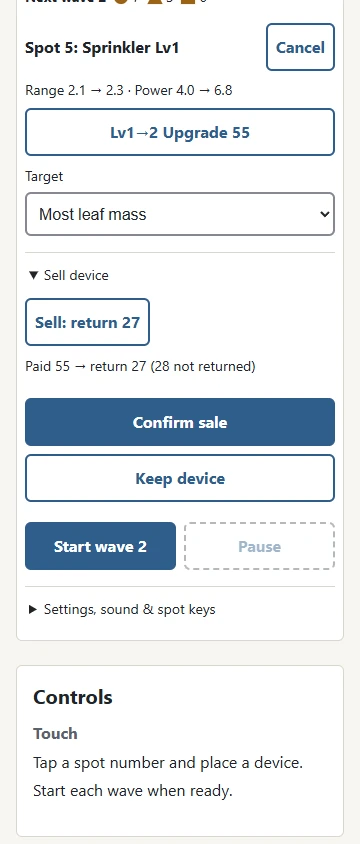
A Fan costs 40 material, a Sprinkler costs 55 and a Gatherer costs 35. Every collected leaf awards 4 material, regardless of its shape. Completing a wave awards another 30 material. A leaf that passes the exit awards nothing. You cannot fill every spot with the starting supply, which makes the first few locations an important part of your strategy. Material earned during a wave is available for the next preparation period.
Each device can be upgraded twice, reaching level three. Upgrades increase its range and collection power and shorten its action interval. The first upgrade costs the same as the original device; the second costs that amount plus 15. Selling returns half of the total material paid for that device, including upgrades, rounded down. Open Sell device to preview the return and the amount lost, then Confirm sale to commit; Keep device cancels. Selling and rebuilding loses material rather than producing a profit. Before replacing a device, check whether an upgrade at the existing spot would solve the coverage problem more efficiently.
Paths and difficulty levels
The two paths have different bends and building locations. The same spot number does not necessarily cover the same part of the route on both boards. Neither path branches, and devices do not block or alter it. Every leaf follows the arrows from IN to OUT. There are eight waves on either board; there is no endless mode or automatic extension after completion.
Easy gives you more starting material and more garden space, with leaves that are more forgiving to collect. Normal asks you to choose your purchases carefully. Hard brings heavier leaves and allows fewer to pass. Preparation time remains unlimited on every difficulty. Pause whenever you want to compare coverage or understand why a particular shape is getting through. The same device roles, upgrade limit, material rewards and completion condition apply on all three levels.
Tower Defense strategy: six practical tips
First, look for bends. A range ring that covers two sections of the path can act on a leaf for much longer than a ring touching only a short straight segment. Selecting a device displays its ring, so use the board rather than guessing from its distance to one point. Second, combine area collection and slowing. A Gatherer can keep a group in reach while a Sprinkler processes several leaves together. Neither device has to do the whole job alone.
Third, keep some collection power further along the path. A layout that looks excellent at the entrance can still let survivors pass the exit. Fourth, compare upgrading with adding another device. A higher-level device at a good bend may cover more useful distance than a new device at a weak location. Fifth, prepare for squares before their wave begins. More single-leaf power or a deliberate targeting change can prevent a large leaf from consuming too many action intervals. Sixth, remember which shapes escaped. Repeated triangles suggest a timing or slowing problem; repeated squares suggest insufficient sustained collection power.
Controls, pause and saved progress
On a phone, tap a numbered spot and then a device button. Open Settings, sound & spot keys for number buttons if the board is difficult to select. Choosing a device previews its range, cost and remaining material; Place confirms it. Cancel, blank space or Escape clears preparation. Tapping the same spot or device choice again cancels. Moving your finger also cancels the tap. On a computer, keys 1 through 8 select spots, Space starts a wave and P pauses or resumes. Keyboard shortcuts do not run while you are entering or selecting a setting. You can also use the visible buttons for every action, and no gesture that depends on dragging is required.
Pause freezes leaf movement and device timing. Opening Settings or moving to another browser tab also pauses the game. Returning to the page does not spend extra wave time: resume when you are ready. During a pause you can inspect a spot or change its targeting. Building actions remain restricted to the preparation period between waves. Sound is off initially and can be enabled separately. There is no background music or requirement to listen for a cue.
Progress is saved in the same browser, including a wave in progress, the positions and remaining mass of leaves, device levels, material and garden space. Continue restores this position. The Japanese and English pages share this save. Another device or browser does not receive it automatically, and clearing browser storage removes saved progress and records. Starting a new game replaces the saved run, so use Continue when you intend to finish your existing layout.
Tower Defense FAQ
Can a device block the path? No. All building spots are outside the marked route, and placement never changes how leaves travel. Can I collect a leaf by tapping it? No. Only devices perform collection; tapping the board selects a spot. Why is a device not acting? Its target may be outside range, or it may still be waiting for its next action interval. Its selected targeting rule only compares leaves it can reach.
Do slowing effects keep multiplying? No. A slowed leaf has one slower movement rate and a remaining duration. Another slowing action can refresh the duration without applying another multiplier. Does the last wave count as complete when space reaches zero? No. Zero space is a loss on every wave. Completion requires every remaining leaf to be resolved and at least one space left.
What do records measure? Each path and difficulty has its own completion count and best amount of space remaining at completion. A result on Easy is not compared against Hard, and the two paths have separate records. You can replay the same settings to compare your arrangements. Unfinished runs and failed runs do not add a completion to the record.
Rules and tower defense variations
Tower defense is a genre rather than one universally regulated game. Different games allow free placement, path blocking, automatic waves or unlimited survival. This garden uses fixed paths, numbered building spots, eight finite waves and manual wave starts. Buying, upgrading and selling happen between waves; targeting may change during a wave. There are no military units, weapons or battles in the garden: the objective is to manage fallen leaves with simple collection devices.
The useful rhythm is to read the forecast, choose a spot, place or upgrade a device, inspect the range and then begin the wave. If a layout fails, try the same path again and change one decision at a time. After completing it, you can look for a combination that leaves more garden space, or try a different path. The finite ending makes each arrangement easy to compare without extending the session indefinitely.
| Option | This garden |
|---|---|
| Path | Fixed, not blocked by devices |
| Waves | 8, started manually |
| Upgrades | Between waves, up to level 3 |
| End | Zero space loses; complete all waves with space left |