 Yorimichi Games
How to use this amidakuji generator
Amidakuji is the way people in Japan have long drawn lots with nothing but a pen and paper. You draw one vertical line per person, write the names along the top and the outcomes along the bottom, add a few horizontal rungs between the lines, and then follow each line down to see where it ends. Schools, offices and families use it to hand out chores, pick who goes first, split up roles for a project or decide who gets which gift at a party. This page does the drawing for you: type the names and outcomes and the ladder is ready. It works for 2 to 20 people, right in the browser, with no account and nothing to download.
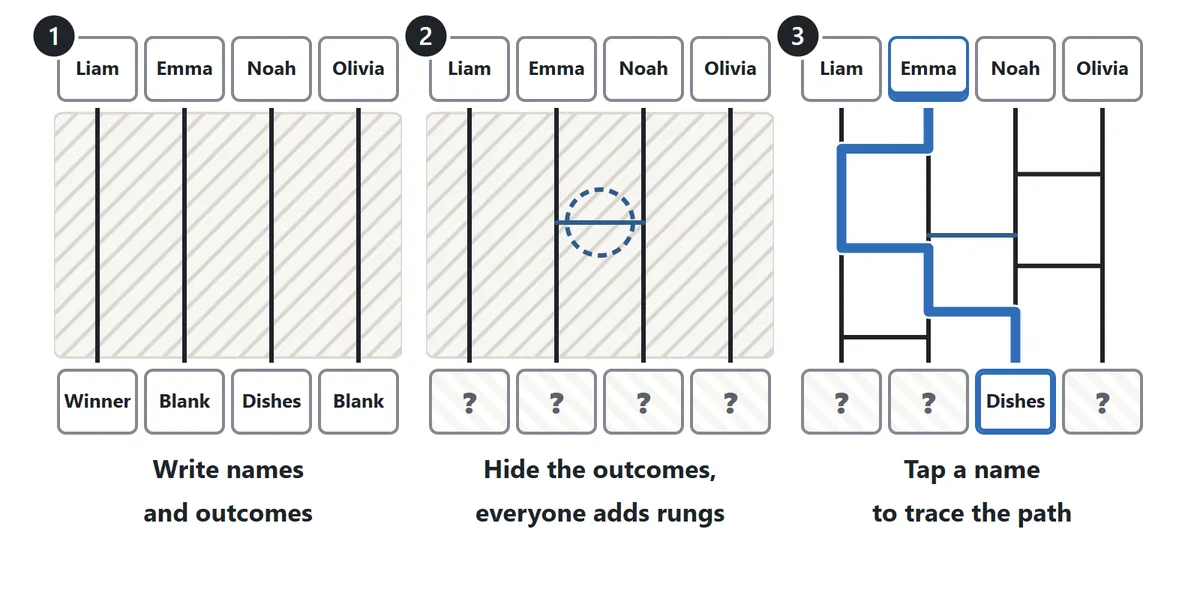
1. Write the names and outcomes
Choose the number of people and the kind of outcomes in the settings, then press Start. You can begin with One winner (one Winner and the rest Blank), An order (1st, 2nd, 3rd and so on) or Write my own, and you can change any single outcome later. Tap a box at the top to type a name or a box at the bottom to type an outcome. Press Enter or the arrow button to jump to the next box, so you can type straight through the list. For a big group, Paste a list lets you enter all the names at once, one per line; pasting a column from a spreadsheet works too. Names are remembered on this device, so a regular group does not have to retype them every time.
2. Hide the outcomes and add rungs together
When everything is filled in, press Hide outcomes. The bottom row turns into question marks, just like folding the bottom of a paper amidakuji over so nobody can peek. Now everyone can take a turn adding rungs: tap between two vertical lines and a rung appears at that height. Tap your rung again to remove it. Shuffle names mixes up the order of the names if you want to be extra careful.
3. Follow the lines and reveal
Press Reveal when the group is ready. The hidden rungs appear, and tapping a name traces that person’s path in color all the way down. Only the outcome that person reaches is uncovered, so you can announce the results one at a time. All at once traces everyone who is left in one go. When every result is in, a summary list appears, and Copy results copies it as plain text in the form “Name → Outcome”, ready to paste into a group chat, an email or a note.
Amidakuji rules: how the ladder works
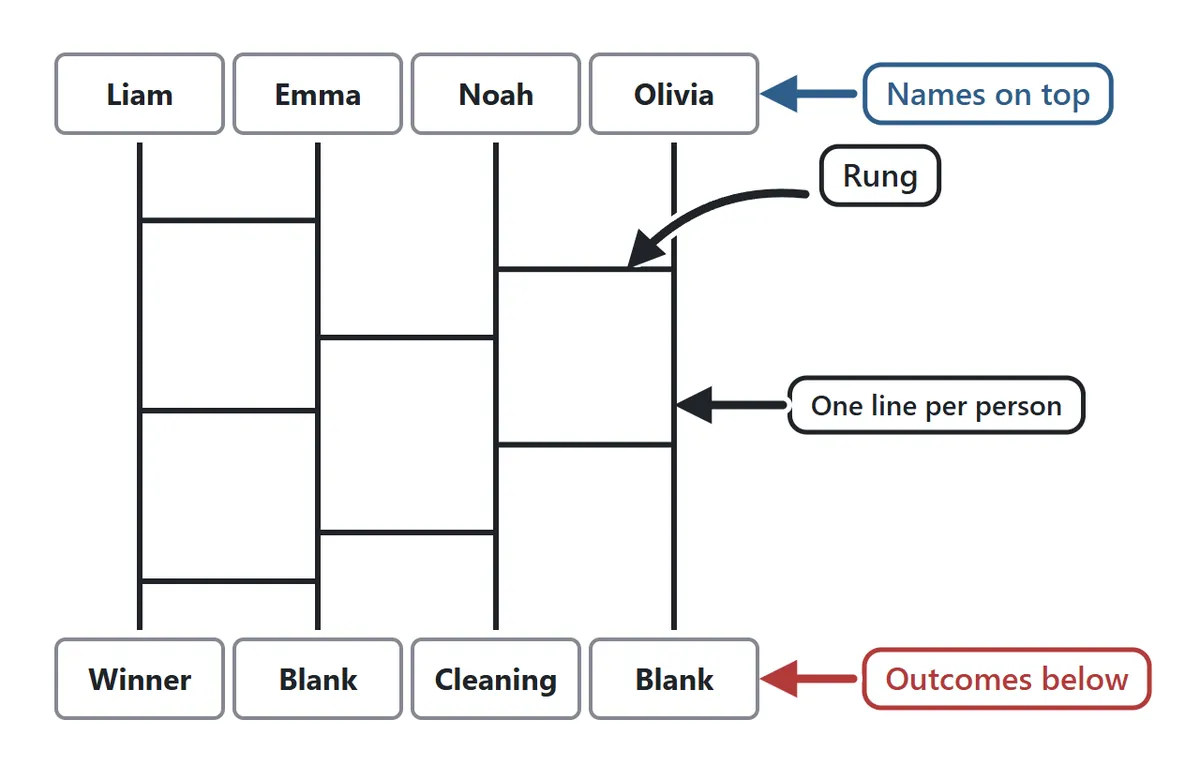
An amidakuji is built from vertical lines, one for each person, and horizontal rungs between them. A rung always connects two lines that are next to each other. It never skips over a line and it is never drawn at a slant.
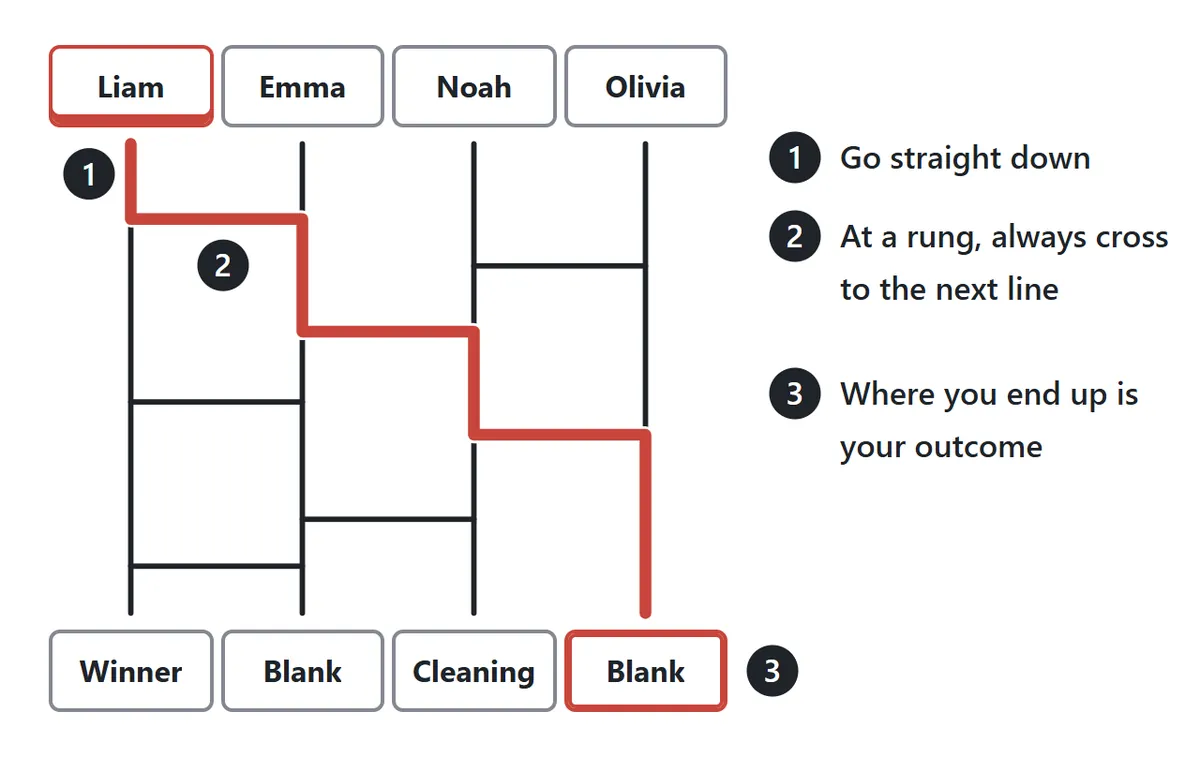
Following a path is just as simple. Start at a name and move down the line. Whenever you meet a rung, you must cross it to the neighboring line, then carry on downward. Repeat until you reach the bottom. The outcome written there belongs to that person.
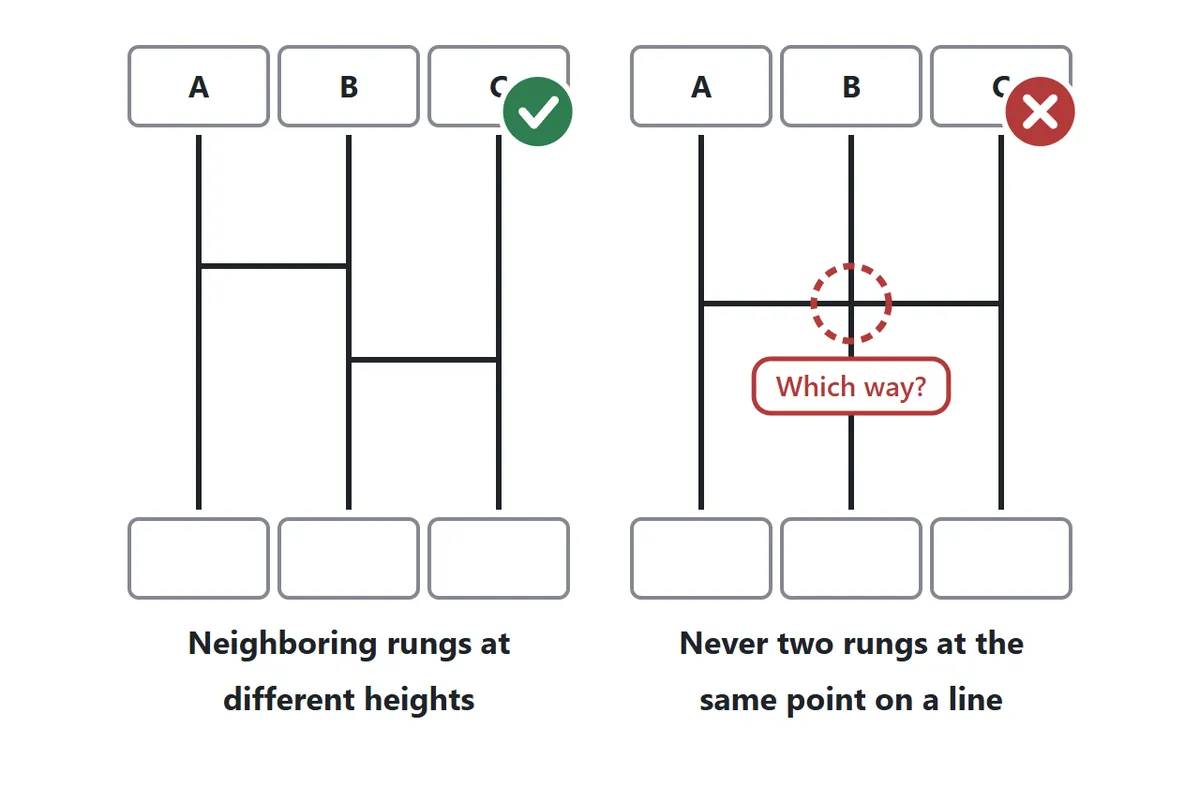
There is one rule for drawing rungs. A single vertical line must never have rungs arriving from the left and the right at exactly the same height, because anyone who reaches that point would not know which way to turn. Neighboring rungs just need to be a little higher or lower than each other. On this page, if you try to add a rung at the same height as its neighbor, it is nudged up or down automatically.
Why two people never get the same outcome

In an amidakuji two people can never land on the same outcome, and no outcome is ever left over. The reason is neat: each rung simply makes the two people on its neighboring lines swap places. However many swaps you make, there is still exactly one person on every line. So no matter how many rungs are drawn, or who drew them, every person gets exactly one outcome and every outcome goes to exactly one person. That is why the ladder has been trusted for dividing things up for centuries.
Is amidakuji fair?

Here is something most people never notice: a hand-drawn amidakuji with a handful of random rungs is not actually fair. With no rungs at all, everyone would end up directly below their starting point, and with only a few rungs the paths still tend to finish directly below or one line over. Far corners are hard to reach. For example, with 5 people and 10 random rungs, the person on the far left lands directly below about one time in three, but reaches the far right only about one time in fourteen. Making every position equally likely by hand takes dozens of rungs, and the number grows quickly as the group gets bigger.
This generator places its rungs so that every possible assignment of people to outcomes is equally likely, and the rungs your group adds do not change that. The one exception is the setting Rungs: Visible from the start. If people can see the ladder while they add rungs, they can steer a path toward an outcome they want. For a real draw, keep the default Hidden until the reveal.
Settings at a glance
| Setting | Options | Use it when |
|---|---|---|
| People | 2–20 | Paste a list to match the number of names automatically |
| Outcomes | One winner, an order, or your own | Choosing one person, setting a speaking order, or assigning jobs |
| Number of rungs | Few, normal, many | Only the look changes; fairness is the same |
| Rungs | Hidden or visible | Hidden for a real draw, visible for practice |
| Tracing speed | Slow, normal, fast | Slow builds suspense when you reveal one by one |
Path puzzle game
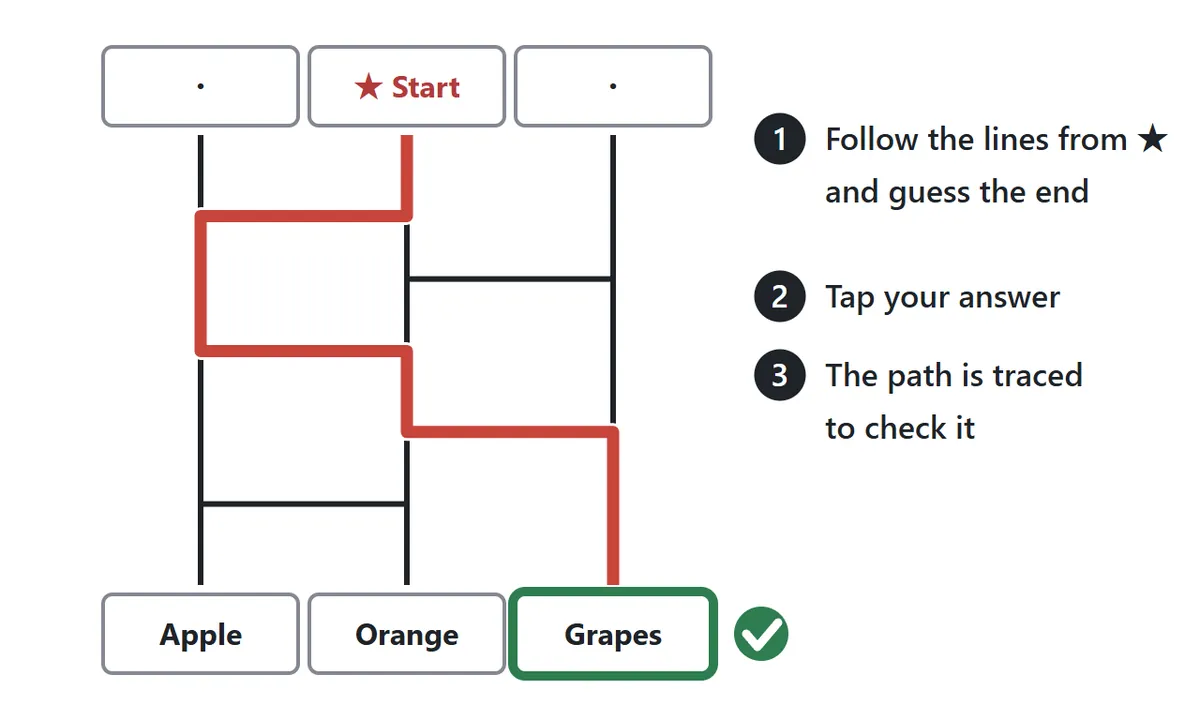
Switch the mode to Path puzzle game and the ladder becomes a quick brain teaser. Look at the path starting from the ★ at the top and work out which fruit it reaches at the bottom, then tap your answer. The path is traced automatically, and if you were right you score a point. There are 10 puzzles per round, with 3 lines on Easy, 4 on Normal and 6 on Hard. Tracing the path with a finger while counting the turns is a good way to train careful attention. Your best score is saved for each difficulty.
Print a paper amidakuji
The Printable button opens a page for printing an amidakuji on US Letter or A4 paper. Pick 2 to 20 people and few, normal or many rungs, or choose no rungs so everyone can draw their own. You can fit one or two ladders on a sheet and put a title at the top. The names and outcomes you typed on this device can be printed in, or the boxes can be left blank to fill in by hand. Fold along the dotted line above the outcomes to hide them while people add rungs with a pen.
Tips for a smooth draw
1. Let people choose their own line
When each person picks which line to write their name on, the result feels like their own choice. If you pasted the names in one go, press Shuffle names so nobody worries about the order.
2. Have everyone add one rung
After the outcomes are hidden, ask each person to add a rung. It turns the draw into something the whole group took part in, and because extra rungs never affect fairness on this page, people can add as many as they like.
3. Reveal one at a time and save the winner for last
Revealing names one by one is far more fun than showing everything at once. Set the tracing speed to Slow and you will hear a reaction at every turn in the path.
4. Write specific outcomes
Instead of just “Job” or “1st”, write exactly what each outcome means, such as “Monday cleaning”, “Take out the trash” or “Buy snacks”. The copied results then make sense on their own when you share them.
5. Use a wide screen for big groups
With more than about ten people, a phone held upright turns the names sideways to fit. A computer, a tablet or a phone turned to landscape keeps them easy to read.
Amidakuji FAQ
Is this amidakuji really random and fair?
Yes. A hand-drawn ladder with a few rungs tends to send people straight down, but this page places its rungs so that every assignment is equally likely, and the rungs your group adds do not change that.
Can two people end up with the same outcome?
No. However many rungs there are, an amidakuji always gives each person one outcome of their own.
Are the names I type saved or sent anywhere?
Names and outcomes are stored only in this browser on this device. They are not sent over the internet. If you close the page partway through, open it again on the same device and press Continue.
How do I share the results?
When everyone’s result is in, press Copy results. A “Name → Outcome” list is copied as text so you can paste it into a message.
Can I use it without typing names?
Yes. Empty name boxes are shown as A, B, C and so on. You can decide the letters first and work out who is who afterwards.
How do I have two winners?
Start with One winner, then tap one of the Blank boxes and change it to Winner. Or choose Write my own and type every outcome yourself.
What does amidakuji mean?
The word combines amida and kuji, which means a lot or a draw. Amidakuji is said to have been played in Japan at least since the Muromachi period, several hundred years ago. Early versions did not look like a ladder. Lines were drawn outward from a center point, one per person, and the shape resembled the halo of light behind statues of Amida Buddha, which is where the name comes from. In those days friends often used it to split the cost of shared sweets: different amounts were hidden at the ends of the lines, and each person chipped in whatever their line led to. Today it is simply the everyday way to decide turns and duties fairly in Japanese classrooms, workplaces and homes, and the ladder shape has spread to other countries in East Asia as well.