 Yorimichi Games
How to play Capture Go
Capture Go is the classic first step into the game of Go. You use a real Go board and the real Go rules for placing and capturing stones, but the goal is much simpler: the first player to capture a stone wins. There is no territory to count and no need to understand life and death yet, so a game takes only a few minutes and everybody can see who won. Go teachers in Japan and around the world use it with beginners of all ages; in English it is also known as the capture game, first capture Go, or Atari Go. In Japanese it is called ポン抜き (ponnuki) or 石取り碁 (ishitori-go). This version uses a small 7×7 board with “first capture wins” by default, and you can switch to 6×6 or 9×9 and to “first to capture 3” or “first to capture 5” when you want a longer game.
Placing stones
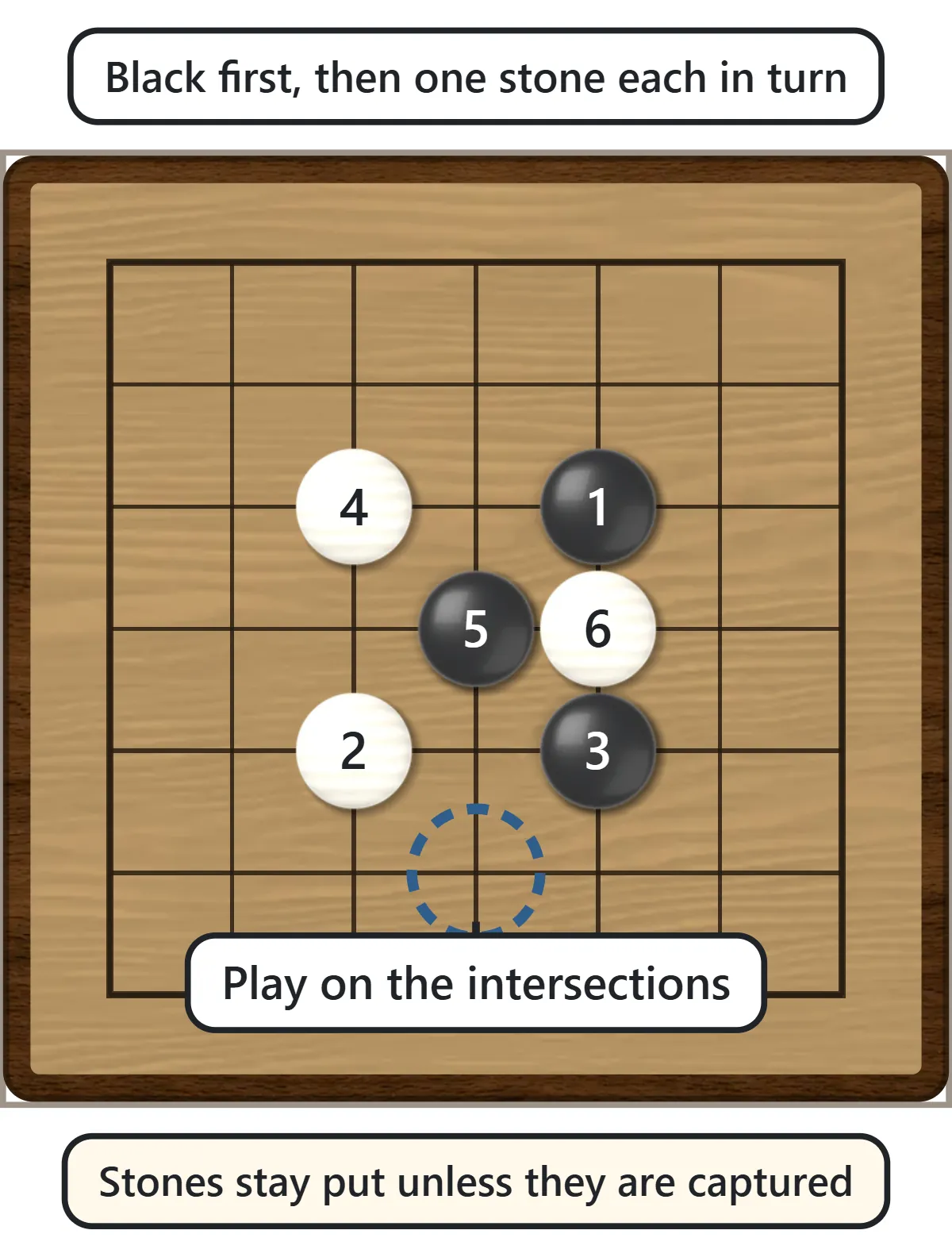
Black plays first, then White, then Black again, one stone per turn. Stones go on the intersections where the lines cross, not inside the squares, and the edges and corners count as well. Once a stone is placed it never moves. The only way a stone leaves the board is by being captured.
Capturing stones
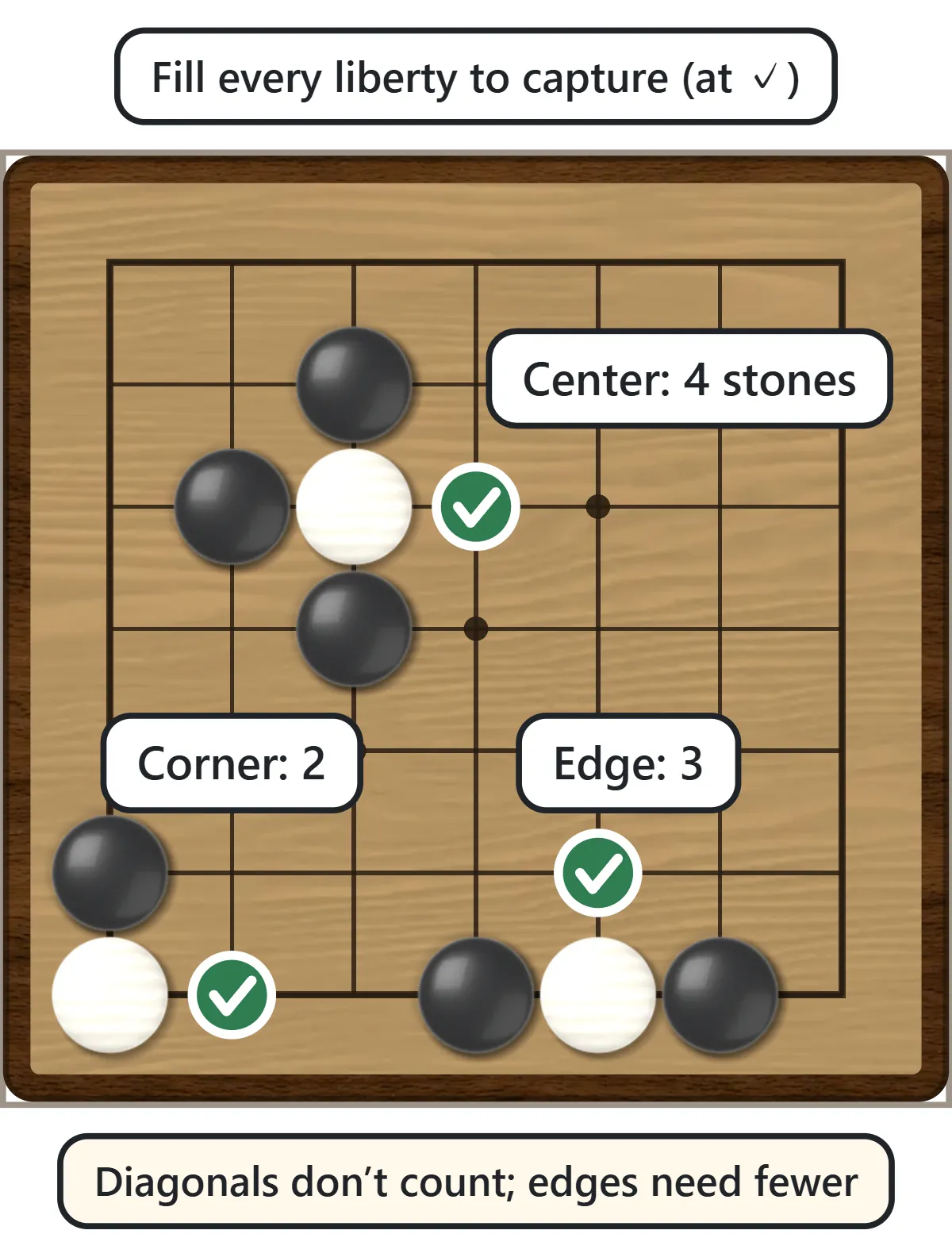
The empty points directly above, below, left and right of a stone are its liberties. Diagonal points do not count. Stones of the same color that touch along the lines form a single group and share their liberties. When you fill the last liberty of an enemy stone or group, you capture it and remove it from the board – the whole group at once. Stones on the edge have only three liberties and corner stones only two, so they are captured faster. That also means your own stones on the edge are easier to catch.
Atari: escape or connect
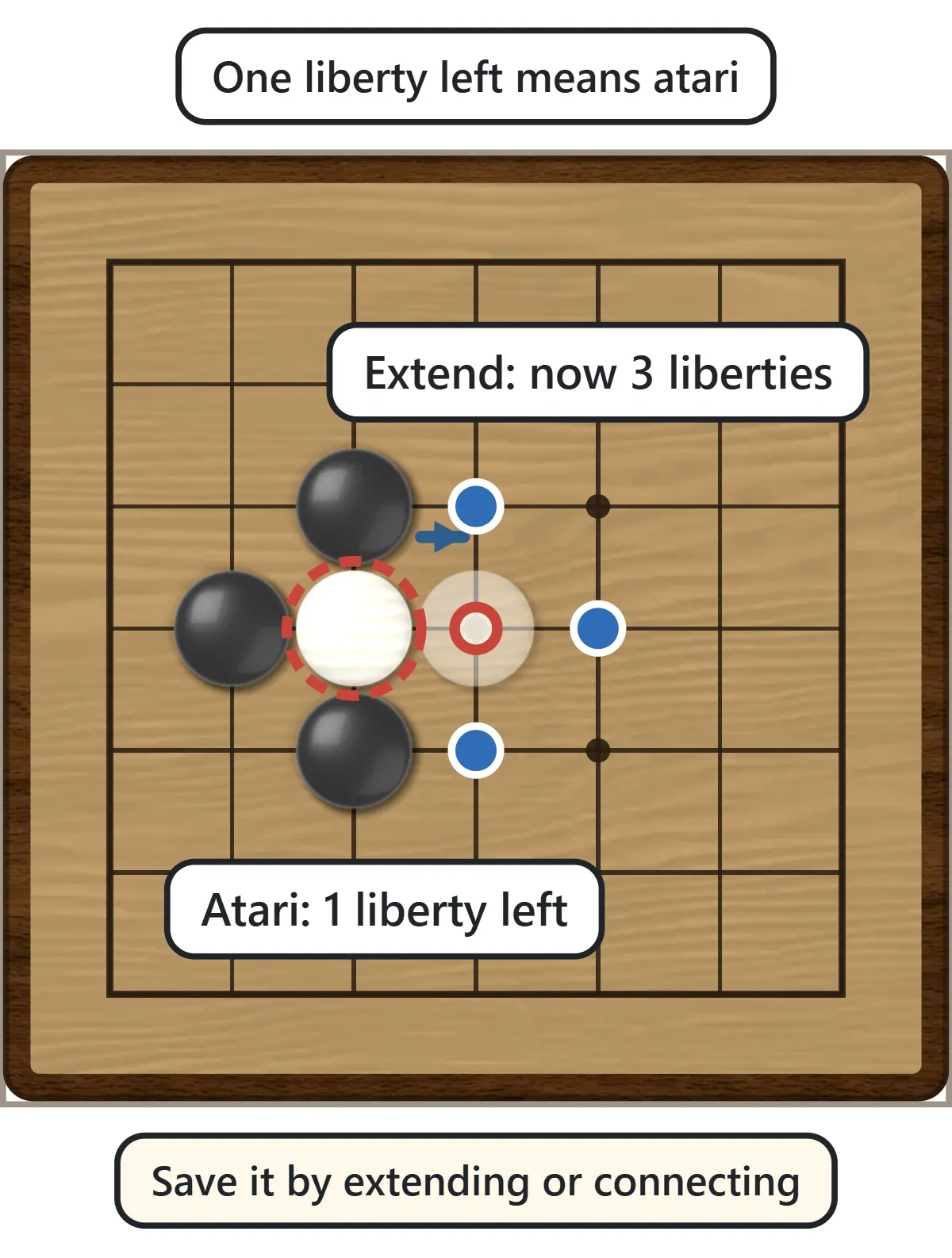
A stone or group with only one liberty left is in atari: your opponent can capture it on the next move. To save it, extend onto the last liberty, or connect it to a friendly group so the combined group has more liberties. If you end up with three or more liberties you are usually safe for now. In this game, stones in atari get a red dashed ring and their last liberty a small red ring. You can switch the marks off once you can spot atari on your own – which is the real skill Capture Go teaches.
The ladder (shicho)
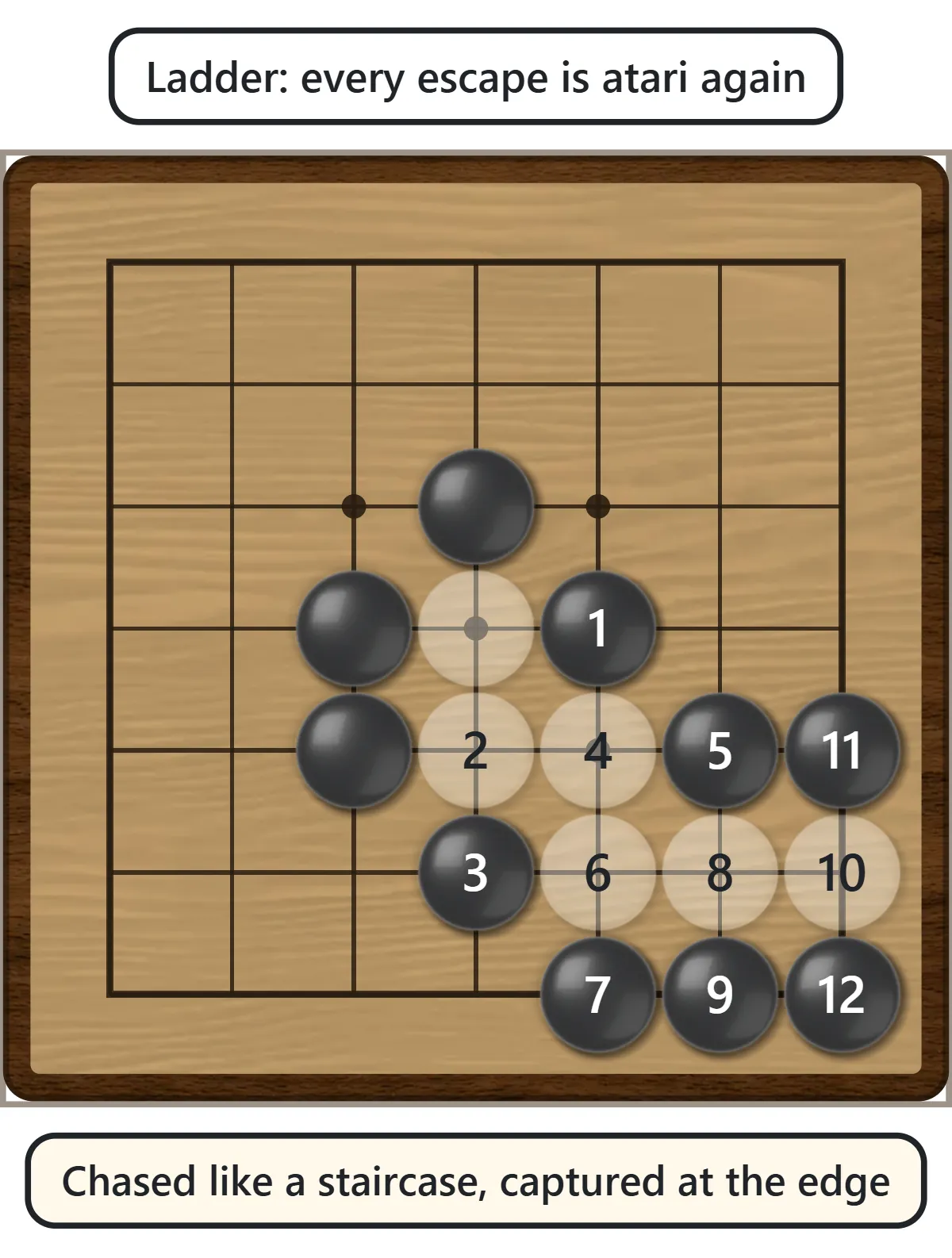
Escaping from atari does not always work. If the extended group still has only two liberties, your opponent can put it in atari again, and again. The stones zigzag across the board like a staircase and are finally captured at the edge, together with every stone that ran. This pattern is called a ladder (シチョウ, shicho, in Japanese). Before you run, check whether the new group would have three liberties, or whether one of your stones stands in the ladder’s path – a “ladder breaker” lets you escape. If the ladder works against you, give up the stone and play elsewhere.
The net (geta)
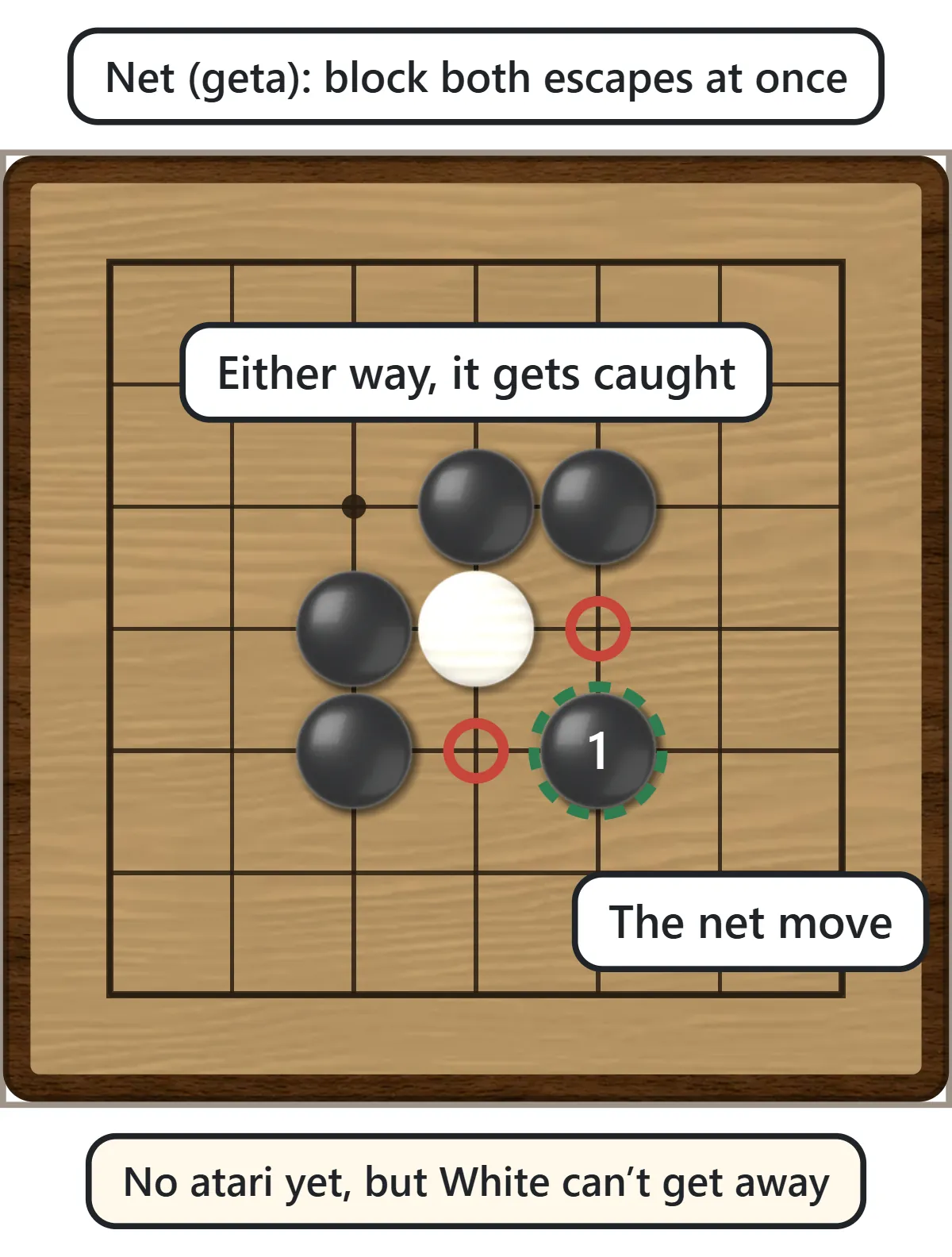
Sometimes the strongest move is not atari at all. Playing one point away, diagonally in front of the enemy stone, can close both escape routes at the same time. This loose surrounding move is called a net (ゲタ, geta, in Japanese). Whichever way the stone runs, it ends up in atari and gets captured. A net often works when a ladder would fail, so when an enemy stone has two liberties, compare the direct atari with the net.
Where you can’t play (suicide)
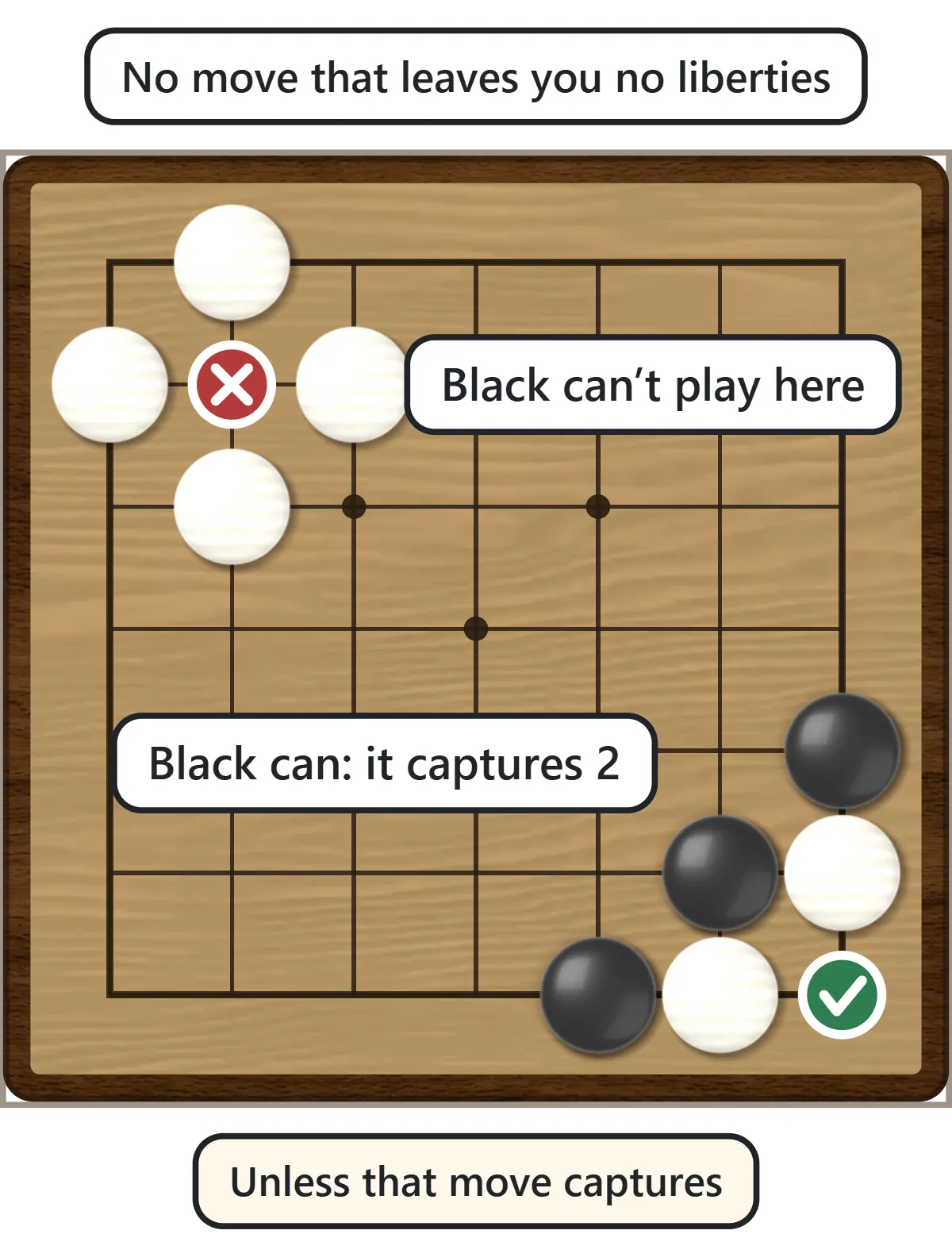
You may not place a stone where it would have no liberties, such as an empty point completely surrounded by enemy stones. This is called a suicide move and it is not allowed, just as in regular Go. The exception: if your stone fills the last liberty of the surrounding enemy stones, they are captured first, so the move is legal – and in Capture Go it usually wins the game on the spot. If you tap a point you can’t play, the game shows a cross and tells you why.
Ko (when you play to 3 or 5 captures)

When the game is “first to capture 3” or “first to capture 5”, a capture does not end the game, so the ko rule matters. In a ko shape both players could take one stone back and forth forever. To prevent that, after your single stone is taken you may not immediately retake it; you have to play somewhere else first. The point you can’t retake right now is marked with a blue square. With “first capture wins”, ko never comes up because the first capture ends the game.
How the game ends
The first player to reach the target number of captures wins, even if one move captures more stones than needed. If neither player can find a safe move, you may pass; two passes in a row end the game, and the player with more captures wins (equal captures is a draw). With “no passing” selected, you must keep playing while any legal move exists, which forces players to fill their own space until someone is captured. You can also resign at any time.
Capture Go rules options
Beginners should start with 7×7, first capture wins, and an empty board, and step up once they beat the Easy computer.
| Setting | Choices | What changes |
|---|---|---|
| Captures to win | 1, 3, 5 | With 1, one oversight decides the game. With 3 or 5 you can win stones back, so sacrifices and ko appear |
| Board size | 6×6, 7×7, 9×9 | Small boards clash at once. On 9×9 there is room to run, so ladders and nets matter more |
| Start | Empty, cross | The cross start begins with the stones already cut |
| Passing | Allowed, not allowed | Without passing, you fill your own space at the end, so the player with more room has the edge |

Capture Go strategy and tips
1. Look for atari before every move
In Capture Go a single missed atari usually loses the game. Make it a habit to ask two questions on every turn: “Can I capture something right now?” and “Is any of my stones in atari?” Use the red rings while you learn, then switch them off and look for yourself.
2. Keep your stones connected
Lonely stones get picked off one by one. Stones that touch along the lines share liberties and are much harder to capture. Watch out for cutting points between your stones and connect them before your opponent cuts in.
3. Don’t play into atari yourself
Playing right next to enemy stones where your new stone has only one liberty simply hands your opponent a capture. The warning setting stops you the first time you pick such a point, but it is worth counting liberties yourself before every contact move.
4. Read the ladder before you run
Running from atari into a working ladder only gives away more stones. If the extended group would still have just two liberties, read the ladder to the edge. When you are the attacker, check that the ladder really works before you start chasing.
5. Aim for double atari
A move that puts two separate enemy groups in atari at once is called a double atari. Your opponent can save only one of them, so you capture the other. Whenever two weak enemy stones are close together, look for the point between them.
6. Push your opponent toward the edge
Stones on the first line have only three liberties and are easy to capture, so try to drive enemy stones toward the edge and keep your own stones off the first line early in the game.
Capture Go FAQ
Which computer level should I choose?
Start with Easy. It often misses stones in atari and leaves captures on the board, so you get to enjoy capturing. Normal takes captures and runs from atari more often but still makes plenty of mistakes. Hard watches for atari, plays ladders and nets, and punishes careless moves – yet it still slips sometimes, so look for its weaknesses.
How is Capture Go different from regular Go?
Placing stones, capturing and illegal moves are exactly the same. Only the goal differs: regular Go is won by surrounding more territory, while Capture Go is won by capturing. Once capturing feels natural, move on to regular Go on a 9×9 board, where surrounding territory matters more than taking stones.
What does “ponnuki” mean?
In Go, ponnuki is the diamond shape left behind after four stones capture a single enemy stone. It is famously strong, and the Japanese name of this beginner game comes from that idea of “pulling out” a stone.
Can a game end with no captures?
Yes. If both players build solid shapes, there may be nothing left to capture. Then both pass and the game is a draw (with 3 or 5 captures, more captures wins). Choose “no passing” if you always want a winner – players must keep filling the board until someone is captured.
Can two people play on one device, and can I stop and continue later?
Yes. Choose “Friend (same device)” and take turns on the same screen. If you leave in the middle of a game, the Continue button brings it back on the same device and browser. Undo and hints work in both modes.
A short history of Capture Go
Playing to the first capture is said to have been popularized as a teaching method by a Japanese professional Go player, and today Go clubs and schools in many countries use it to introduce the game. The Nihon Ki-in, the Japan Go Association, has also published a free program in which children play “first to capture a set number of stones” against the computer on a 9×9 board. Because the only rule you need is how to capture, children and adults can start playing within minutes and pick up a feel for liberties, atari and ladders before moving on to full Go.