 Yorimichi Games
How to use the online quiz buzzer and the buzzer quiz
This page gives you two things in one. The Buzzer turns a single computer, tablet or phone into a set of quiz buzzers for 2 to 8 players, so you can run a quiz night, a team game or a quick review session without buying any lockout buzzer hardware. The buzzer quiz modes go one step further: the screen shows a question one word at a time, and you buzz in the moment you know the answer. Nothing to install, nothing to sign up for—open the page, pick a mode and press Start.
| Mode | Players | What it does |
|---|---|---|
| Buzzer | 2–8 | A host reads questions aloud and the fastest player answers. Correct, wrong, scores and sit-outs are tracked for you. |
| Solo quiz | 1 | The question appears word by word. Buzz when you know it and answer from 4 choices. The sooner, the higher your score (10 questions). |
| Today’s 10 | 1 | Ten questions set by the date. Everyone gets the same set that day, so you can compare scores with friends. |
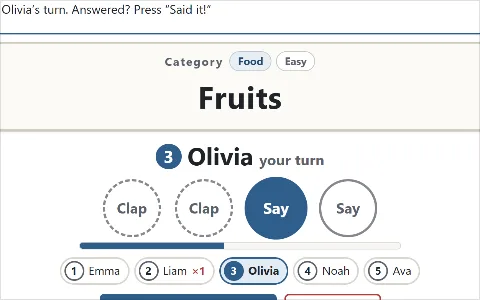
| Group quiz | 2–8 | The screen reveals the question and players race to buzz in. No one has to act as the reader. |
Quiz buzzer for game nights and classes
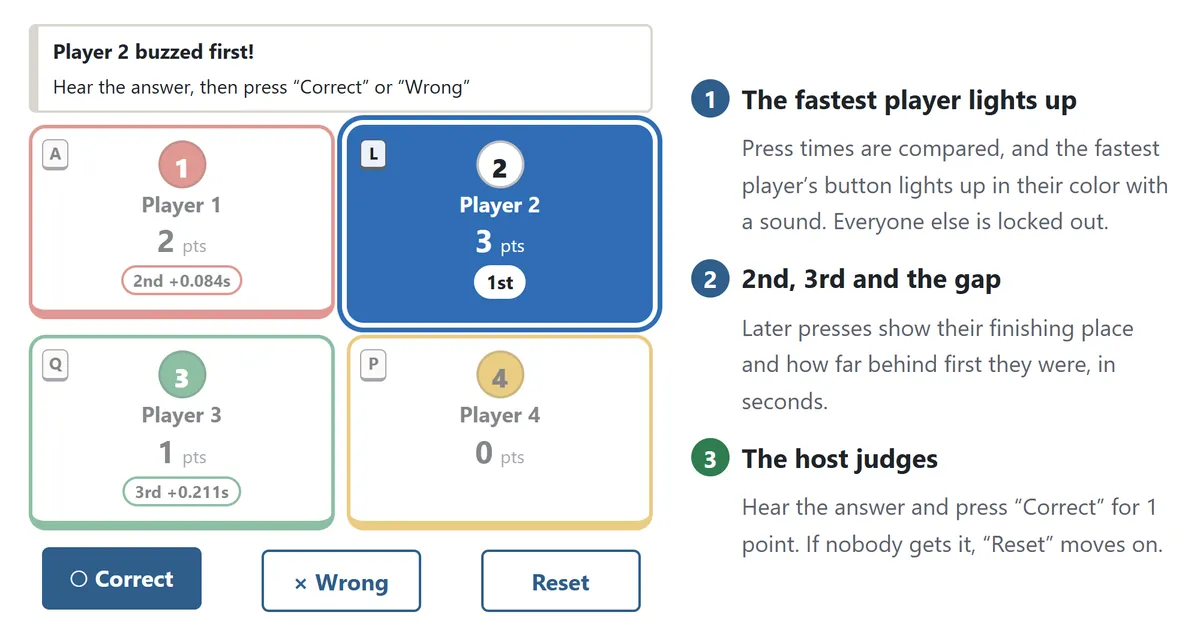
Choose Buzzer and the screen fills with one large button per player. Each button shows a number, a color, a name and the current score. Names can be changed under “Set names and keys”—use team names if you are playing in groups. The host reads a question, and anyone who knows the answer presses their button. Only the fastest player’s button lights up, a buzz sound plays (if sound is on), and everybody else is locked out until the host decides.
After hearing the answer, the host presses Correct or Wrong. A correct answer adds 1 point and the buzzers open for the next question straight away. If nobody gets it, or you want to skip a question, press Reset. To fix a score by hand, press Edit scores and use the +1 and −1 buttons under each player. Everything stays on the device, and if you close the page you can pick up with the same scores using “Continue.”
What happens when two players buzz at the same time?
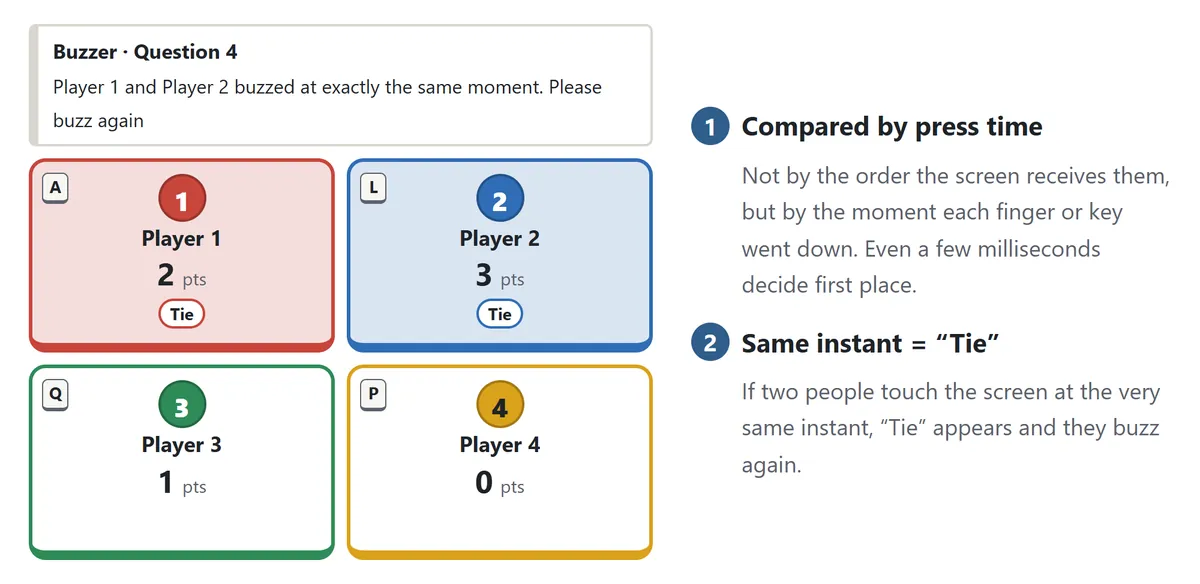
The winner is decided by the moment each finger or key actually went down, not by the order the signals happened to reach the page. Even when several people touch one screen at once, a press that was a few milliseconds earlier still wins. On touch screens, two fingers can occasionally register at exactly the same instant. Rather than picking one at random, the game shows “Tie” and asks both players to buzz again, so nobody loses a point to a coin flip.
Wrong answers, penalties and sitting out
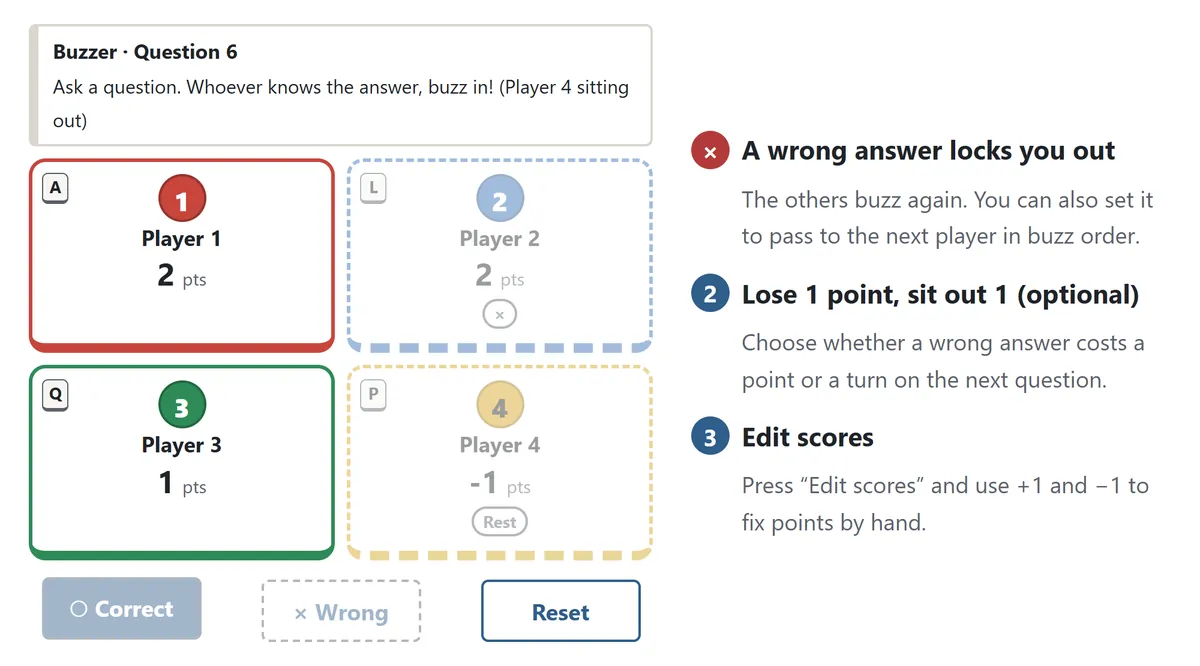
A player who answers wrong cannot buzz again on that question. The others can buzz again, or—if you choose “Next in buzz order”—the turn passes straight to whoever buzzed second. Following rules common at quiz contests, you can also make a wrong answer cost 1 point, or make that player sit out the next question. These options keep players from buzzing on a hunch.
Buzzing with keyboard keys and going full screen
On a computer every player can also buzz with their own key. By default Player 1 uses A, Player 2 uses L, Player 3 uses Q and Player 4 uses P; change them under “Set names and keys.” Two to four people can share one laptop by sitting on the left and right of the keyboard. Many USB buzzer boxes for quiz games send ordinary key presses, so if you set the matching keys you can connect one and use real buttons. The host can use Enter for Correct, Backspace for Wrong and Space for Reset. “Full screen” enlarges the buttons, which helps when the screen is shown on a TV or projector.
How to play the buzzer quiz solo
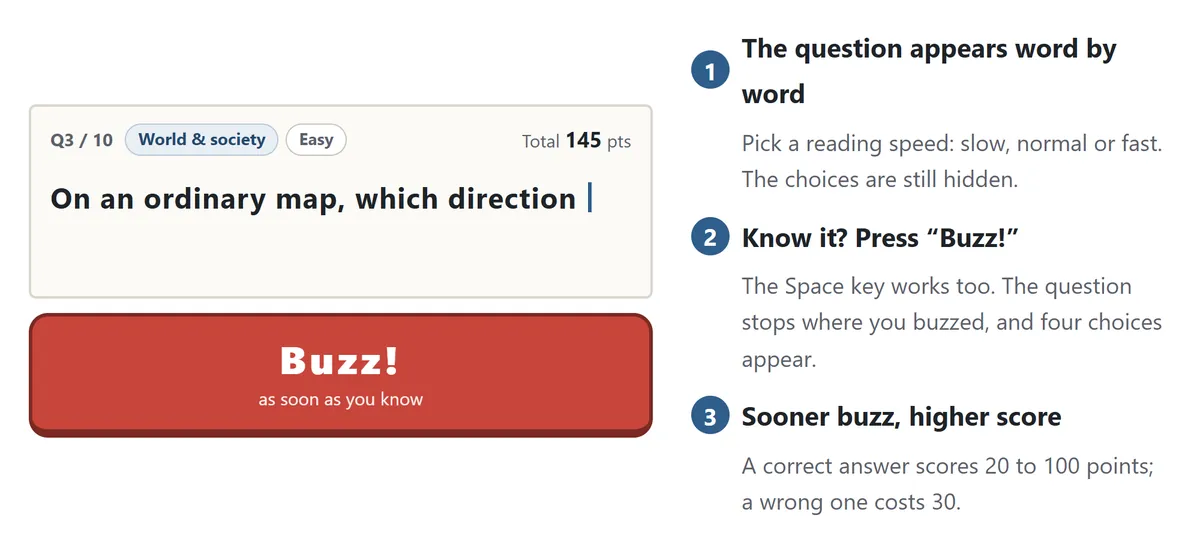
In Solo quiz, the question appears on the screen one word at a time. Press “Buzz!” (or the Space key) the moment you know the answer. The question stops right there and four choices appear; choose one within 10 seconds. You cannot see the choices before you buzz, so the challenge is to work out the answer from the question alone—just like a real buzzer round. You can pick the category, the difficulty and the reading speed before you start.
| Result | Points |
|---|---|
| Correct | 20–100 (the less of the question you needed, the more points: buzz on the first word for 100, after the whole question for 20) |
| Wrong or out of time | −30 |
| Never buzzed | 0 |
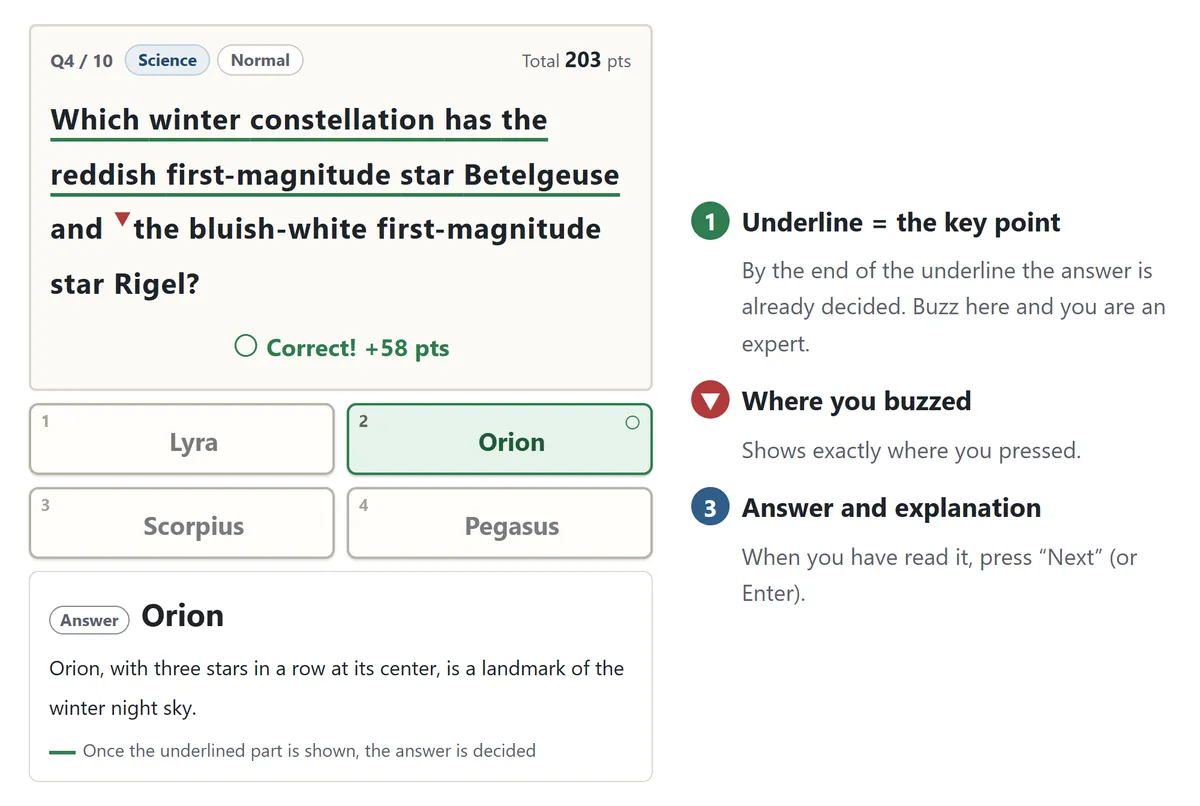
After you answer, the whole question is shown with the correct answer and a short explanation. The green underline marks how far you needed to read before only one answer was possible—the “key point” of the question. The red ▼ shows where you buzzed. If your ▼ lands right at the end of the underline, you buzzed like an expert. Today’s 10 uses the same rules with ten questions chosen by the date: every category appears, the questions go from easy to hard, and the reading speed is fixed at normal so that scores are comparable.
Group buzzer quiz with no host
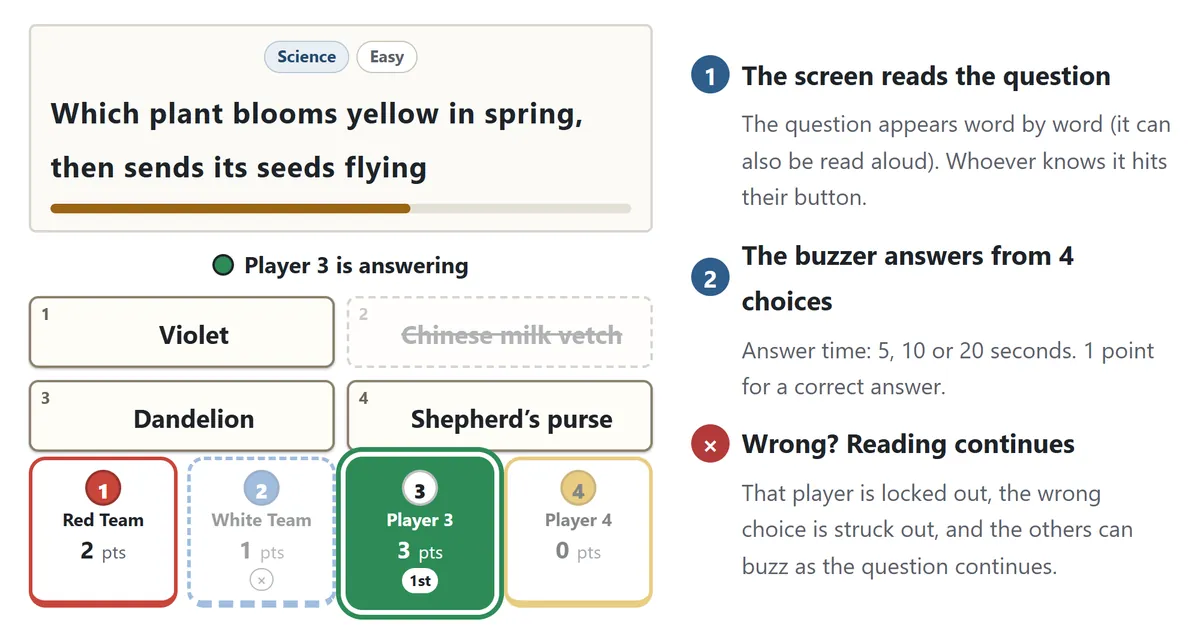
Group quiz combines the buzzer with the built-in questions. Because the screen reveals each question word by word, nobody has to read the questions aloud (you can also turn on the device voice). The name of the fastest player appears, and that player picks from four choices within the time you set: 5, 10 or 20 seconds. A correct answer earns 1 point. A wrong answer strikes out that choice, locks the player out of the question, and the reading continues so the others can still buzz. Choose 5, 10 or 20 questions; at the end you get a ranking with each player’s right and wrong answers.
Buzzer quiz tips
1. Use the first words to narrow it down
Questions open with the topic: “On an insect’s body…”, “In basketball…”. Guess what kind of answer is coming—a body part, a number, a name—so you can buzz the instant it is decided.
2. Aim for the key point
Strong players do not wait for the end of the question. They buzz the moment only one answer is left. After each question, check the green underline to see which words settled it; you will start to spot that point sooner.
3. Watch for a twist
Some questions change direction halfway: “Japan’s currency is the yen. What is the currency of…”. If you hear a setup like that, wait for the real question before you commit.
4. Don’t buzz on a guess
In Solo quiz a wrong answer costs 30 points, and in Group quiz it locks you out of the question. Buzzing when you actually know, not when you think you might, is what pushes your score up.
5. Decide before you buzz
Answer time is limited. Have the answer ready in your head when you press, so you can tap it as soon as the choices appear.
About the questions
On this page there are 167 questions in four categories: General knowledge, Science, World & society and Math. Each has three levels: Easy (everyday basics), Normal and Hard (the general knowledge most adults learned at some point). All questions and explanations were written for this game. Facts such as numbers and “the largest” or “the first” were checked one by one against encyclopedias and dictionaries, and every math answer was recalculated. Topics that change quickly, such as population rankings or sports records, are left out. The original Japanese version also has a “words” category about Japanese language and questions about Japanese customs, history and geography; those do not translate, so they are not used here.
Buzzer quiz FAQ
How many devices do we need?
Just one. All the buttons appear on a single screen, so put a tablet on the table for everyone to reach, or share a laptop keyboard while the screen is shown on a TV or projector.
Can I use my own questions?
Yes—use the Buzzer mode. The screen only decides who was fastest and keeps the score, so the host can read any questions: trivia, vocabulary, sports, music or anything else.
There is no sound.
Sound starts off so the page never makes noise unexpectedly. Press “Sound: off” to turn it on. If your device is muted or the volume is low, you will not hear it either.
Are scores and names saved?
Names, keys, settings and your Solo quiz personal bests are stored only in this browser on this device. If you close the page mid-game, “Continue” on the same device brings back the scores. No account or login is needed.
Is the buzzer fair on a touch screen?
Yes. The game compares the time each touch began, not the order the browser happened to handle them, and calls a tie when two touches start at exactly the same moment.
More quiz and party games
- Trivia Quiz: multiple-choice trivia and trick questions.
- Bingo: a bingo caller and printable cards for parties.
- Reaction Time Test: for anyone who wants faster fingers.
A short history of buzzer quizzes
In a buzzer quiz, players listen to a question and the first to press a button gets to answer. Lockout buzzers became a staple of television quiz shows and later of school and club quiz competitions around the world. In Japan, a style in which the reading stops the moment someone buzzes became especially popular, so the contest is not only about knowing the answer but about how little of the question you need to hear. This page brings that style to the screen: the question is revealed piece by piece, and the underline afterwards shows exactly where the answer was decided.
Comments
Write a comment
No comments yet.