 Yorimichi Games
How to play the categories clapping game
The categories game is about as simple as party games get. Someone names a category, such as “fruits”, and everyone takes turns saying something that belongs to it: apple, banana, mango, cherry… Each answer has to fit the beat of a steady clap. Hesitate too long, repeat something that has already been said, or say something that doesn’t fit, and you’re out. You don’t need cards, a board or a pen, which is why the game turns up everywhere from long car rides to dinner parties.
This page turns one phone, tablet or laptop into the game’s helper. It deals category cards, keeps the clapping rhythm, shows whose turn it is in large letters and keeps a tally of who went out. Put the screen where everyone can see it, choose how many people are playing, and start. There is nothing to install and no account to create.
1. Enter the players and draw a category card
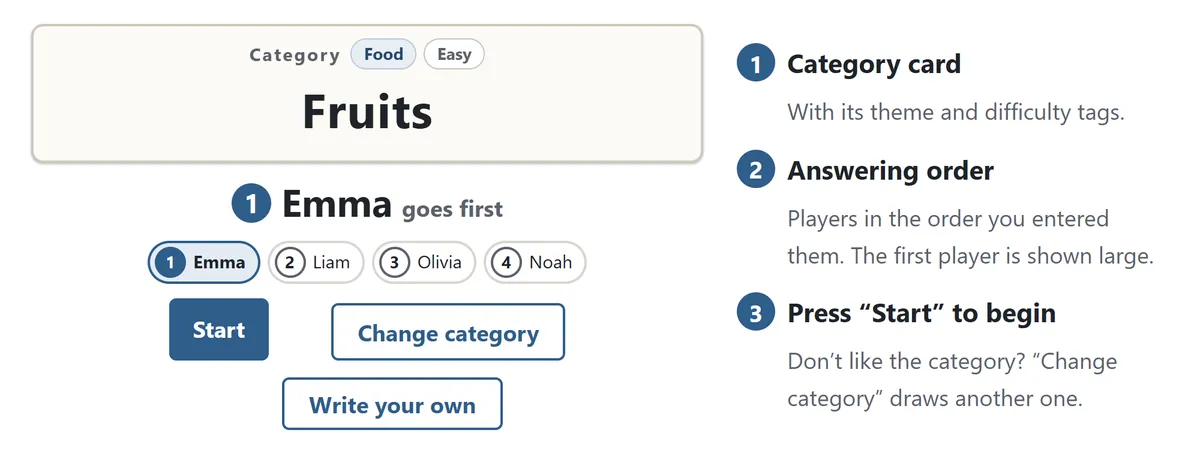
In the settings, pick the number of players (2 to 10) and type their names in the order they will answer. Names are optional; blank ones show up as “Player 1”, “Player 2” and so on. Press “Start” and a category card appears. If it is too easy or too hard for your group, press “Change category” to draw another one. Want to use a category you just thought of? Press “Write your own” and type it in.
2. Keep the beat: clap, clap, answer
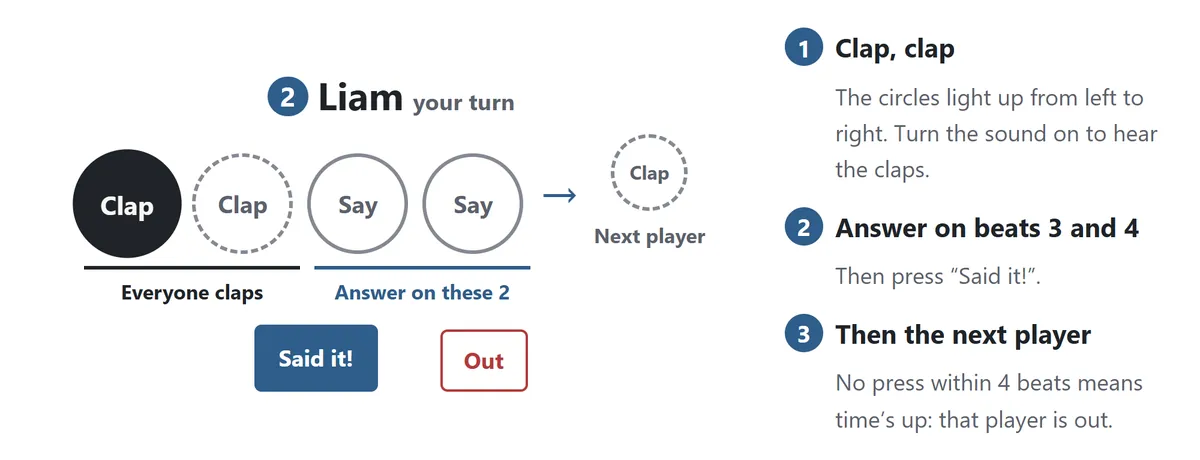
Press “Start” and the screen calls out “Categories!” with a four-beat count-in, then the first player’s turn begins. The four circles light up in order: clap, clap, say, say. Everyone claps on the two clap beats, and the player whose turn it is says an answer on the two answer beats. Once they have answered, press “Said it!”. It doesn’t matter who presses: the player or someone sitting next to them. When the four beats are over, the turn passes to the next player automatically and their name appears in large letters.
There are three rhythm speeds: slow, normal and fast. Start slow for a first game or a mixed group, then speed things up once everyone has the rhythm. When you are used to it, switch “Moving to the next player” to “Move on automatically”. The turns then roll on every four beats without anyone pressing a button, and you only press “Out” when somebody misses, which feels closest to playing out loud with no screen at all. Turn the sound on to hear a clap on the clap beats and a softer tick on the answer beats.
3. How someone gets out
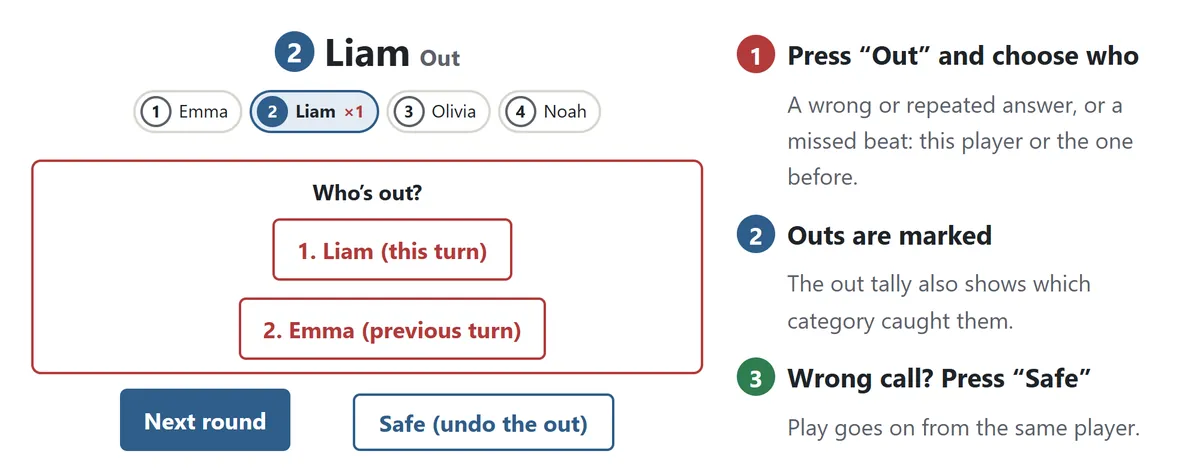
If four beats pass and nobody has pressed “Said it!”, the time runs out and that player is out. For an answer that doesn’t fit the category, or one that has already been said, anyone can press “Out” and choose who it was: the player whose turn it is, or the one just before. If the group decides it was a fair answer after all, press “Safe” to undo the out and carry on from the same player.
An out ends the round. Press “Next round” to draw a new category card; the player who went out starts the next round. The out tally keeps track of how many times each player went out and on which category. If you prefer a knockout game, set “After someone is out” to “Elimination”: players drop out one by one and the last one left wins.
4. Typing answers to catch repeats
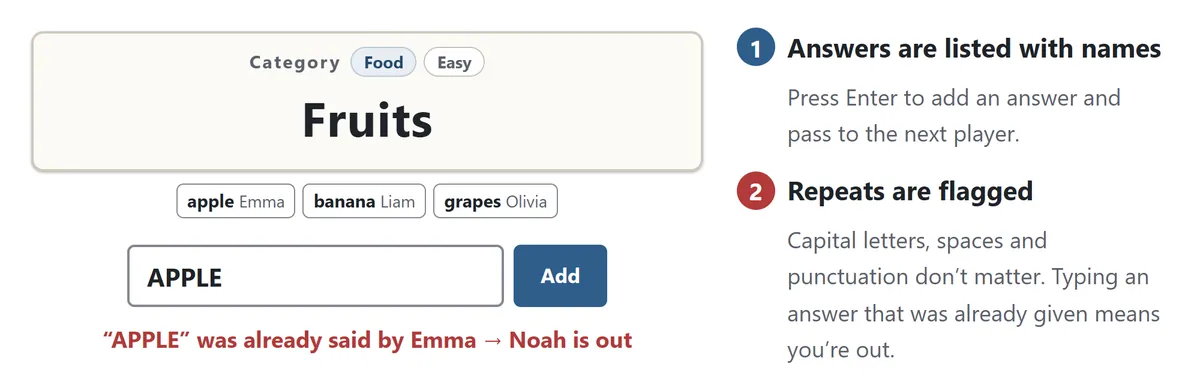
Set “Type answers on screen” to “Yes” and each player types their answer and presses Enter instead of saying it. The answers are listed with the name of the player who gave them, and if someone types an answer that is already on the list, the screen flags it and that player is out. Because typing takes longer than talking, each turn is longer in this mode (about ten seconds at normal speed). It works well when you are passing one device around the table, or when your group tends to argue about whether an answer has already come up. Whether an answer fits the category is still up to the players.
5. Solo practice: how many can you name?
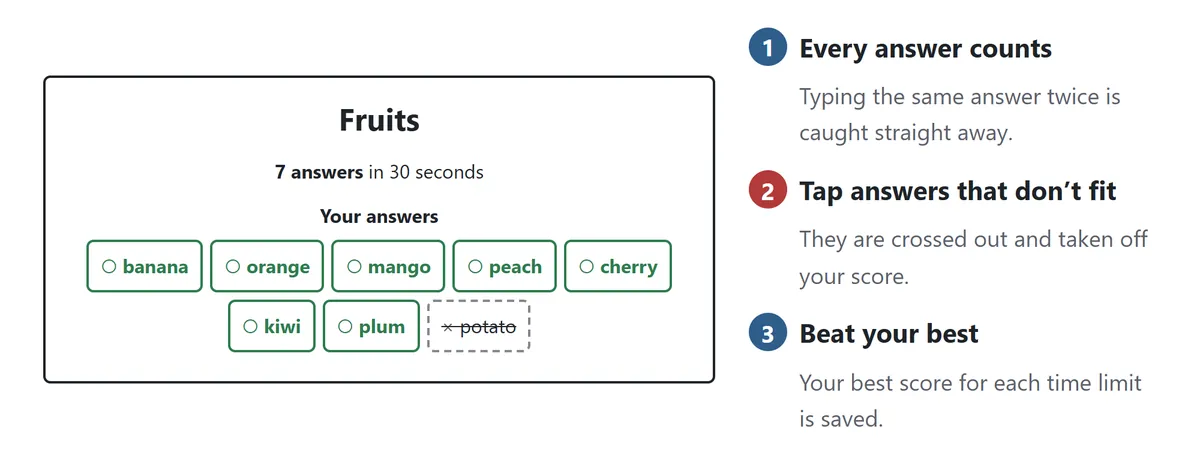
In solo practice you get 30, 60 or 90 seconds to type as many answers to one category as you can. Every answer counts as you enter it, and typing the same answer twice is caught straight away. When time is up, look over your list and tap any answer that doesn’t really fit; it is crossed out and taken off your score. Your best score for each time limit is saved on your device. It is a good warm-up before a group game, or a quick brain workout on your own.
Categories game rules at a glance
Families and friend groups all have their own house rules. These are the rules the timer uses, along with the common variations you can choose in the settings.
| Rule | How it works here |
|---|---|
| Taking turns | Players answer one at a time in a fixed order. Each turn is four beats: clap, clap, say, say. |
| You are out if… | you run out of time, repeat an answer someone already gave, give an answer that doesn’t fit, or lose the beat. |
| Who decides | The group. The screen only checks the time and, when answers are typed, exact repeats. |
| After an out | A new round with a new category, or elimination until one player is left. |
| Winning | Fewest outs when you press “Finish”, or the last player standing in elimination. |
Before you start, agree on the gray areas. Do plural and singular forms count as the same answer? Is “red apple” different from “apple”? Are brand names allowed? Settling these questions up front keeps the game moving and avoids long debates in the middle of a round.
Category ideas: 200 cards in three levels
All of the category cards were written for this game. There are about 200 of them in three levels and seven themes: food, animals and plants, places, everyday things, knowledge, games and culture, and nature and seasons. You can stick to one theme or mix them all.
| Level | Example categories |
|---|---|
| Easy | Fruits, zoo animals, vehicles, red things, things in the kitchen, things that remind you of summer |
| Normal | Countries in Europe, jobs, insects, dog breeds, things to pack for a trip, winter sports |
| Hard | Capital cities, chemical elements, spices, constellations, cat breeds, musical terms and symbols |
A good category is one where everybody can think of a few answers and the group can quickly agree whether an answer fits. With a mixed group of ages and backgrounds, start with Easy or choose Mix to get a little of everything. Some cards, like the planets of the solar system or the signs of the zodiac, have a fixed number of answers; the card shows how many there are, so the group can try to name every single one before anyone goes out.
Tips and strategy for the categories game
1. Start with big categories and a slow beat
Open with categories that have hundreds of possible answers, like animals or foods, so everyone can settle into the rhythm. After a few rounds, raise the speed to fast or move up to Normal and Hard categories. The pressure builds quickly once the obvious answers are gone.
2. Clap together, loudly
Half the fun of the game is the shared clapping. When the clap circles light up, everyone claps, not just the player whose turn it is. In a large or noisy room, turn on the sound so the beat is easy to follow.
3. Keep two answers ready
The answer you were saving is often taken by the person just before you. As your turn approaches, think of at least two answers and use whichever one hasn’t been said yet. Unusual answers are safer than the first ones that come to mind.
4. Listen as well as think
Most outs in the middle of a long round are repeats. Pay attention to what the others say, or switch on typed answers so the screen keeps the list for you.
5. Write your own categories
Inside jokes make the best categories: places your family has been on vacation, things in your office, songs everyone in the group knows. Press “Write your own” before the round starts and type any category you like.
Ways to play with a group
Because it needs no equipment and works with almost any number of people, the categories game fits many occasions. Put this screen on a TV or a laptop and the whole room can follow along.
- Party icebreaker: a quick, loud game that gets people talking and laughing within a minute.
- Family game night: mix Easy and Hard cards so younger and older relatives can both compete.
- Team building: play in teams by entering a team name instead of a player name and letting each team pick a speaker.
- Language practice: learners of English (or any language) can use the cards to practice vocabulary under gentle time pressure. Slow speed and typed answers work well here.
- Memory workout: at a slow pace, categories such as “things that remind you of winter” or “traditional games and toys” bring back stories and memories.
Categories game FAQ
How many people can play?
The timer manages turn order for 2 to 10 players. For bigger groups, play in teams and enter each team as one player. On your own, use solo practice.
Does the screen decide whether an answer is right?
No. In group play the players decide. The screen only watches the clock and, when answers are typed, whether an answer has already been given. In solo practice every answer counts until you remove it yourself.
Can we pause or continue later?
Yes. Press “Pause” at any time; switching to another tab or app also pauses the beat. Group games are saved on your device, so you can close the page and pick up with “Continue” in the same browser.
Is there sound?
Sound is off at first. Press “Sound: off” to hear the claps, the answer beats and a buzzer when someone is out.
What languages can I answer in?
Any language you like. The categories are shown in the language of the page, but the answers are up to your group.
Where the game comes from
In Japan this game is known as the Yamanote Line game, named after a railway loop that circles central Tokyo. It is said that the game began with players taking turns naming the stations on that line in order, and that it later blended with an older word game called kokon tōzai, which means roughly “all times and all places”. Players there still open a round by calling “Kokon tōzai!” before the clapping starts. Today the categories can be anything at all, and similar clapping games are played in many countries under different names. This version keeps the clap-clap-answer rhythm and leaves the trains out: the cards cover everyday topics, general knowledge and a few tough ones for experienced players.
Comments
Write a comment
No comments yet.