 Yorimichi Games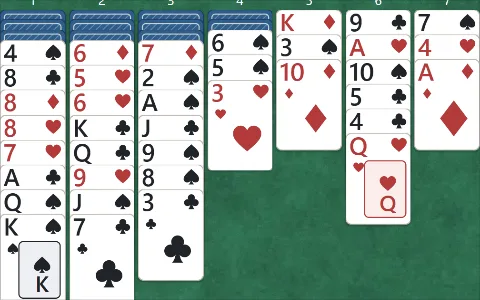
The goal of Yukon and the layout
Yukon is a one-player card puzzle using a standard deck of 52 cards. The goal is to collect each suit in order from Ace to King. The four spaces above the cards are called foundations: one each for spades, hearts, diamonds and clubs. The seven columns below them are the tableau. All 52 cards start in those columns, some face down and some face up. Move visible cards between columns to uncover the hidden ones and send cards to their foundations. There is no stock to draw from, timer or opponent. Hearts and diamonds are red; spades and clubs are black. Ace is the lowest rank, followed by Two through Ten, Jack, Queen and King. The printed rank and suit in each card’s upper corner remain visible when cards overlap.
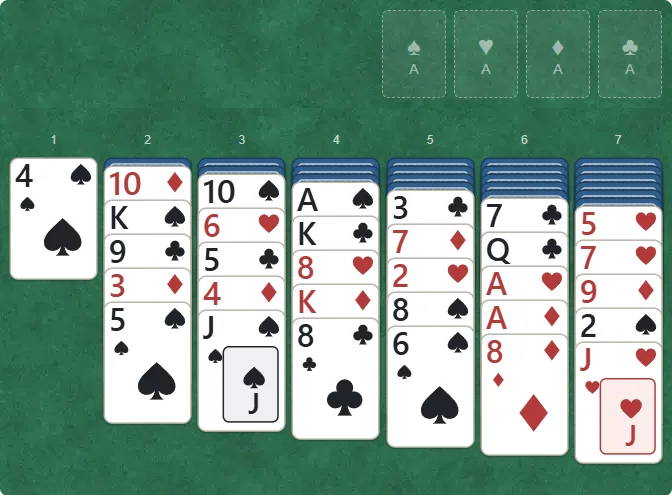
- Foundations: collect each suit from Ace to King in these four spaces.
- Tableau: move cards in these seven columns to uncover hidden cards.
The standard deal: 21 face down, 31 face up
Reading from left to right, the seven columns contain 1, 6, 7, 8, 9, 10 and 11 cards. Their face-down counts are 0, 1, 2, 3, 4, 5 and 6, making 21 hidden cards. The first column has one face-up card and each other column has five, making 31 visible cards. Cards overlap downwards; the bottom card is the exposed end of its column. You cannot select a face-down card, but you can select any face-up card, including one in the middle of a column. The screenshots show numbered deal 12. Choose that number to begin with the same layout. There is no draw action or stock recycling during a game. Restart returns to this opening; New deal starts according to your chosen settings.
Select a packet and tap a green destination
Tap a face-up card to select it and every card below it. The selected group is outlined in yellow. The card you tapped is the leading card of this moving packet. You cannot leave some of its following cards behind or remove only a card from the middle. Eligible destination columns are outlined in green. Tap a card in one of those columns to move the whole packet there. In standard Yukon, its leading card must be one rank lower than the destination’s bottom card and the opposite colour. The example below selects the black Ten of spades to place on the red Jack of hearts. The Six of hearts, Five of clubs, Four of diamonds and Jack of spades travel with it, even though those five cards are not in descending order. Only the boundary between the leading card and the receiving card matters. A black Ten cannot go on a black Jack, or on a red Queen.
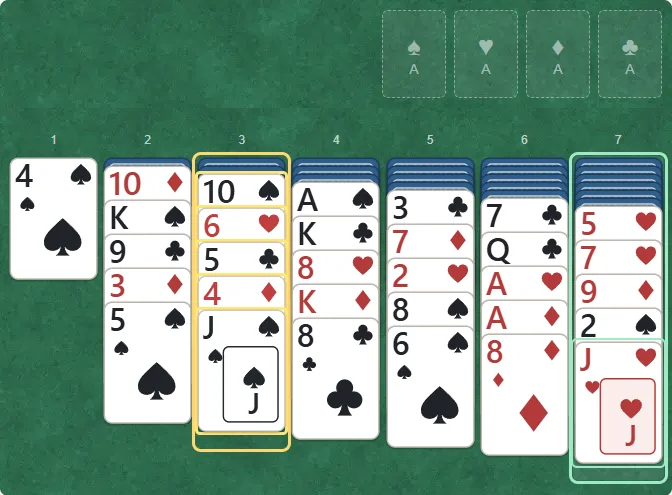
- Tap 10♠ to select it and all four cards below it.
- Tap the green J♥ to move all five selected cards together.
When the move removes all the visible cards covering a hidden card, that newly exposed card turns face up automatically. In this example, the Ace of clubs appears in column 3. Only one hidden card turns over; any remaining hidden cards stay covered. Cards are never turned down again during normal play. Tap the same selected card or empty table space to cancel your selection. Tapping an invalid destination leaves the cards where they are and preserves the selection, so you can try a different receiving column. You do not need to drag the packet or reposition each of its cards separately.
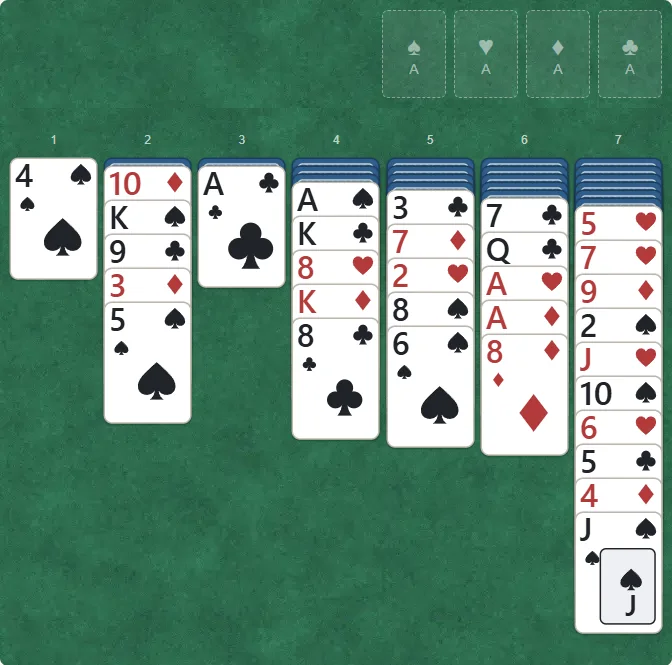
- One hidden card turns face up automatically, revealing A♣.
- All five moved cards are now below J♥ in the rightmost column.
Empty columns and foundations
An empty tableau column accepts only a packet led by a King. Cards following that King may be unordered. A Queen or Ace cannot lead a packet into an empty column, however useful the space would be. Foundations use a different rule: only the bottom, exposed card of a tableau column may move there, one card at a time. A visible Ace with other cards below it cannot jump directly to a foundation. Each foundation starts with its own suit’s Ace, then accepts Two, Three and so on up to King. The Two of hearts goes onto the Ace of hearts, not an Ace of another suit. In the screenshot below, the exposed Ace of clubs has moved into the club foundation. The next card that space can receive is the Two of clubs. In the standard setting, a card sent to a foundation cannot return to the tableau. Moving a useful receiving card away too soon can reduce your later options.
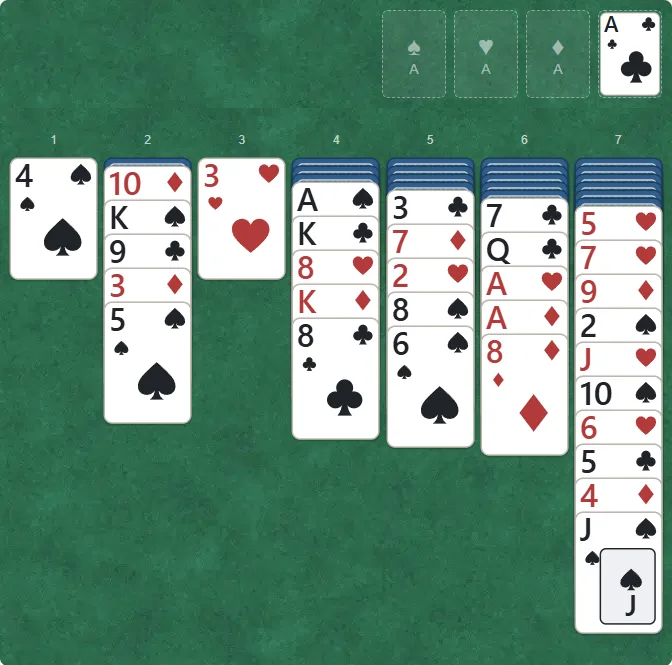
- A♣ is now in the club foundation. Add 2♣ next.
- The next hidden card in the old column has turned face up: 3♥.
Standard Yukon, Russian and assistance
The default setting is standard Yukon. Russian is a separate variant available in the settings: its tableau builds down in the same suit instead of alternating colours. A Six of spades can go onto a Seven of spades, but not a Seven of clubs or a red Seven. Unordered packets, King-led moves into empty columns, the foundation order and the opening layout remain the same. The optional Foundation return setting is an assistance rule. It allows the top card of a foundation to return to a tableau column only when that column can legally receive it. It does not allow arbitrary placement or removal of buried foundation cards. A completion with this option is labelled assisted. Choose the variant before starting; changing settings does not silently change the rules of a saved game.
Difficulty and verified solvable deals
Easy, Normal and Hard describe deal selection. All three use the same deck size and movement rules. Verified deals come from a small catalogue with a legally replayed complete solution. A solvable opening can still become blocked after an unhelpful choice. Daily deal selects from the same verified catalogue using your device’s local date, difficulty and variant. The collection is finite, so different dates or consecutive starts may repeat a number. Numbered and random deals are not difficulty-filtered. An opening outside the verified catalogue is labelled Solvability not checked. That does not mean it is impossible, and not every random opening is guaranteed to have a solution.
Touch, mouse and keyboard controls
Tap a face-up card, then a destination card or foundation. On a computer, click those same places. All seven columns fit on screen. Arrow keys move focus between visible cards, and Enter or Space selects a card. Keys 1 through 7 choose a destination column; F sends the selected exposed card to its foundation. H gives a hint, Z undoes a move, P pauses or resumes, and Escape clears the selection. Browser Tab navigation also reaches the buttons. Hints consider visible cards only and suggest one move; they do not reveal hidden card values or promise a winning route. Confirm the suggested move yourself by tapping its green destination.
Undo, saving and practical tips
Undo reverses the previous action, including any hidden card turned by it. Pause hides the face-up tableau and resumes the same position. Progress is saved in this browser on this device and shared between the Japanese and English pages. Use Resume after reloading. There is no account or transfer to another device; clearing browser storage removes the save. If storage is unavailable, you can keep playing on the current page. Sound starts off. Restart resets the current numbered opening, while New deal uses the current setup. Look first for moves exposing hidden cards, then consider whether a cleared column has a King-led packet available to fill it. Keep useful receiving cards in play rather than rushing every card to a foundation. If no legal move remains, undo to explore another branch. A blocked position alone does not prove the opening unsolvable, and you can practise the same numbered deal again.