 Yorimichi Games
How to play Block Tower
Block Tower is a stacking game with real-feeling physics. You get one wooden block at a time, and your job is to place it on the tower without anything falling off the table. Blocks lean when their weight is off-center, slide on slopes, bump into each other and topple, just like a set of real wooden building blocks on a tabletop. Play alone and chase your best height, take turns with the computer or a friend where whoever knocks the tower down loses, or work through twelve shape and height puzzles.
1. Eight kinds of blocks
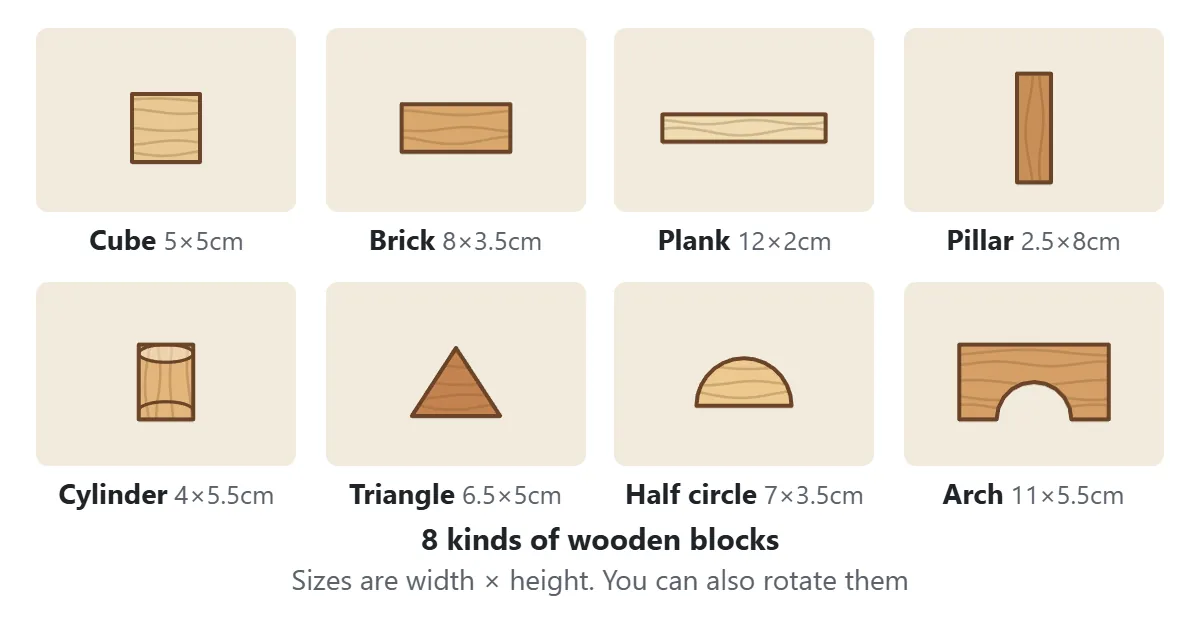
The set has eight shapes: cube, brick, plank, pillar, cylinder, triangle, half circle and arch. They are all made of the same wood, so bigger blocks are heavier. The block after the one you are holding appears in the “Next” box in the top-right corner, so you can always plan one move ahead.
2. Drag the block, then let go to drop it
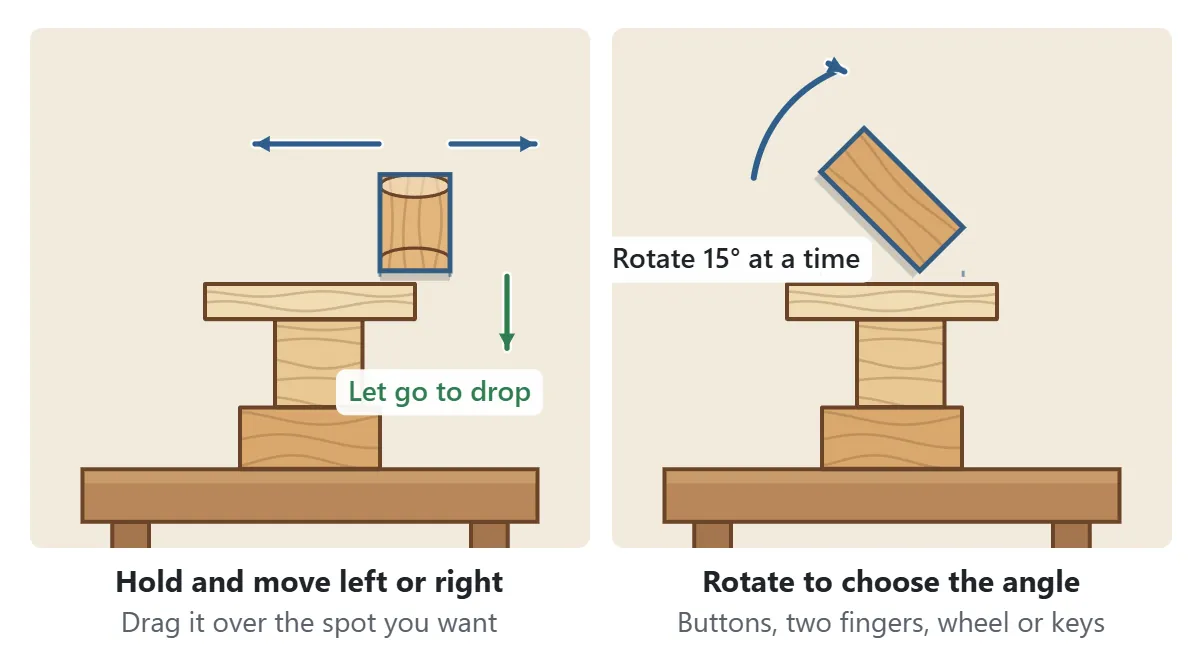
On your turn you are holding a block. Drag it left or right with your finger or mouse and let go over the spot you want; the block drops straight down onto the tower. Use the rotate buttons to turn it 15° at a time, or twist with two fingers on a phone or tablet, or use the mouse wheel or the keyboard on a computer. The two dotted lines under the block show where its edges will land.
If you prefer a timing challenge, set Placing to Sliding. The block then slides back and forth on its own, and it drops the moment you tap the screen or press Drop.
3. Stacking game rules: the center of mass decides
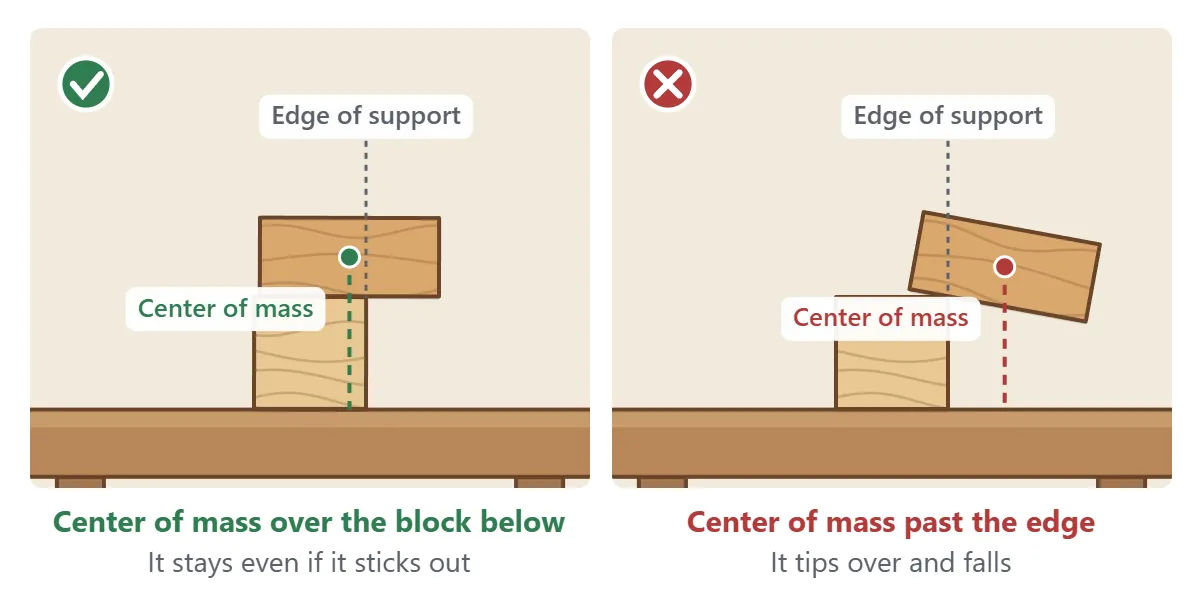
Whether a block stays put depends on its center of mass – the point where its weight balances. For a cube or a plank that is simply the middle of the shape. If the center of mass is above the block underneath, the block stays even when it overhangs. Once the center of mass passes the edge of the support, the block tips and falls. As the tower grows, the combined weight of everything above a block matters too, so a tower that keeps leaning to one side can eventually fall as a whole.
4. If a block falls off the table, the game is over
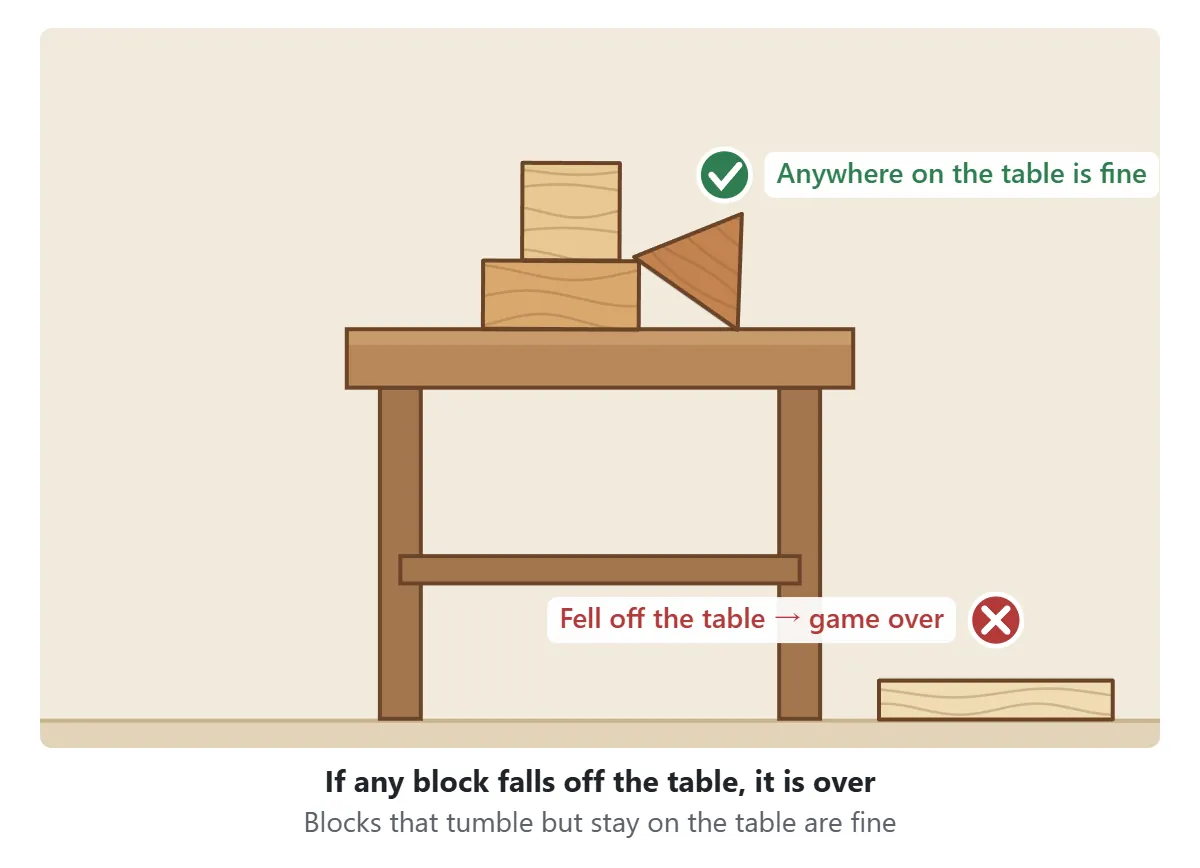
The game ends as soon as any block falls off the table. A block that rolls off the tower but stops on the table is not a problem, and you are free to place blocks on the table beside the tower. In solo play your score is the highest point the tower reached before it fell, shown on the ruler at the left in centimeters. Your personal best is marked with a dotted blue line.
5. Two-player and vs computer: take turns
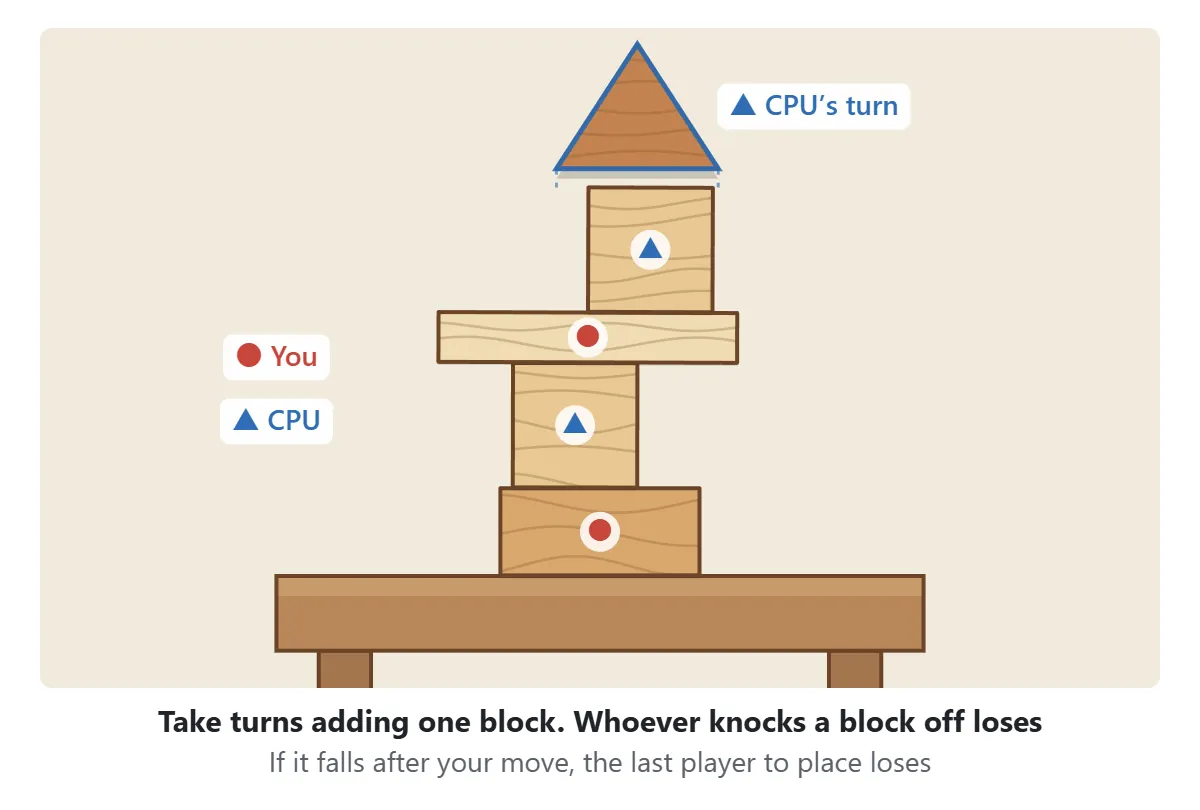
Against the computer or a friend, you share one tower and add one block per turn. A random draw decides who starts. Whoever makes a block fall off the table loses – and if the tower falls a moment after your move, that still counts against the last player who placed a block. Both players draw from the same sequence of blocks, so a smart move is to leave a top that will be awkward for the block your opponent gets next.
6. Puzzles: shapes and heights
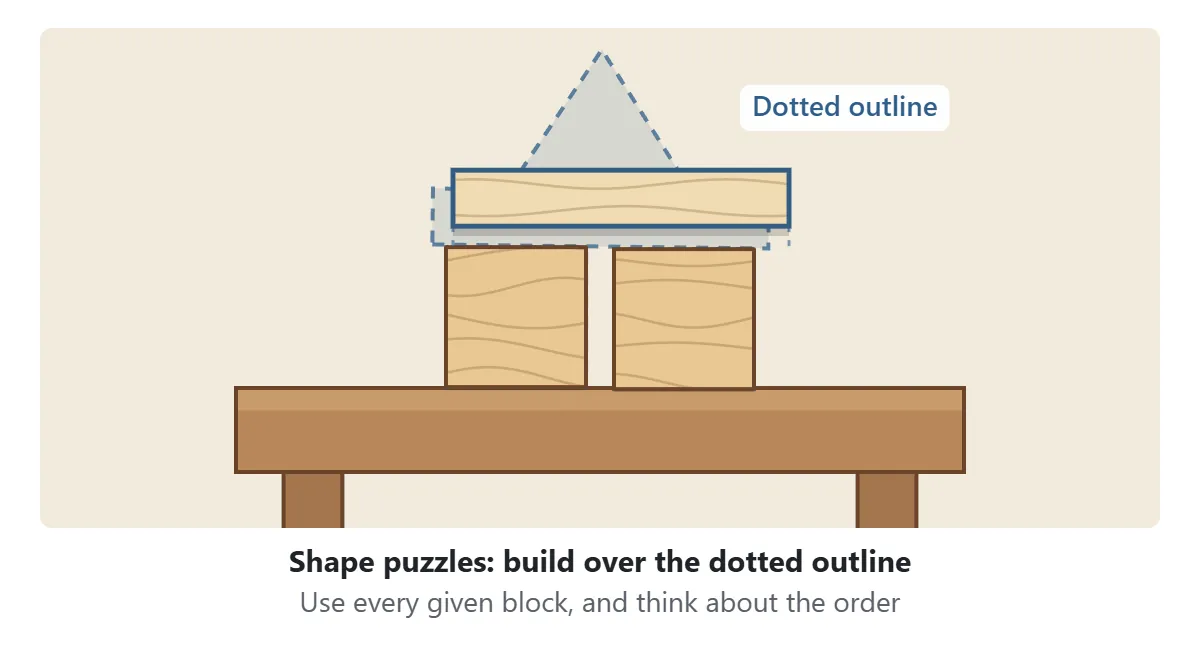

There are twelve puzzles. In the six shape puzzles – a gate, a house, stairs, a bridge, a lookout tower and a castle – you must use every block you are given to cover a dotted outline. Pick which block to place from the row below the screen; build from the bottom up, because a block cannot float in the air. In the six height puzzles you just need to reach the goal line, but the fewer blocks you use, the more stars you get. Some of them use a narrow table or start from triangles or half circles.
Game modes and settings
| Mode | What you do |
|---|---|
| Solo | Stack until it falls and beat your best height |
| vs CPU | Take turns with the computer at three levels |
| 2 players | Share one screen and take turns |
| Puzzles | Six shape puzzles and six height puzzles |
| Table & blocks | Difference |
|---|---|
| Easy | A wide 32 cm table and lots of flat blocks |
| Normal | A 26 cm table and an even mix of shapes (also used in 2-player games) |
| Hard | A narrow 21 cm table with more triangles, half circles and pillars |
CPU levels
| Level | What it feels like |
|---|---|
| Easy | Often places blocks off-center and sometimes at an awkward angle. A good place to start |
| Normal | Usually picks a safe spot, but now and then gets careless and leaves a wobbly tower |
| Hard | Thinks before every move and chooses safe spots and angles, though its hand still slips occasionally |
Block Tower strategy: tips for a taller tower
1. Keep flat sides up
The easiest top to build on is wide and flat. Lay bricks and pillars on their side to make a broad, low surface. A triangle point or the curve of a half circle gives the next block nothing to sit on, so try not to leave those at the very top.
2. Wide blocks low, small blocks high
A wide base can carry a top that wanders a little off-center. When a plank or a brick comes along, use it to widen your foundation. Balancing a long plank on a thin pillar works only if you hit the middle almost exactly.
3. Line up the middles
Small offsets add up. If the last block ended up a little to the right, place the next one slightly to the left to bring the center of mass of the whole tower back over the base.
4. Watch it settle
A freshly dropped block may wobble or slide for a moment. Check what moved and which block is leaning before you place the next one – it is the best way to spot trouble early.
5. Park awkward shapes on the table
If a half circle or an arch looks impossible to use up high, put it on an empty part of the table instead. Your height record does not go down, and the piece may become part of a wider foundation later.
6. In a match, look at your opponent’s next block
The next block in the top-right corner is the one your opponent will have to place. If it is a triangle, leaving fewer flat spots makes their move harder. Just remember that knocking the tower over yourself loses the game, so safety comes first.
Block Tower FAQ
Can I play on a phone or tablet?
Yes. Drag the block with your finger and lift it to drop. Rotate with the buttons or by twisting with two fingers. On a computer you can also use the keyboard: ← and → to move, Z and X to rotate, and Space to drop.
A block ended up tilted. Is that a problem?
Only blocks that leave the table end the game. You can stack on a tilted block, but its top is now a slope and the next block may slide. Rotating the next block to match the slope can help.
How is the height measured?
It is the height of the highest point of the blocks still on the table. Your record keeps the highest the tower reached before it fell. One cube is 5 cm tall, and the ruler is marked every 5 cm.
Can I stop and continue later?
Yes. The game saves the tower every time the blocks settle. Close the page, come back later and press “Continue” to pick up where you left off.
Any tips for stacking real wooden blocks?
Build on a hard, level table and lower each block gently before letting go – dropping it from high up jolts the blocks underneath. And just like in this game, keeping the middle of each block lined up is what lets a real tower grow tall.
A short history of wooden building blocks
Wooden blocks are one of the oldest toys around: simple cubes, bricks and cylinders made to be stacked, lined up and knocked over. In the 1830s the German educator Friedrich Fröbel, who founded the first kindergarten, designed sets of wooden cubes, bricks and triangular prisms as learning materials, and his “gifts” are often named as one of the roots of the modern building block. Many designers have created new block sets since then, and they are found in homes and classrooms all over the world.
Taking turns to add a block to a shared tower until someone knocks it down is a familiar balance game in many countries, played with all kinds of wooden pieces. Working out which shape goes where, and how far a block can stick out before it tips, quietly builds a feel for balance and weight.