 Yorimichi Games
How to play the Schulte table
A Schulte table is a square grid filled with numbers in random order. Your job is simple: find the numbers in order – 1, 2, 3 and so on up to the largest one – and tap each as soon as you see it. On the classic 5×5 grid that means 25 numbers, and the clock runs until you tap the last one. Because the only rule is “go in order”, anyone can start right away, yet it is surprisingly hard to get fast. This free online version runs in any browser on a computer, tablet or phone, with no download and no sign-up.
What you see on the screen
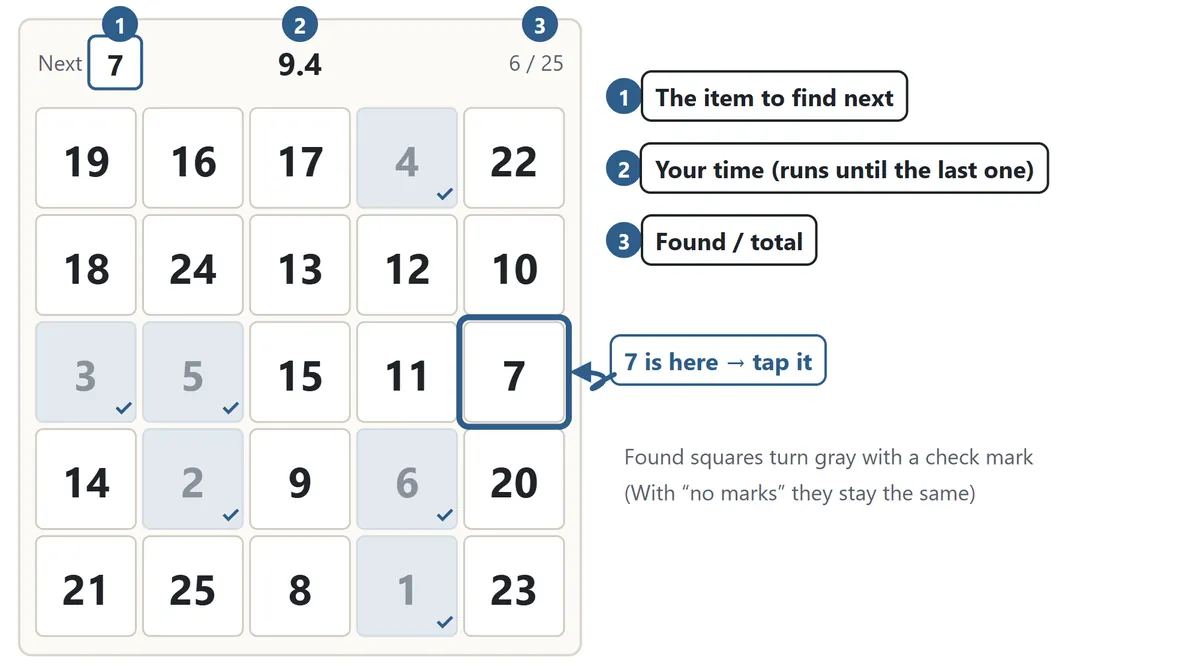
Press Start and a short 3-2-1 countdown begins. During the countdown the numbers are hidden, so you can't memorize the layout in advance. When the grid appears, the clock starts. The panel above the grid shows the item you need next on the left, your time in the middle, and how many you have found on the right. Tap or click the square with that number. A correct tap turns the square gray with a small check mark, and the “Next” box moves on. When you tap the last number, the clock stops and your result appears.
What happens when you miss
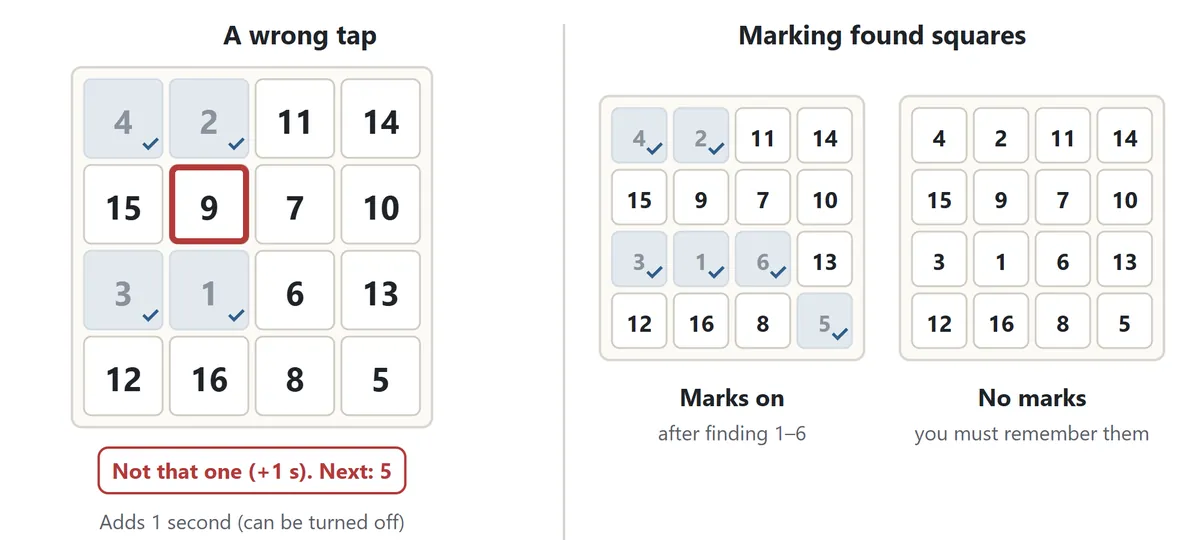
If you tap a square that isn't the next item, it flashes with a red frame and one second is added to your time. Random tapping only makes your time worse. If you would rather not have a penalty – for a first try, or when playing with a young child – set Misses to No penalty: misses are still counted, but the clock doesn't change. Tapping a square you have already found again is never counted as a miss.
Schulte table rules and settings
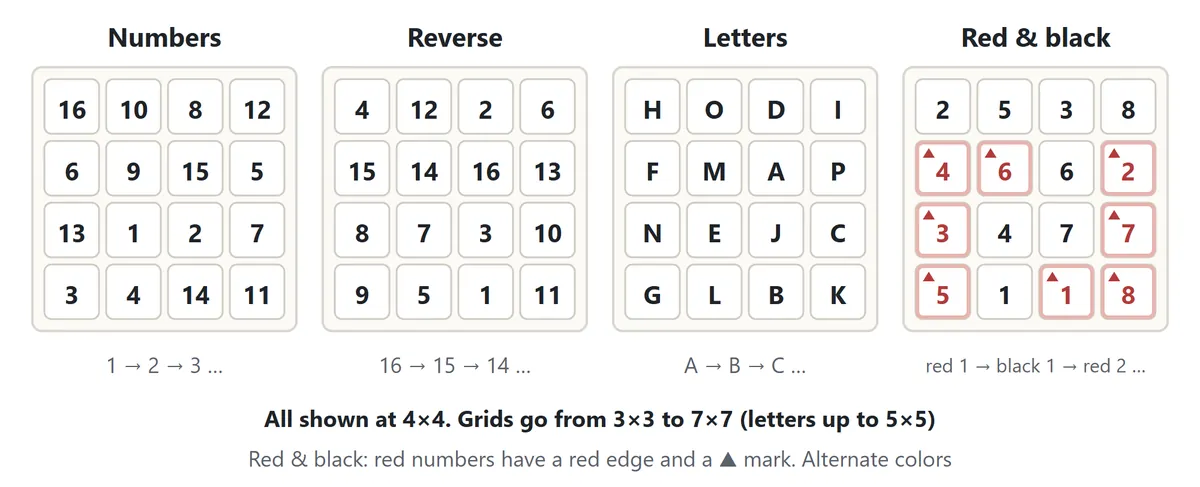
| Order | What you tap |
|---|---|
| Numbers | 1, 2, 3 … up to the largest number. The classic Schulte table |
| Reverse | From the largest number down to 1 |
| Letters | A, B, C … in alphabetical order (up to 5×5) |
| Red & black | Red 1, black 1, red 2, black 2 … switching colors every tap |
Red & black mixes two sets of numbers in one grid, so every number appears twice and you have to check the color as well as the digit. It is a simplified take on the two-color tables used in psychology. Red squares also have a red edge and a small triangle in the corner, so you can tell them apart by shape if the colors are hard to separate.
You can pick any grid from 3×3 (9 squares) to 7×7 (49 squares). The 5×5 grid is the one most people know. 3×3 and 4×4 are quick and friendly for beginners; 6×6 and 7×7 not only have more items but also spread them over a wider area, which makes them much more demanding. Letters stop at 5×5 because the alphabet only has 26 letters.
The Found squares setting changes how much the grid helps you. With Mark them, found squares turn gray. With No marks, nothing changes when you tap, so you have to keep track of where you are in your head. That is the hardest way to play.
Daily grid and your progress chart
The Daily mode gives everyone the same 5×5 number grid on the same date, with the one-second miss penalty, so you can compare times with friends or family. The game keeps your first time of the day, your best time that day, and how many days in a row you have played.
In free play, your personal best is kept separately for every combination of order, size, penalty and marks, because times under different conditions can't be compared fairly. Once you have played a setting twice, the result screen shows a line chart of your last 30 times with a dashed line for your personal best, so you can see whether you are getting faster. Tap a point on the chart to see that game's time. Records are stored only in your browser on this device.
Schulte table tips: how to get faster
1. Fix your gaze on the center
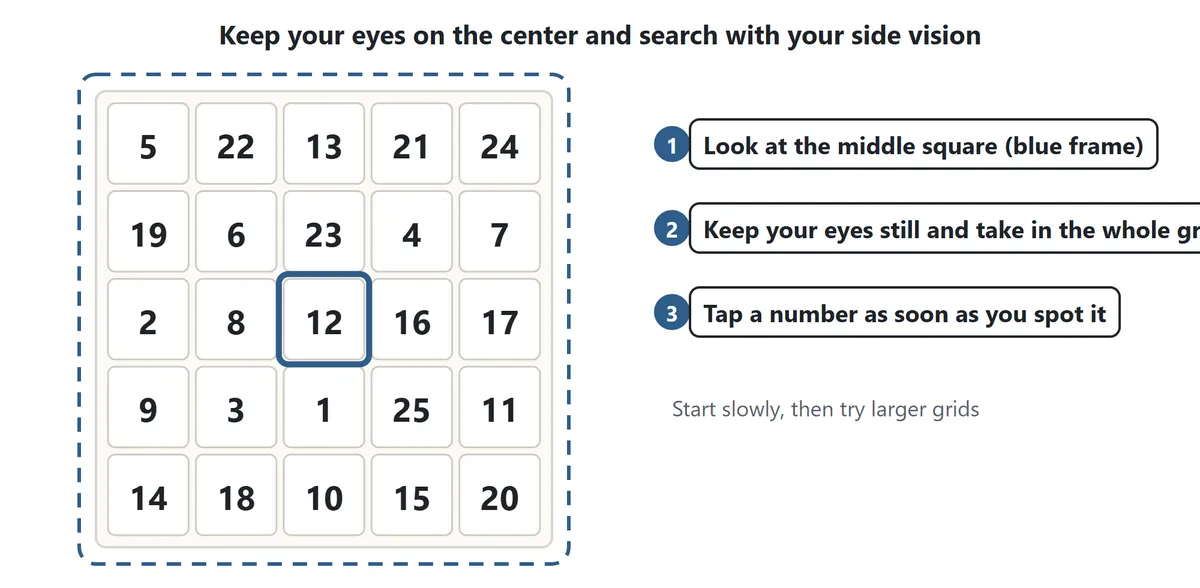
The classic advice for Schulte tables is to look at the middle of the grid and find the numbers around it with your side vision, instead of chasing each number with your eyes. Moving your eyes back and forth across the grid costs time. If you keep them near the center and let the whole table sit in your field of view, numbers start to “pop out” on their own. It feels odd at first, so practice on 3×3 or 4×4 before moving up.
2. Don't say the numbers in your head
Silently reading “one, two, three” slows you down. The next item is always shown in the Next box, so focus on spotting its shape rather than saying it.
3. Let your eyes run ahead of your hand
While your finger or mouse is moving to a square, your eyes can already be looking for the next number. You don't need to watch each tap land – the gray mark and the sound confirm it.
4. Remember what you see on the way
While looking for 8 you will often notice where 10 or 11 is. Keep a loose note of those positions; when their turn comes, you will find them almost instantly.
5. Accuracy first, then speed
Each miss costs a full second, which is often more than the time you would have spent checking. Aim for zero misses first, then push the pace.
6. Take short breaks
Doing grid after grid tires your eyes and your focus fades. Speed-reading guides often suggest no more than about ten tables a day. After a few rounds, look at something far away and rest for a moment.
Playing with a keyboard
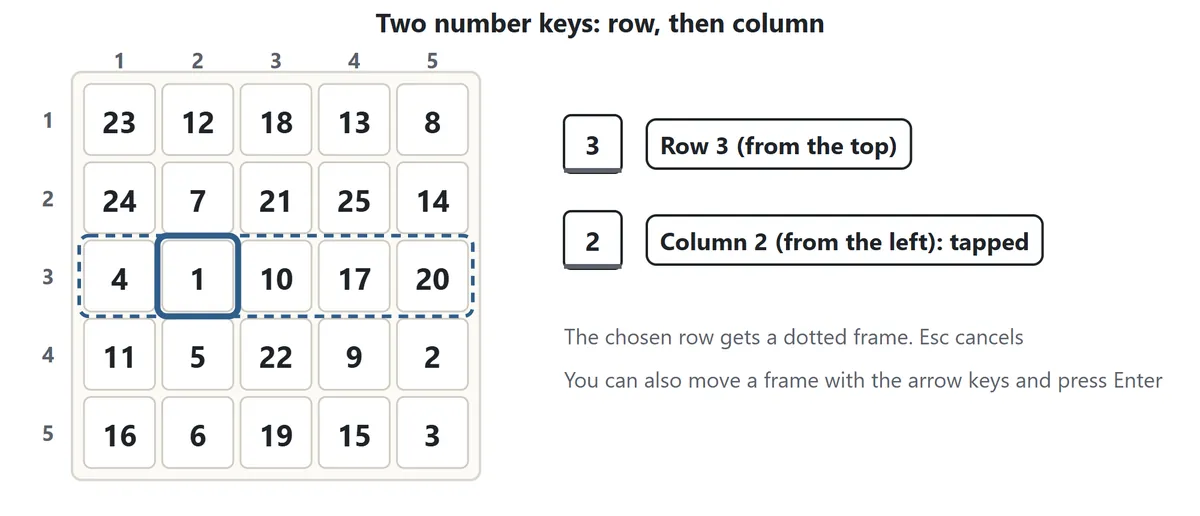
On a keyboard you choose a square with two number keys. The first key is the row, counted from the top; the second is the column, counted from the left. For example, pressing 3 and then 2 taps the second square in the third row. After the first key, the chosen row gets a dotted frame and small column numbers appear in its squares. Press Esc or Backspace to cancel. You can also move a dotted frame with the arrow keys and press Enter or Space to tap. Press P to pause.
Schulte table FAQ
What is a good Schulte table time?
There is no official benchmark here. Your time depends on the layout, the size of your screen and how you feel that day, so the most useful comparison is with your own personal best. For a head-to-head comparison, play the Daily grid – everyone gets the same layout.
Does it improve my brain or my eyesight?
This game is made as a focus and visual-search game. We don't make any claims about effects on the brain or eyesight. Enjoy it as a quick mental warm-up or a short break.
Why are my times different on my phone and my computer?
The grid size and the way you tap are different. On a phone the grid is small, so your eyes travel less, but tapping with a finger takes a moment. On a computer the grid is larger and the mouse has farther to go. Compare records on the same device.
What if I stop in the middle?
If you switch tabs, the game pauses automatically; press Resume to carry on. If you close the page, you can pick up where you left off with Continue on the same device. While paused, the numbers are hidden and the clock stops.
Does it make sound?
Sound is off at first. Press “Sound: off” to turn on short effects for correct and wrong taps.
Where the Schulte table comes from
The Schulte table is named after the German psychiatrist Walter Schulte (1910–1972). Grids of shuffled numbers that you point to in order are said to have started as a psychological task for looking at attention – how steady it stays, and how quickly someone slows down as they tire. A typical use was to time several tables in a row and see when the times started to grow.
Many variations followed. Psychologists in the former Soviet Union used grids that mix Arabic and Roman numerals, and red-and-black tables in which you count the two colors in turn; a red-and-black table is reported to have been part of the psychological screening of cosmonaut candidates. The grid also became a familiar exercise in speed-reading books, where the goal is to keep your eyes on the center and find the numbers around it. Today people play Schulte tables on paper and on screens alike.
The Red & black mode in this game is a simplified version of those two-color tables: you tap the same number in red and then in black before moving on.