 Yorimichi Games
How to play the color test
This color test is a simple one-player game: a grid of squares is painted in a single color, except for one square that is just slightly off. Your job is to spot the odd color out and tap it. Every correct answer takes you to the next stage, where the grid gets bigger and the difference gets smaller. How far can you go? Try it against the clock in the 60-second challenge, or take your time in No timer mode. It runs in any modern browser on a computer, tablet or phone, with no download and no sign-up.
One important point before you start: this is a game, not a medical color vision test, and it cannot diagnose color vision. Your result depends heavily on your screen, its brightness, the light in the room and how tired your eyes are. A high or low score says nothing reliable about how you see color.
Reading the screen
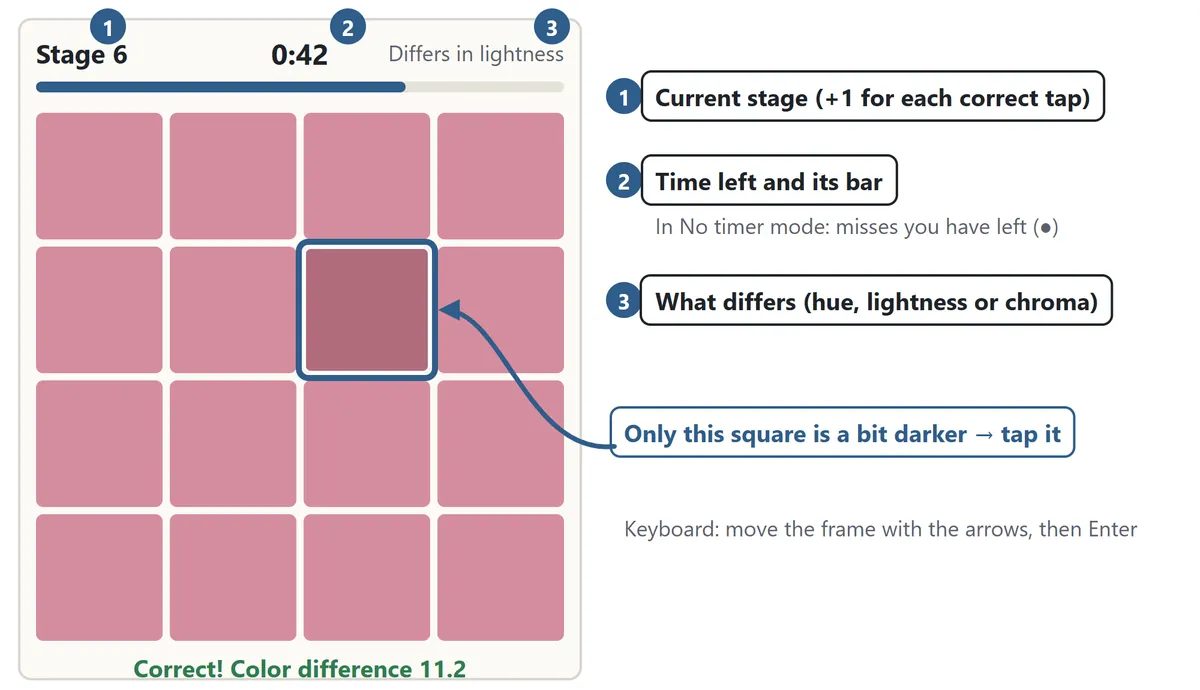
Press Start. In the 60-second challenge a 3-2-1 countdown runs first, then the first grid appears. All the squares look alike, but one of them has a slightly different color. Tap it with your finger or click it with the mouse. On a keyboard, move the dotted frame with the arrow keys and press Enter or Space to choose. Above the grid you can always see the stage you are on, the time you have left, and whether the odd square differs in hue, lightness or chroma.
What changes as you progress
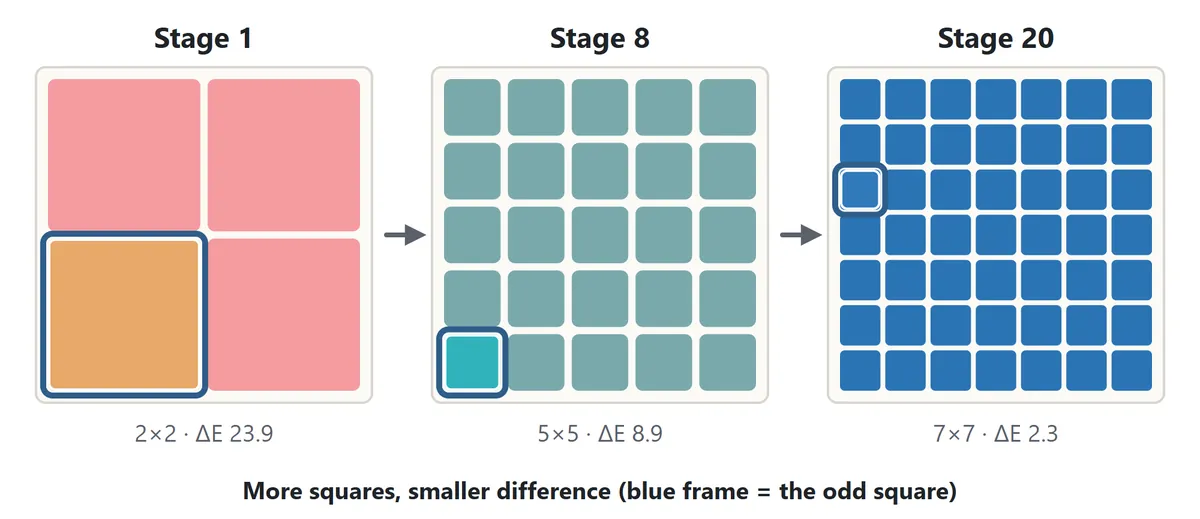
Stage 1 is a 2×2 grid and the odd square jumps out immediately. Then the grid grows to 3×3, 4×4 and so on, reaching 7×7 (49 squares) from stage 17. At the same time the color difference shrinks a little with every stage. Early on, the odd square seems to float off the grid; later you have to compare squares one by one before you can see it at all.
Misses and penalties
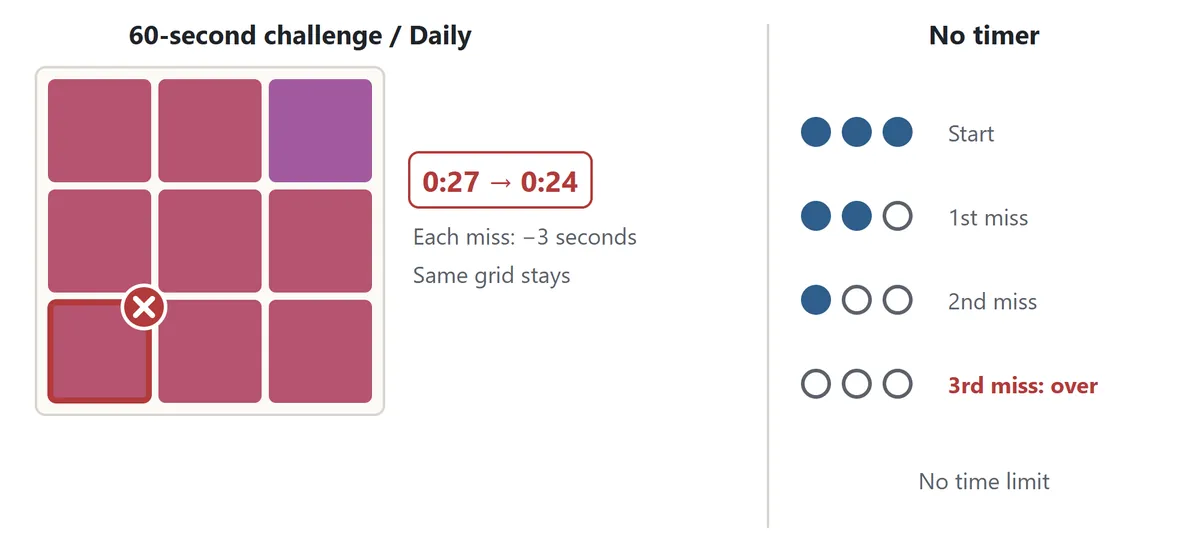
If you tap a square that is not the odd one, it flashes red. In the 60-second challenge and the Daily puzzle, every miss takes 3 seconds off your remaining time, so random tapping quickly drains the clock. No timer mode has no clock, but you can only afford two misses: the third one ends the game. Either way, the same grid stays on screen after a miss. When the game ends, the odd square of the last grid is outlined in blue so you can see what you missed.
Modes and difficulty
| Mode | How it works |
|---|---|
| 60-second challenge | Clear as many stages as you can in 60 seconds. Each miss costs 3 seconds |
| No timer | No clock. Keep going until your third miss |
| Daily | 60 seconds, Normal, mixed differences. Everyone gets the same colors on the same day |
There are three difficulty levels, and they differ in how quickly the color difference shrinks. On Easy the difference fades slowly; on Hard it drops fast, and after about stage 20 it is close to the limit of what most people can see on a screen. If you are new to the game, the Normal 60-second challenge is a good place to start.
The Type of difference setting chooses what changes in the odd square. Mixed picks hue, lightness or chroma at random for each grid. You can also play with only one type to find out which kind of difference you notice most easily. Your records are kept separately for every combination of mode, difficulty and type.
Hue, lightness and chroma: the three properties of color
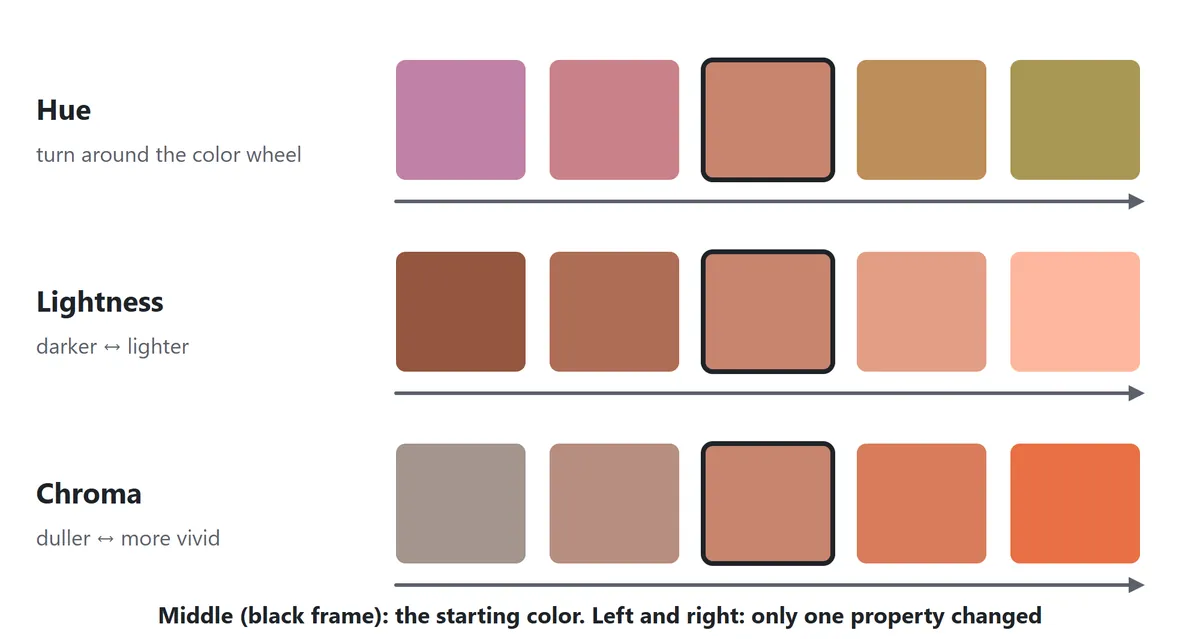
When people describe a color precisely, they usually split it into three properties: hue, lightness and chroma. Art classes, design courses and color science all start from this idea, and systems such as the Munsell color system are built on it.
Hue
Hue is what we normally mean by “which color”: red, orange, yellow, green, blue, purple. Arranged in order, the hues form a color wheel. When a grid differs in hue, the odd square is turned a little way around that wheel, so it looks slightly redder, yellower, greener or bluer than the rest.
Lightness
Lightness is how light or dark a color is, from black at the bottom to white at the top. Grays have lightness too, even though they have no hue. When a grid differs in lightness, the odd square is a touch lighter or a touch darker than the others.
Chroma (saturation)
Chroma is how vivid a color is compared with a gray of the same lightness. Strong, clean colors have high chroma; muted, grayish ones have low chroma. In everyday speech this is often called saturation. When a grid differs in chroma, the odd square looks a little more vivid or a little more dull.
Measuring color difference (ΔE)
Color scientists measure how different two colors look with a number called delta E (ΔE). This game uses one of the standard formulas, CIEDE2000, to build every grid so that a hue difference, a lightness difference and a chroma difference of the same stage look roughly equally large. A ΔE of about 1 is the size of difference you can only just see when two colors sit side by side. Your result shows the smallest ΔE you managed to spot.
Tips to spot the odd color faster
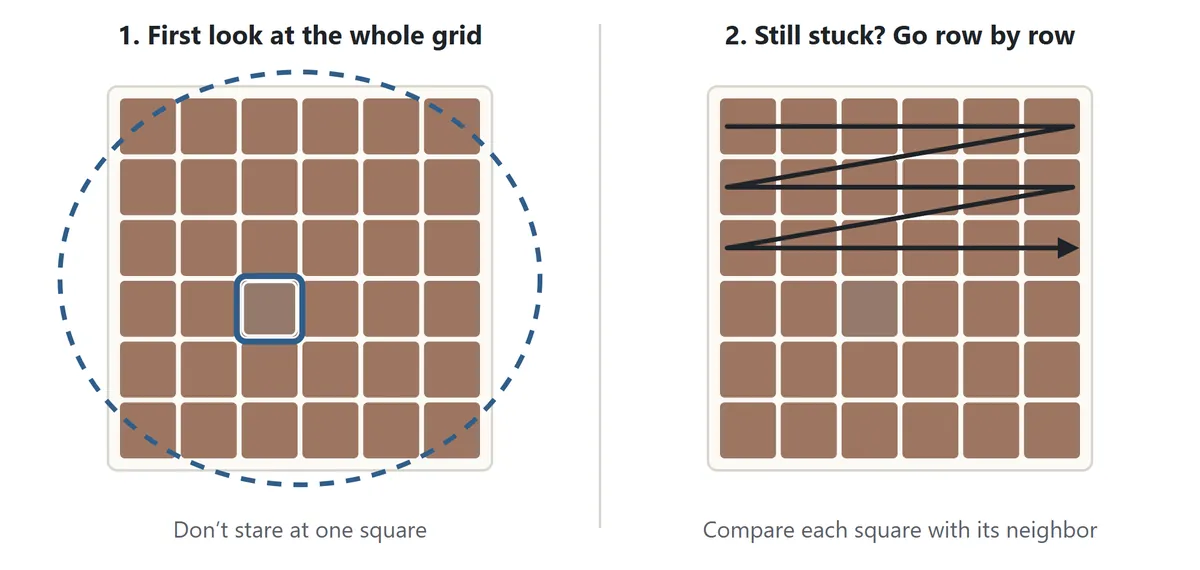
1. Look at the whole grid first
Instead of staring at one square, rest your eyes near the middle and take in the whole grid at once. While the difference is still large, the odd square tends to pop out this way, and it is much faster than checking squares one at a time.
2. If it does not pop out, go row by row
Once the difference is small, scan from the top left, comparing each square with its neighbor, one row at a time. A fixed scanning order stops you from checking the same area twice or skipping a square.
3. Use the hint above the grid
The line above the grid tells you what to look for. For lightness, look for a square that is a shade lighter or darker. For chroma, look for one that is a little duller or brighter. For hue, look for one whose tint is slightly off.
4. Do not rush your taps
In the 60-second challenge a miss costs 3 seconds, which is usually more than the extra second you would spend checking. If you are not sure, compare once more before you tap.
5. Set up your screen
Small differences disappear on a screen that is too dim, too bright or viewed at an angle. Sit straight in front of the display, use your normal brightness, and avoid reflections from windows or lamps. Some screens, especially phones with night or blue-light filters, shift colors, which can make certain grids harder.
6. Rest your eyes
Looking at the same color for a long time makes your eyes adapt, and differences become harder to see. After a few games, look at something far away for a moment. Your best score often comes after a short break.
Color vision diversity
Not everyone sees color the same way. Some people find it hard to tell certain reds and greens apart, and a smaller number have difficulty with blues and yellows. Red–green color vision deficiency is common: estimates are roughly 1 in 12 men of Northern European ancestry and about 1 in 20 men in Japan, and far fewer women. Many people now prefer to talk about color vision diversity rather than defects.
The hue grids in this game can be much harder or easier depending on how you see color. If telling hues apart is difficult for you, choose Lightness or Chroma under Type of difference for a fairer game. Whatever you choose, the game only gives you a score; it does not judge your color vision. If you want to learn more about your own color vision, an eye care professional can help.
Color test FAQ
Can this game tell me if I am color blind?
No. It is a color perception game, not a medical test, and it cannot diagnose color vision. Screens show colors differently, and brightness and room lighting change the result.
What is a good score?
There is no official benchmark, and the same person can score quite differently on another screen or another day. Try to beat your own best, or compare how you do with hue, lightness and chroma.
Why is my score different on my phone and my computer?
Each display reproduces color in its own way, with different brightness, contrast and viewing angles. Use the same device and brightness if you want to compare results.
What is the Daily puzzle?
It is a fixed set of grids for each date: everyone who plays on the same day sees the same colors in the same order. It always uses 60 seconds, Normal difficulty and mixed differences. The game keeps your first score of the day, your best of the day and how many days in a row you have played.
What happens if I leave the page?
Switching to another tab pauses the game automatically; press Resume to carry on. If you close the page, Continue picks up where you left off on the same device. Records are stored only in your own browser.
Does it make sounds?
Sound starts off. Press “Sound: off” to hear effects for correct taps, misses and the last three seconds.
Where this kind of color test comes from
Comparing colors that differ only slightly has long been part of color research and of training for people who work with color. In the 1940s, for example, an arrangement test that asks people to sort many caps of gradually changing hue became a well-known way to study color discrimination. The odd-color-out grid seems to have become a popular casual game in the 2010s, when smartphones made quick browser and app games common. Today it is enjoyed by players of all ages as a light test of color perception and a starting point for thinking about how differently people see color.
Another color game
If you like working with colors, try Color Sort Puzzle, where you pour colors between tubes until each tube holds a single color.