 Yorimichi Games

How to play dot to dot
Dot to dot – also called connect the dots – is one of the oldest pencil puzzles around. A page is covered in numbered dots, and you draw a line from 1 to 2, from 2 to 3, and so on until you reach the last number. Nothing on the page looks like much at first, but by the end the lines have traced a picture. In this online version, the finished outline also fills with color and the picture’s name appears, so there is always a small reveal waiting at the end.
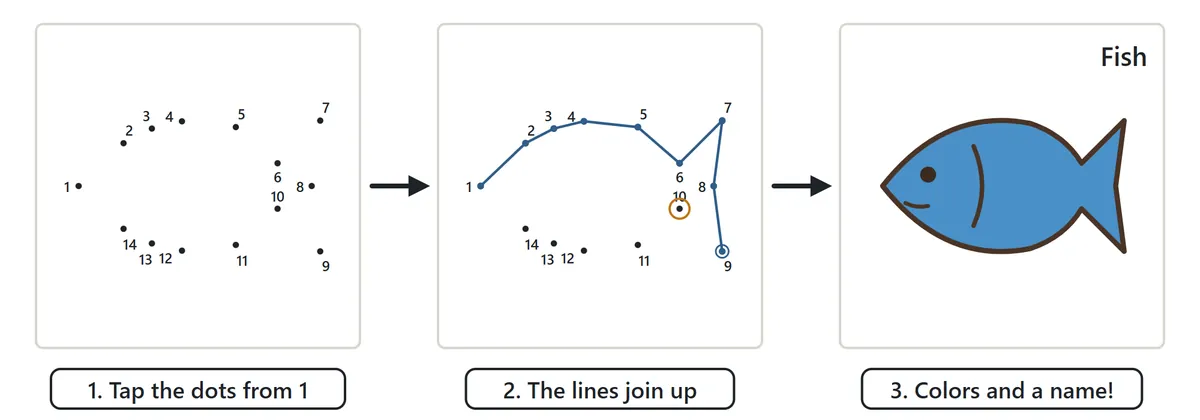
Tap the dots in order
Start by finding dot number 1 and tapping it (or clicking it with a mouse). Then tap 2, and a line appears between them. Keep going with 3, 4, 5… The bar above the page always shows the next number in a large box, so you never have to remember where you were.
You don’t have to lift your finger between dots. Press on a dot and drag toward the next one; as soon as you pass close to it, the line snaps on and you can carry on to the one after that. It feels a lot like drawing the whole shape in one stroke with a pencil. When a shape is closed – an apple, a fish, a star – the last dot automatically joins back to dot 1 and the picture is complete.
Near misses and wrong dots
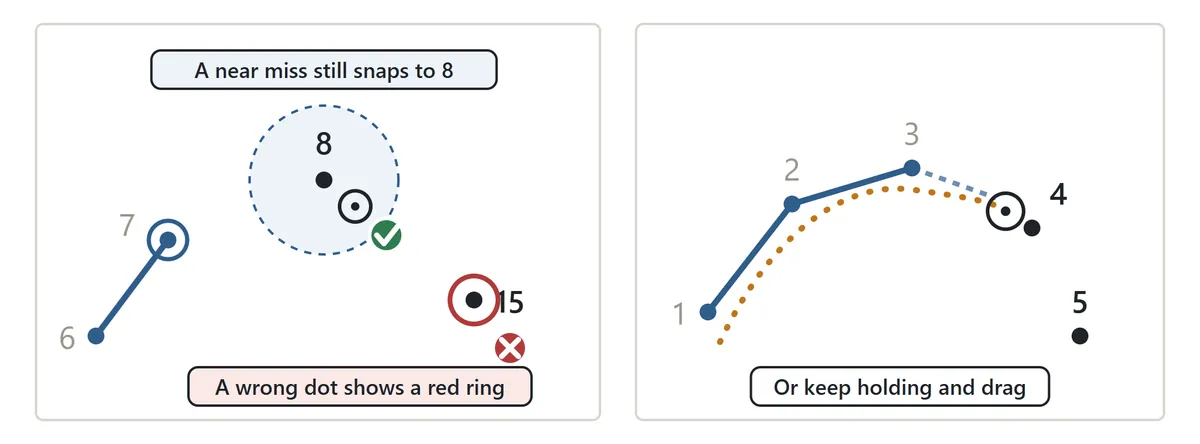
Hitting a tiny dot exactly with a finger is hard on a phone, so the game is forgiving: if you tap slightly off and the next dot is the closest one, your tap snaps onto it. If you clearly tap a different dot, that dot shows a red ring for a moment and the message tells you which number you touched and which one you are looking for. There is no buzzer and no penalty beyond a small counter in the results, so younger children can explore without getting discouraged.
Stuck? Press Where’s the next dot? and a glowing ring appears on it. In the settings, Next-dot ring lets you choose whether that ring is shown all the time (great for small children), only after a wrong tap, or never (for players who want to find every number themselves).
Levels, dot labels and skip counting

| Level | Dots | Good for |
|---|---|---|
| Easy | 10–20 | First-timers and children who are just learning numbers. The dots are far apart and easy to spot. |
| Medium | 30–50 | Anyone who can count to 50. Animals and vehicles with clear shapes. |
| Hard | 60–100 | Grown-ups and patient kids. Detailed outlines; use Zoom on a phone. |
There are 17 pictures in each level – 51 in all, every one drawn for this site. When you choose a level, you get the next picture you haven’t finished yet. Finished pictures move into your Album, where you can pick any of them to play again.
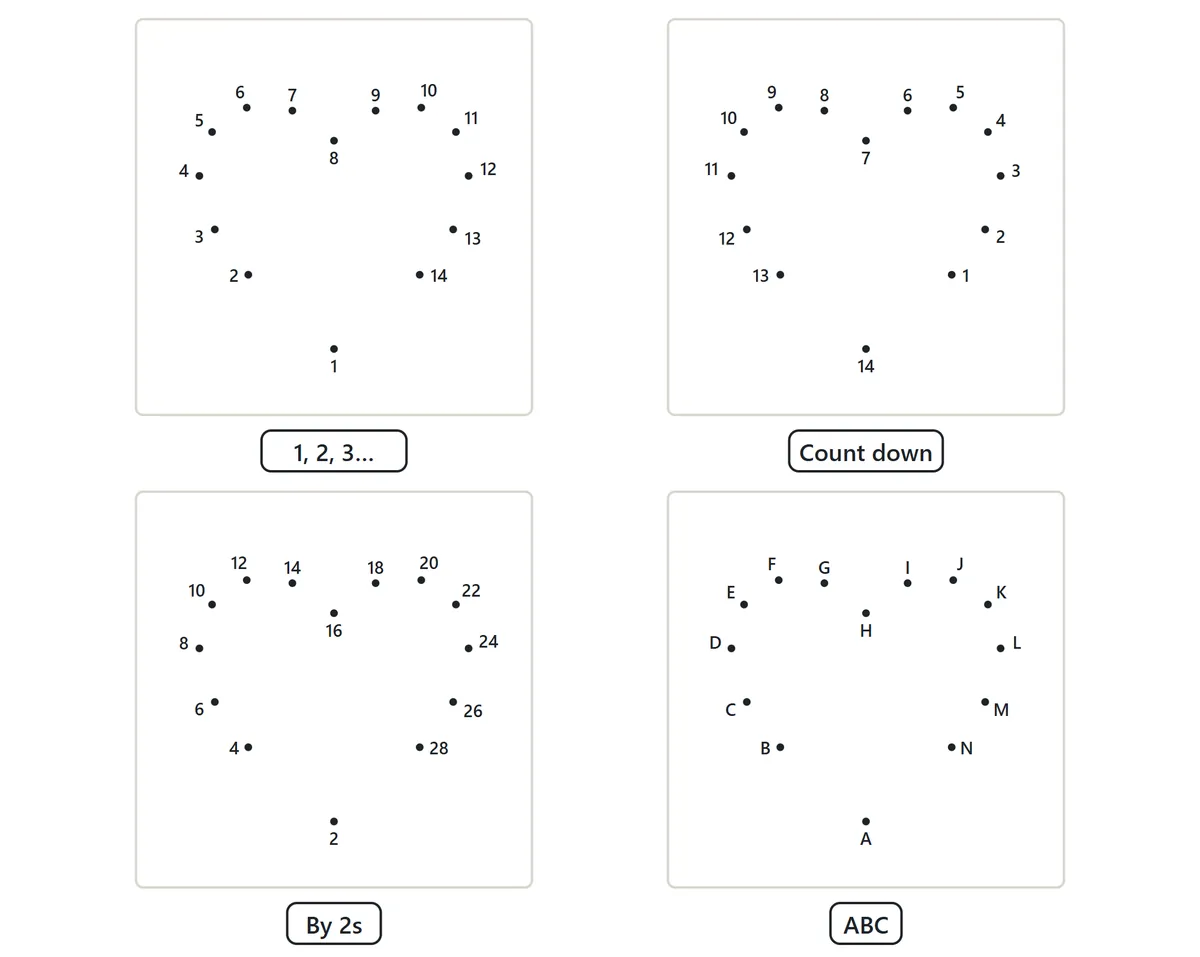
The dots don’t have to be plain numbers. Under Dot labels you can choose:
- 1, 2, 3… – the classic connect the dots, good for number order and counting practice.
- Count down – start at the biggest number and work back to 1.
- Skip counting – count by 2s, 3s, 4s and so on up to 10s. Counting by 5s, for example, gives 5, 10, 15, 20… It is a relaxed way to practice multiplication facts, and the numbers keep going past the tenth dot.
- ABC – alphabet dot to dot, from A to Z and then on with lowercase a, b, c… Because there are only 52 letters, the alphabet order is available for Easy and Medium pictures.
Connect the dots tips
1. Look near the last dot first
The next dot is almost always close to the one you just joined. Scan the area right around your last dot before you search the whole page – it is much faster, and it is how experienced solvers work through pictures with hundreds of dots.
2. Numbers sit on the outside of the line
Each number is placed next to its dot, usually on the outside of the shape so it doesn’t get crossed by a line. Where the dots are crowded, a number may sit diagonally above or below its dot. If you are not sure which dot a number belongs to, pick the dot closest to the number.
3. Guess the picture as you go
After a dozen lines you can often see an ear, a tail or a wheel. Guessing what the picture will be makes it easier to predict where the line is heading next – and the name stays hidden until you finish, so it is a fun guessing game with children, too.
4. Zoom in on the busy parts
Hard pictures have spots where many dots crowd together, like legs, ears and claws. On a phone or tablet, press Zoom to make the page bigger and move it around with your finger. When the next dot is about to leave the screen, the page scrolls to show it.
5. Turn the help off as you improve
Showing the next-dot ring all the time makes the game smooth for young children, but finding the next number yourself is the real exercise. As you get comfortable, switch the ring to “After a wrong tap” or “Never”.
6. Make it a daily habit
Today’s picture is one picture per day, the same for everyone. It comes from the Easy and Medium sets, so it takes only a few minutes. Finish it on consecutive days and the game counts your streak – a gentle brain break for the morning coffee or before bed.
Printable dot to dot worksheets
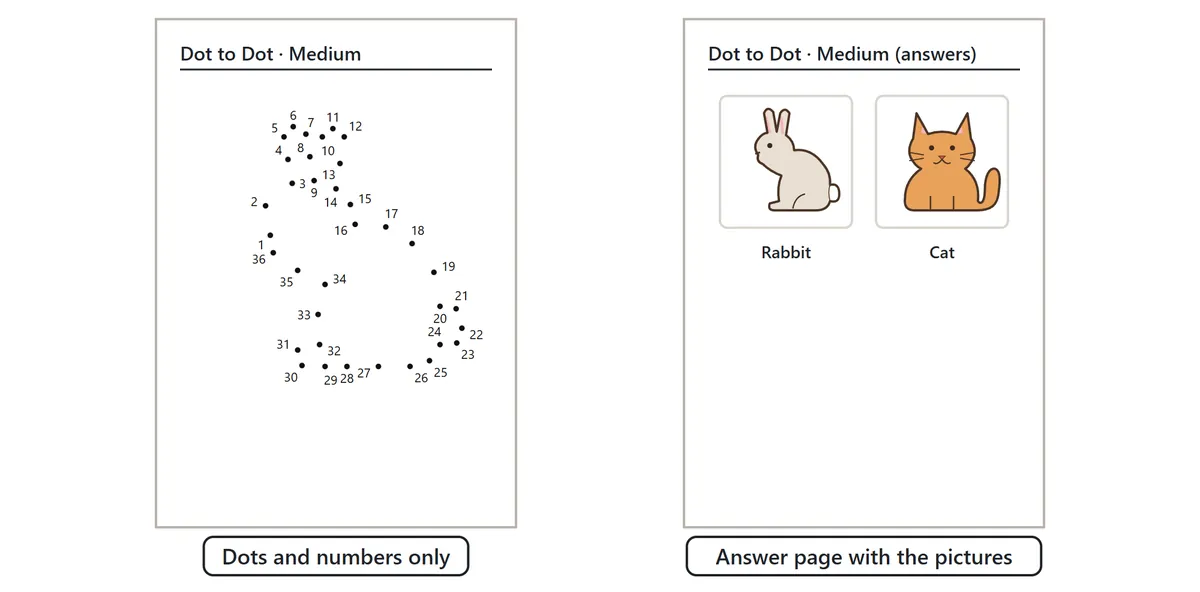
Press Printable to open a print-ready page. Choose the level, the first picture, how many pictures go on each page, how many pages, and the dot labels (including skip counting and ABC order), then print with your browser on US Letter or A4 paper. The dots and numbers print cleanly in black and white. An optional answer page shows each finished picture in color with its name, which children can use as a coloring guide after they have joined the dots.
Teachers use printable dot to dot pages for number recognition and counting in the early grades, and skip counting sheets for times-table review. They also make calm activities for waiting rooms and road trips, and many adults enjoy them as a simple, screen-free puzzle.
Your Album, best times and any half-finished picture are stored only in the browser on your device. Nothing is uploaded and there is no account to create.
Dot to dot FAQ
Can I skip a number?
No. A line only appears when you reach the next number in the order. Tapping any other dot shows a red ring instead.
What if I draw a line to the wrong dot?
That can’t happen here – wrong dots never get a line, so there is nothing to erase. If you want to begin a picture again, press Start over twice.
How long does a picture take?
An Easy picture usually takes under a minute, a Medium one two or three minutes, and a Hard one five minutes or more, depending on how quickly you find each number.
Is this the same as “dots and boxes”?
No. Dots and boxes is a two-player game where you take turns drawing lines between dots to close boxes. Dot to dot is a picture puzzle you solve on your own by following the numbers.
Can I play with sound?
The game starts silent. Press Sound: off to hear a soft click as each dot joins and a short tune when the picture is done.
A short history of connect the dots
Pictures drawn by joining numbered dots became a popular children’s feature in newspapers in the early twentieth century, and books made up entirely of dot-to-dot puzzles are said to have appeared in the 1920s. Since then the idea has been stretched in every direction: alphabet dot to dots for letter practice, skip counting sheets for math class, and very large puzzles for adults with more than a thousand dots. The simple pleasure is the same in all of them – follow the order, and watch something appear out of nothing.