 Yorimichi Games
How to use the wheel spinner
This page is a free random picker with three modes. Spin a wheel to choose one entry, draw slips from a box one at a time, or shuffle a list of names into random teams. Teachers use it to call on students, pick classroom helpers and set presentation order; families and friends use it for chores, game night and prize draws; and anyone can use it to settle a decision they keep going back and forth on. There is nothing to install and no account to create.
Add your entries and spin
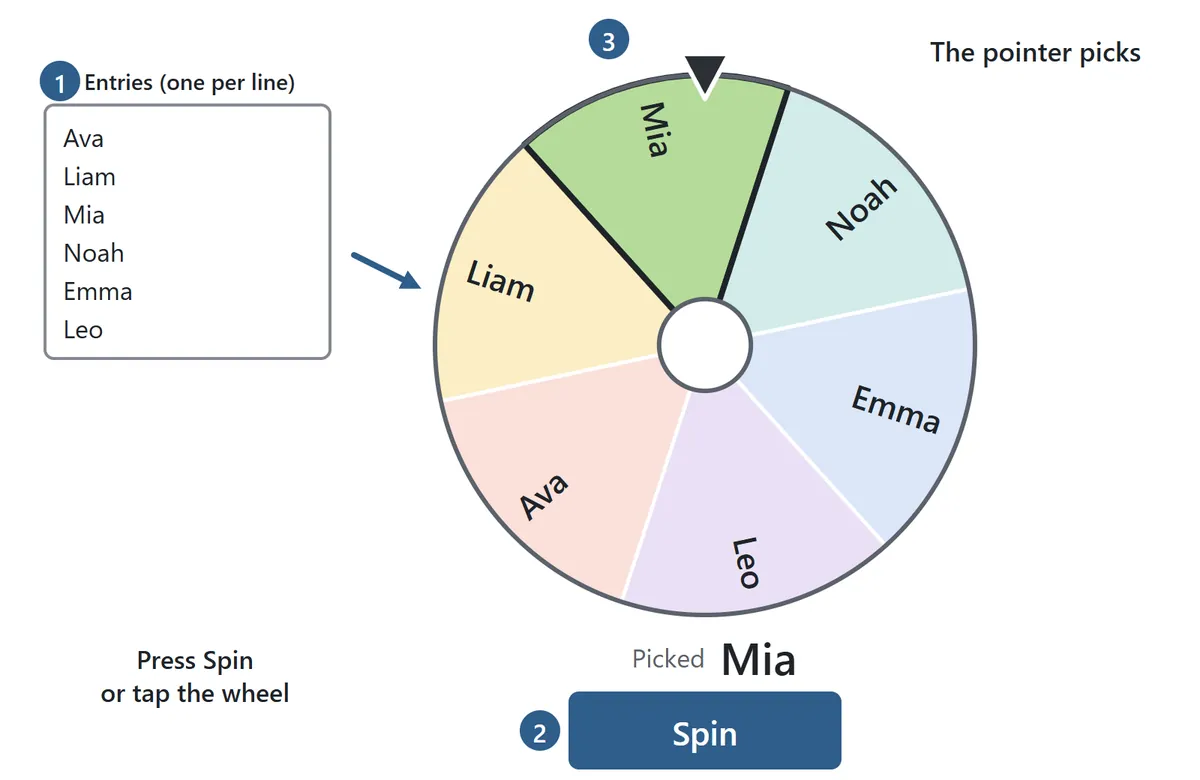
Choose Wheel in the settings and press Start. A wheel appears with a text box below it. Type your entries one per line and the wheel updates as you type. You can also copy a column from a spreadsheet or a class list and paste it straight in. Blank lines are skipped, extra spaces are trimmed, and if the same name appears twice it gets two slices.
Press Spin, or tap or click the wheel itself, and it spins fast before gradually slowing to a stop. On a computer the space bar works too. The entry under the pointer at the top is the pick, and it is shown in large type under the wheel along with a short history of earlier picks. In the settings you can choose a spin time of 3, 5 or 8 seconds: 8 seconds builds suspense in front of a class, while 3 seconds is better when you need to spin many times in a row.
Need numbers instead of names? Enter a number and press Add numbers to fill the list with 1 to 30, or any range up to 100, which is useful for picking by seat or roll number. The Yes / No button makes an instant two-way decision wheel.
Weighted entries: make one option more likely
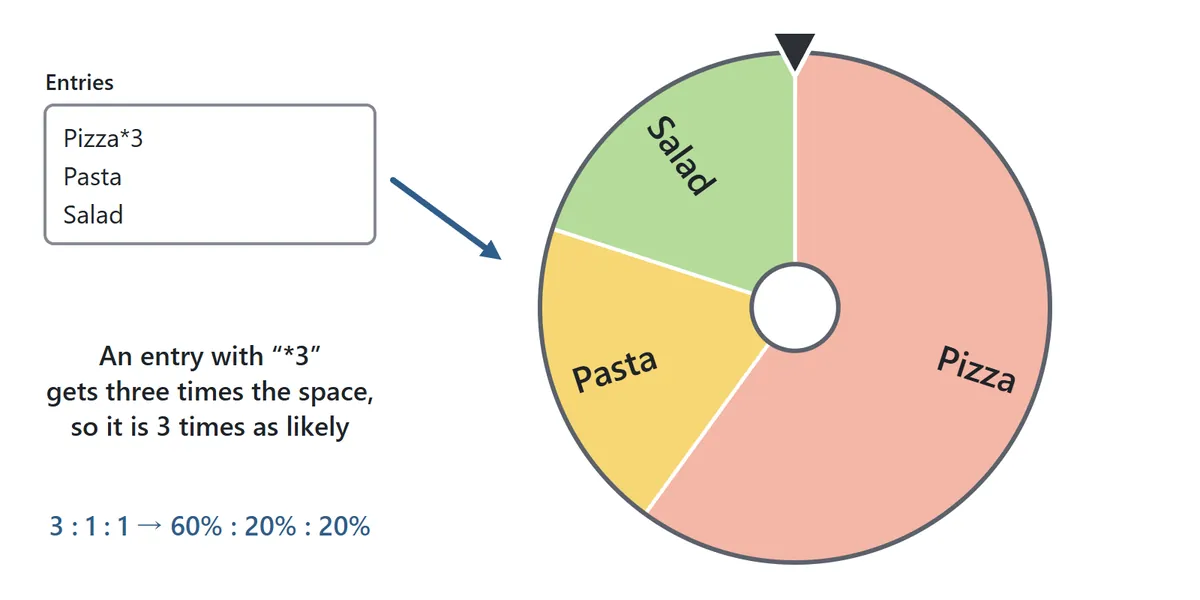
To give an entry better odds, add an asterisk and a number to the end of its line, such as Pizza*3. With Pizza*3, Pasta and Salad, Pizza gets three times the space of each of the others, so it wins 60% of the time and the other two win 20% each. A multiplication sign (×3) works as well, and weights go up to 100. The size of each slice always matches its real chance of winning, so what you see is exactly what you get.
Remove the winner and spin again
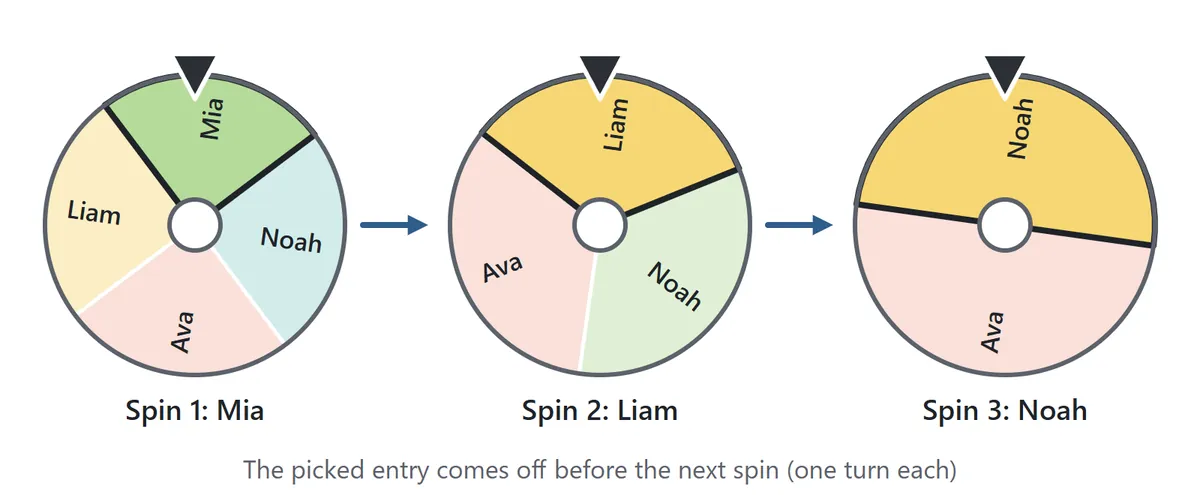
Set Picked entry to Remove after spin when everyone should get exactly one turn, such as deciding the order of presentations. The picked entry stays highlighted so everyone can see the result, then it is taken off the wheel when you spin again. Removed entries are listed under the text box, and Put all back restores them. With Keep on wheel, every spin picks from the full list.
Draw names from a box

Draw from a box works like pulling folded slips of paper out of a hat. Each line in the text box becomes one slip, and a line such as Try again*5 puts five identical slips in the box. So one line saying Winner and one saying Try again*5 gives you one winning slip and five others. Press Draw or tap the box, and a slip rises out and opens to show what it says. Every slip drawn is added to the list below, numbered in the order it came out.
By default, drawn slips stay out of the box, just as they would with real paper. When the box is empty the Draw button is disabled, and Refill box puts every slip back. If you choose Put back in the box, each draw is made from the full set, so the same slip can come up again. Keep slips out for handing out jobs or prizes that each exist only once; put them back when every draw should have the same odds.
Does it matter who draws first?
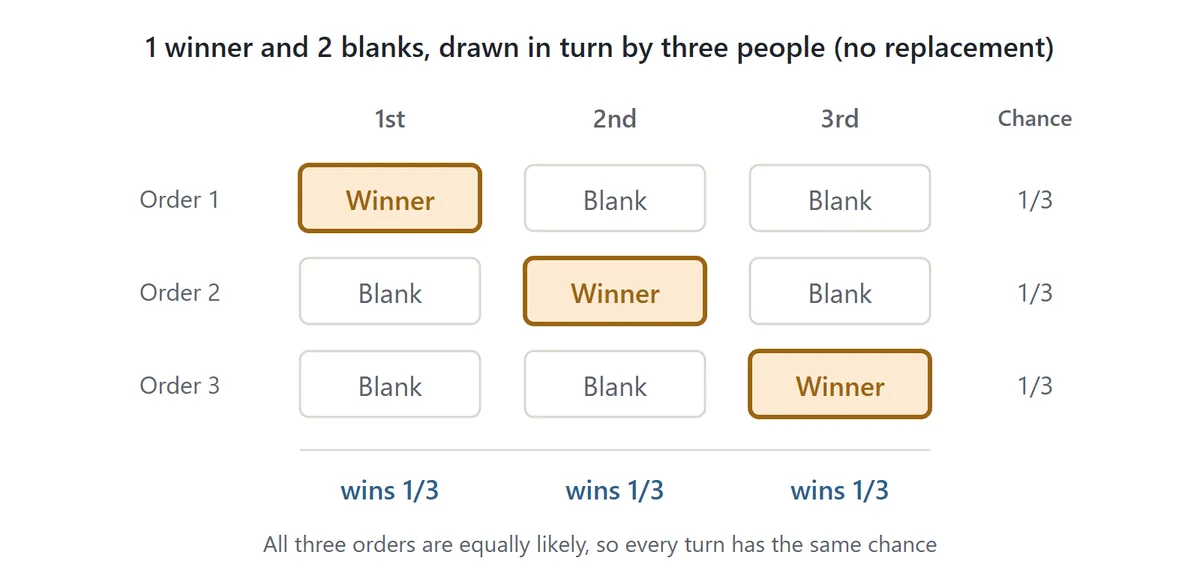
People often worry that drawing first, or last, is an advantage. It is not. Suppose one winning slip and two blanks are drawn by three people in turn. The winning slip is equally likely to be in any of the three positions, so each person has exactly a one in three chance, no matter when they draw. Seeing earlier people draw blanks does make the remaining slips more likely to win, but before anyone draws, every place in line is equal. The same holds for any number of winners and slips.
Random team generator
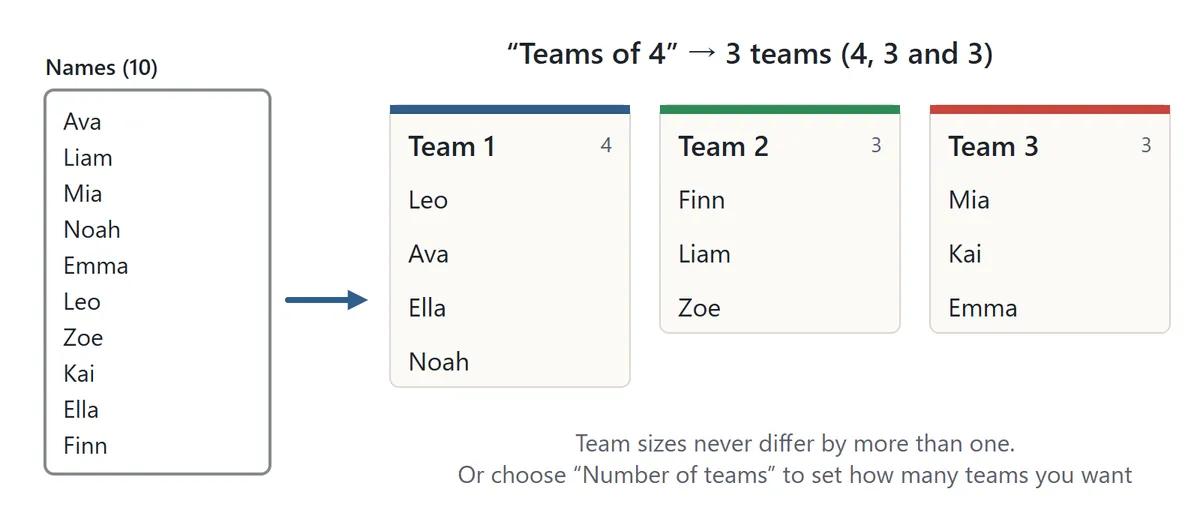
Choose Make teams, pick whether to split by team size or by number of teams, choose the number, and press Start. Type or paste one name per line and press Make teams. The names are shuffled thoroughly and dealt into teams, and each team card fills up one name at a time. When the numbers do not divide evenly, team sizes never differ by more than one: ten people in teams of 4 become teams of 4, 3 and 3, and twelve people split into 5 teams become 3, 3, 2, 2 and 2.
Not happy with the mix? Press Reshuffle teams for a completely new split. Copy puts the result on the clipboard as “Team 1: Ava, Liam, …”, one team per line, ready to paste into an email, a class announcement or a spreadsheet.
Which mode should I use?
| Mode | Best for | Repeated use |
|---|---|---|
| Wheel | Picking one person, one turn or one option; weighted choices | All entries every time, or one turn each |
| Draw from a box | Winners and blanks, jobs, prizes, fixed numbers of each | A fixed set of slips until the box is empty |
| Make teams | Group work, sports teams, table groups | A fresh shuffle every time |
Tips for classrooms, meetings and parties
Put it on the big screen
Big screen fills the display with the wheel, the box or the teams. On devices that support it the page switches to full screen, and Esc or Exit big screen takes you back. It works well on a classroom projector or a meeting-room TV, where people at the back can still read the result. Sound starts off, so nothing beeps unexpectedly in a quiet room.
Paste your roster from a spreadsheet
Copy a column of names from a spreadsheet and paste it into the text box: each cell becomes one line. Your list is saved on this device, so it is still there next time you open the page on the same browser.
Give everyone one turn
For presentation order or reading turns, use Remove after spin and let people go in the order they are picked. The odds stay fair for everyone who is left. If someone is absent, just delete their line from the list.
Use slips for a set number of winners
If exactly three people should win, the box is a better fit than the wheel. Write Winner*3 and Try again*27 for a class of thirty and exactly three winning slips will come out. For several different prizes, write each prize on its own line and fill the rest with Try again*N.
Keep a record
Copy saves the history as a numbered list in the order things were picked, such as “1. Mia” and “2. Liam”. Paste it into a rota, a chore chart or meeting notes instead of writing it out by hand.
Pair it with dice
When you need a number rather than a name, for a board game or a quick probability lesson, try the Dice Roller on this site as well.
Wheel spinner FAQ
Is the random name picker really fair?
Yes. Picks come from the cryptographic random number generator built into your browser, and every entry wins with exactly the odds you set. Earlier results, the number of spins and the order of the list make no difference. The winner and the exact stopping point are chosen before the wheel starts to slow, and the wheel is then steered to that point, so the pointer and the result always agree. The same name can come up twice in a row now and then, and that is simply what fair randomness looks like.
Are the names I type sent anywhere?
No. Your entries, slips and results are stored only in this browser's local storage on your own device, and nothing is sent to a server. Other people cannot see them from their devices. On a shared computer, press Clear list and Clear history when you are done.
How many entries can I add?
The wheel takes up to 100 entries, the box up to 500 slips and the team generator up to 300 names. Each entry can be up to 40 characters. When the wheel has so many entries that the names would be too small to read, they are hidden on the wheel and the pick is shown in large type underneath instead.
Does it work on phones, tablets and Chromebooks?
It does. It runs in any modern browser on phones, tablets, laptops, Chromebooks and iPads, with no app to install.
Can I make the spin shorter?
Choose a spin time of 3 seconds in the settings. If Reduce motion is turned on in your device settings, the animation is skipped and the result appears right away.
A short history of drawing lots and spinning wheels
Choosing by lot is one of the oldest ways people have found to make a fair decision. In ancient Athens, many public officials were chosen by lot from citizens who put their names forward, and the city even used purpose-built allotment machines to do it. In Japan, the sixth shogun of the Muromachi period, Ashikaga Yoshinori, was chosen by drawing lots at a shrine in 1428 and is still remembered as the “shogun chosen by lottery”. Today, some elections that end in an exact tie are still settled by drawing lots.
The word roulette comes from French and means “little wheel”. It began as the name of an eighteenth-century French game played with a spinning disc, but spinning wheels have long been used simply to choose at random, and a wheel spinner like this one is used for everything from classroom questions to deciding what to cook tonight. Paper slips or a spinning wheel, the appeal is the same: nobody can pick the result in advance.