 Yorimichi Games
How to play this car racing game
This is a top-down racing game: you look straight down on the track and drive a small car around it. You are the red car, and the blue, green and yellow cars are driven by the computer. The race is three laps long and you start from the back of the grid in fourth place, so you will have to pass all three of them. Take the corners cleanly, find a gap, and try to cross the line first. If you would rather not race anyone, the time trial mode lets you drive alone and chip away at your own best time.
Steering, speed and braking
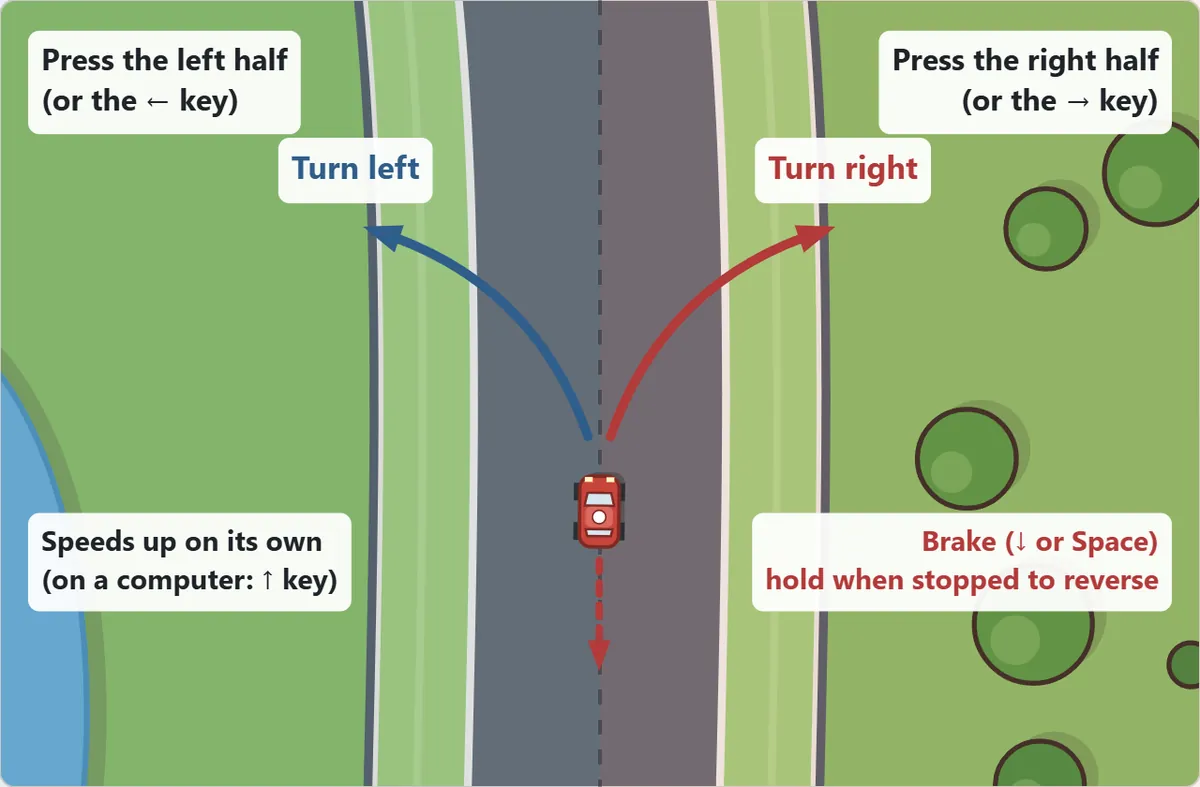
On a phone or tablet the accelerator is automatic. Hold your finger on the left half of the screen to steer left and on the right half to steer right. The ◀ and ▶ buttons below the track work the same way, and many people find them easier to reach with their thumbs. Press “Brake” to slow down. If you come to a stop and keep holding the brake, the car rolls backwards, which is the quickest way to get away from a wall you have run into.
On a computer, use the arrow keys: ↑ to accelerate, ← and → to steer and ↓ or Space to brake. W, A, S and D work too. If you would rather not hold ↑ all the time, set “Accelerator” to “Automatic” in the settings. You can also hold the mouse button on the left or right half of the track to steer; when you drive with the mouse, the car accelerates by itself.
There are two camera views. “Car points up” turns the picture so that your car always faces the top of the screen, so left on the screen is always left for the car. “Fixed track” keeps the track still and lets the car move around it, which some players find more comfortable if a turning view makes them dizzy.
Car racing rules: stay on the road
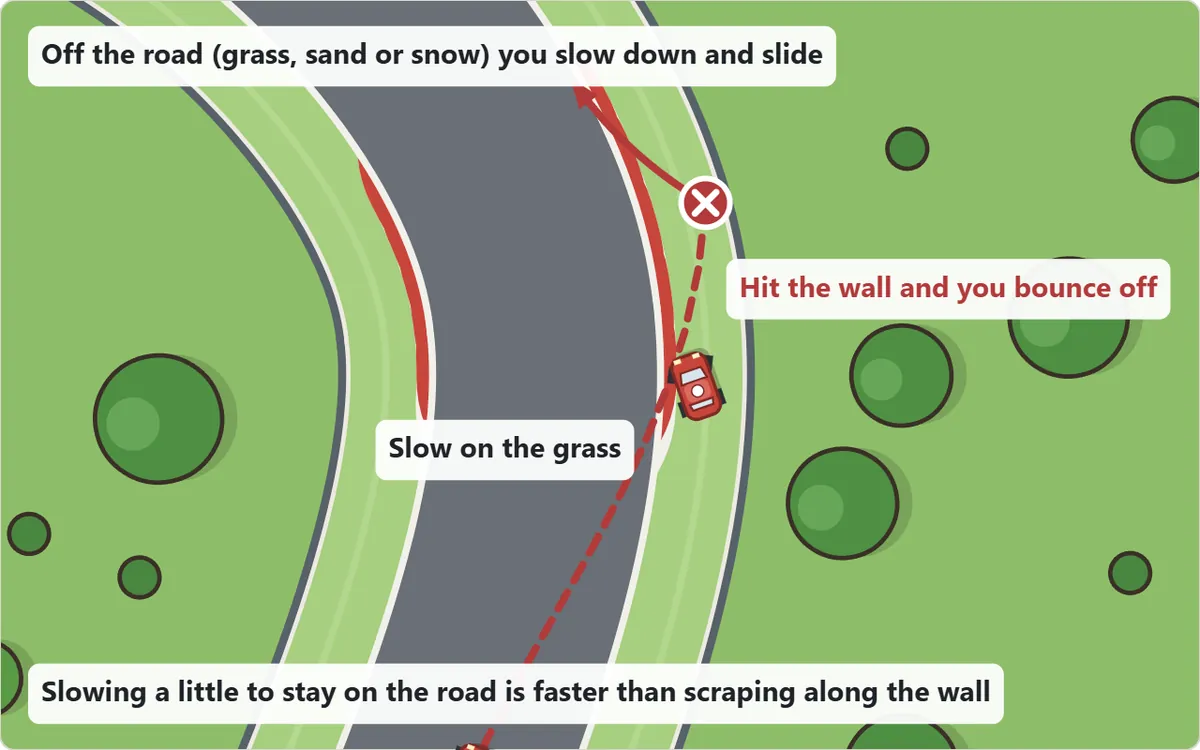
The grey road is lined with grass on the park track, sand on the seaside track and snow on the mountain track. Drive onto it and the car loses speed quickly even with your foot down, and it slides more when you turn. Further out there is a wall. Hit it and the car bounces back with a big loss of speed. There are no shortcuts, so the fastest way round is simply to stay on the tarmac.
Cars can bump into each other. If you run into the back of another car, it gets pushed forward a little and you lose speed; side-by-side contact pushes both cars apart. Nobody crashes out of the race, but every bump costs time, so leave a little room when you pass.
Laps, positions and the finish
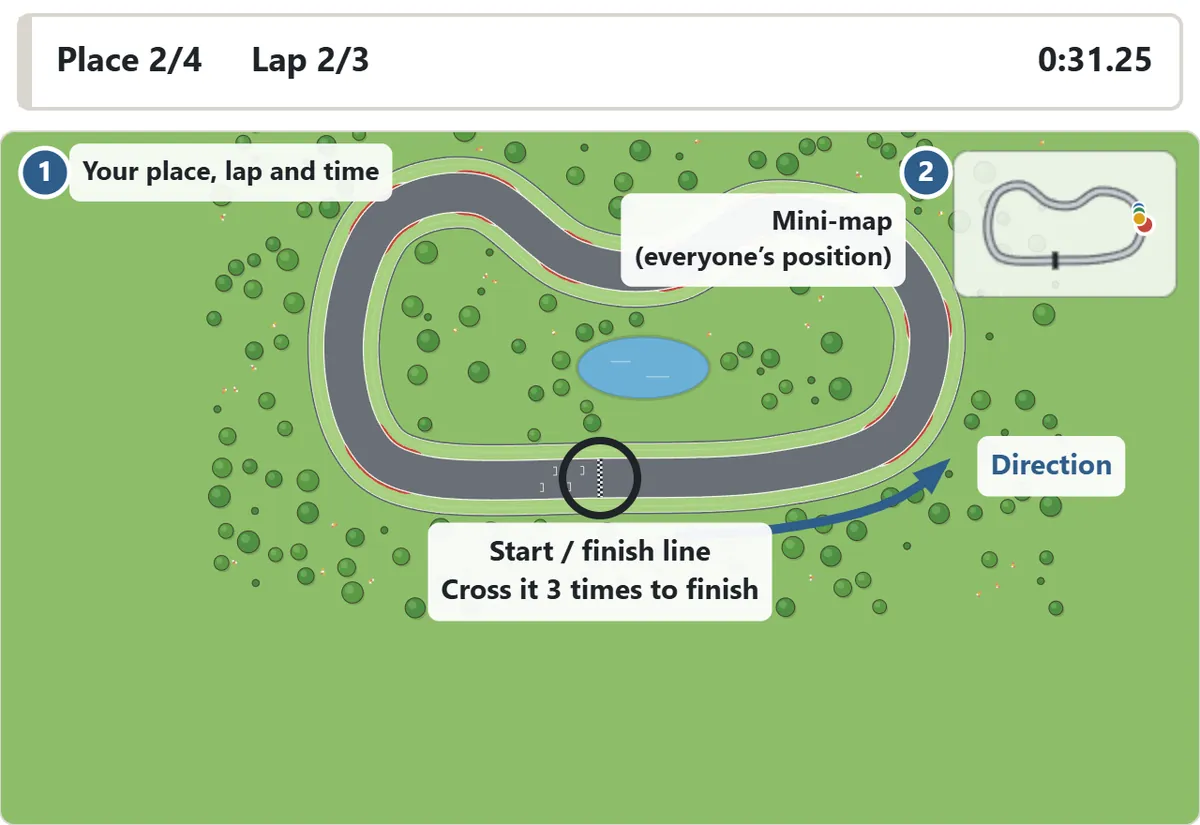
After you press “Start”, a 3-2-1 countdown runs and then the race begins. The black and white checkered line across the road is the start and finish line. Rolling over it from the grid does not count as a lap; your first lap ends when you have gone all the way round and cross it again. Finish the third lap and the race is over. Places are decided by the order in which cars cross the line, and cars still on the track are ranked by how far round they have got.
The bar above the track shows your place, which lap you are on and your race time, and each lap time is announced as you complete it. The mini-map in the top corner shows the shape of the whole track with a coloured dot for every car. If you turn round and drive the wrong way, a “Wrong way!” warning appears until you face the right direction again.
Time trial and the ghost car
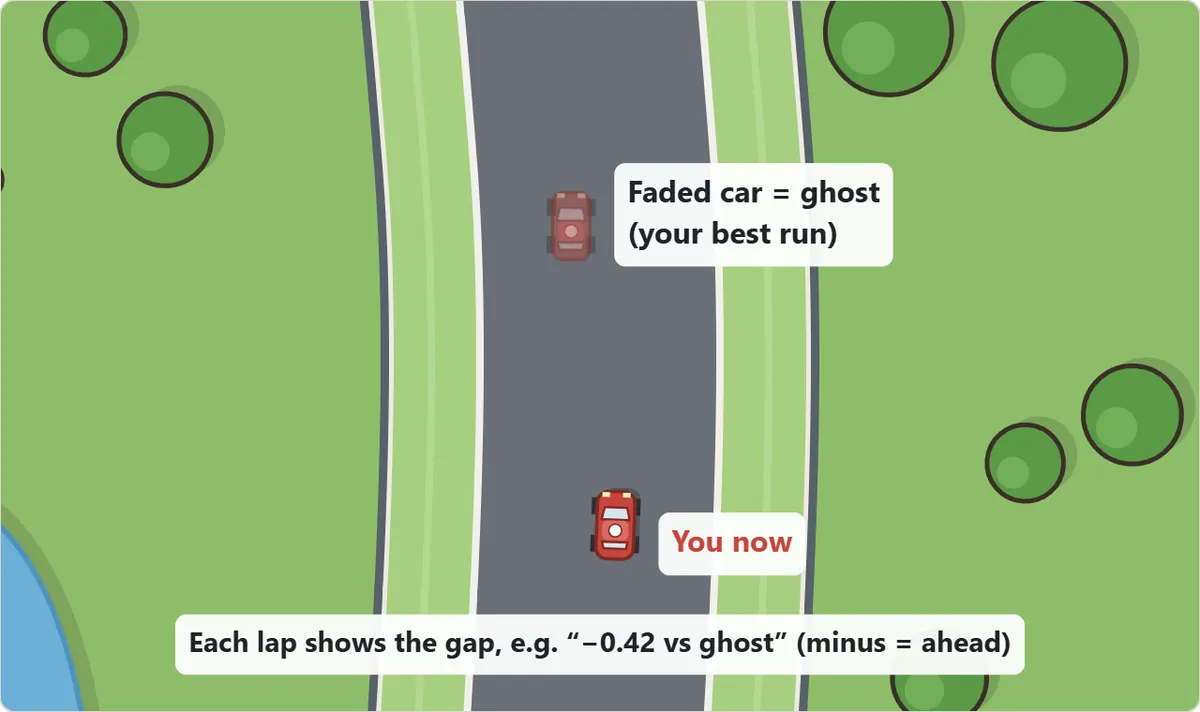
In time trial you drive three laps alone and try to set the fastest time you can. Your best run on each track is saved, and from then on it drives alongside you as a faded “ghost” car. The ghost cannot touch you, so you can follow it as closely as you like. At the end of each lap you see the gap, such as “−0.42 vs ghost”; a minus sign means you are ahead of your best pace. Beat the ghost to the line and you set a new record, and that run becomes the new ghost.
Tracks and computer levels
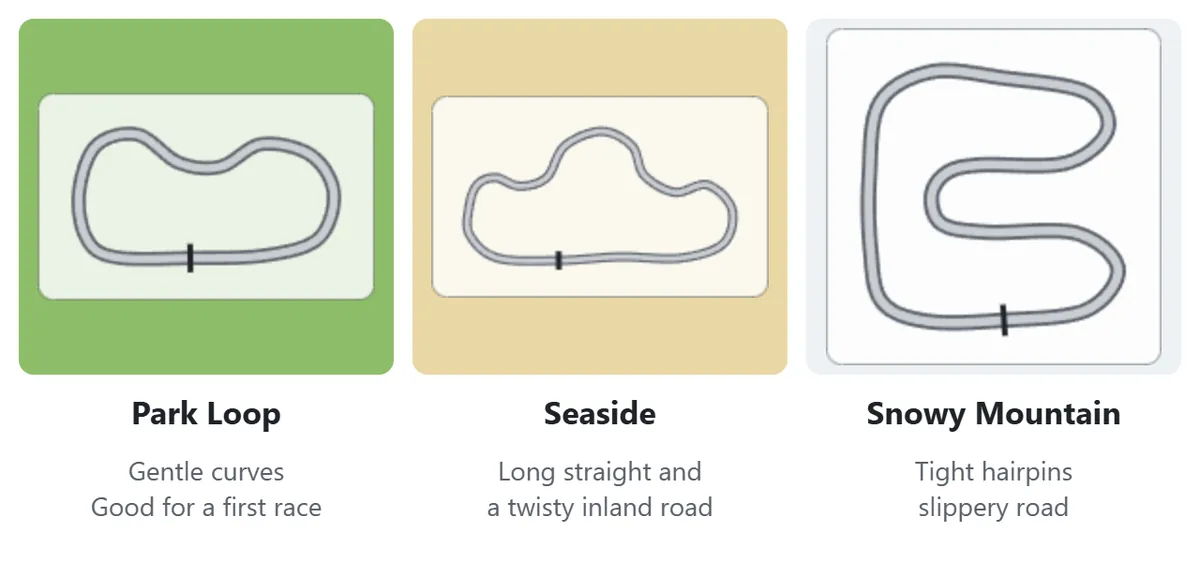
| Track | What it is like | Tip |
|---|---|---|
| Park Loop | Short, wide and gentle; grass off the road | The best place to start. Most corners can be taken flat out |
| Seaside | A long coastal straight and a twisty inland road; sand off the road | Brake before the tight bend at the end of the straight |
| Snowy Mountain | Tight hairpins and a slightly slippery road | Brake early and keep steering inputs small |
| CPU level | What racing it feels like |
|---|---|
| Easy | Slow on the straights and often runs wide. Stay calm and you will get past |
| Normal | Drifts wide now and then. Keep it on the road and you can win |
| Hard | Takes a clean line and is quick on the straights. A test once you know the corners |
Every computer car follows a racing line, but none of them is perfect: their line wanders a little and they sometimes brake too late and run wide. The computer cars never get a mysterious burst of speed when they fall behind, and the leader never slows down to let you catch up, so once you have built a lead it is yours to keep.
Racing tips and strategy
1. Outside, inside, outside
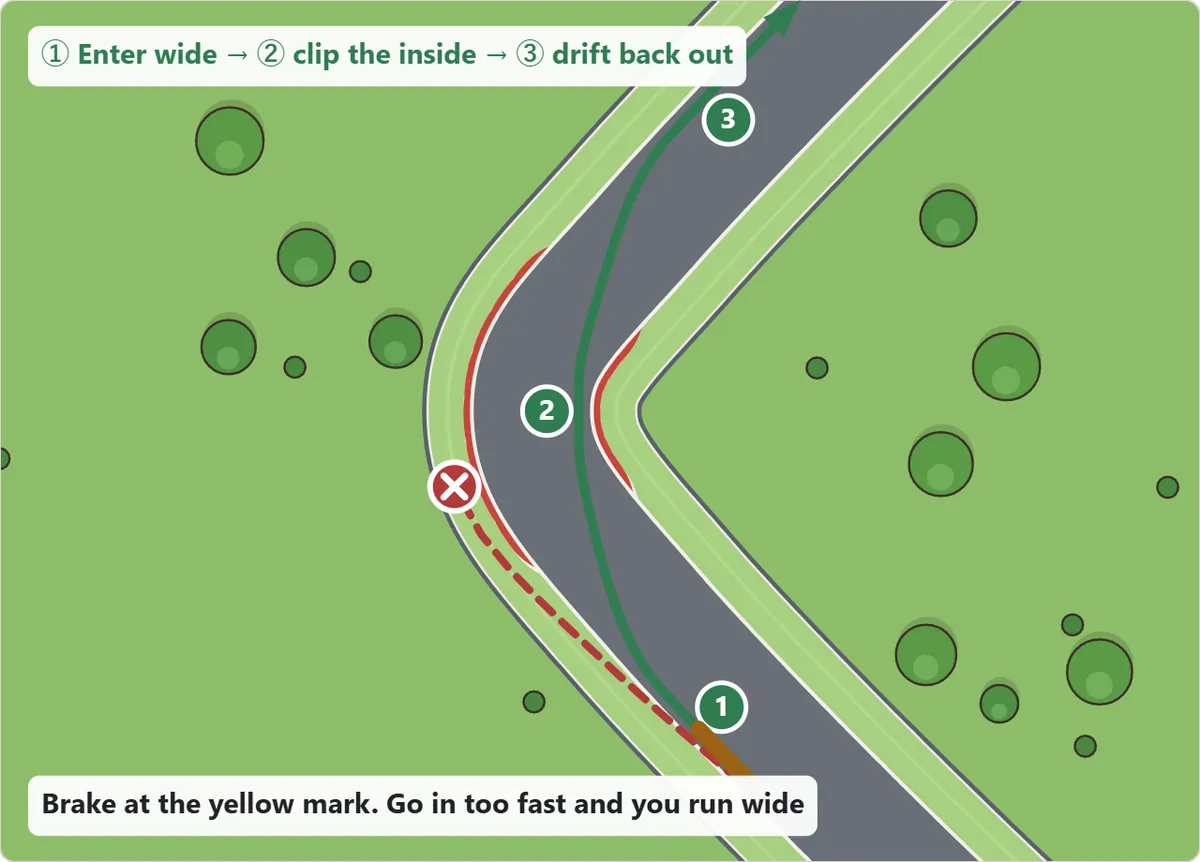
Before a corner, move to the outside edge of the road. Turn in so that you brush the inside edge in the middle of the bend, then let the car drift back to the outside as you leave it. This turns a sharp corner into a wider, gentler arc, so you can carry more speed. Racing drivers call this the racing line.
2. Brake before you turn
Braking in the middle of a tight bend is usually too late. Brake a little while you are still going straight, then come off the brake as you start to turn. Going slightly slower into a corner is far quicker than running wide onto the grass.
3. Steer in short taps
If you hold left or right for too long, the car turns too far, you have to correct the other way and the car starts to weave. Short taps keep it pointing where you want it to go.
4. Get back on the road first
When you run wide, do not keep driving along the grass or sand. Head straight back to the nearest piece of road. If you get stuck against the wall, reverse a little with the brake before you set off again.
5. Pass where there is room
Sitting right behind another car usually ends in a bump that slows you both down. Move to one side on a straight, or take the inside of a corner, and go past where there is space. The first corner is crowded, so it can pay to wait until the cars spread out.
6. Copy the ghost
In time trial the ghost shows exactly where you braked and which line you took on your best run. Notice where you gain on it and where you lose time, change only the slow parts, and your time will keep dropping.
Car racing game FAQ
Will my finger cover the track on a phone?
You can press anywhere on the left or right half of the screen, so press near the edges, away from your car. The ◀ Brake ▶ buttons under the track let you drive without touching the picture at all.
The turning view makes me dizzy. What can I do?
Choose “Fixed track” under “View” in the settings. The track stays still and only the cars move. Steering still works from the car’s point of view: left turns the car to its own left.
Can I stop and carry on later?
Yes. On the same device and browser, “Continue” puts every car back where it was, with the same lap and time, and counts down 3-2-1 before you drive off. The game also pauses by itself when you switch to another tab or app.
Where are my records and ghosts saved?
Your best lap on each track, your time trial records and ghosts, and your race results are stored in your browser on the device you play on. There is no account to create. Clearing your browser data deletes them.
Is there sound?
The game starts silent. Press “Sound: off” to turn it on and you will hear a quiet engine, plus sounds for the start, laps and the finish.
A short history of top-down racing games
Driving games are often said to be one of the oldest kinds of video game, going back to the early days of arcade machines. Many of the first ones showed the track from above, just like this game, and later ones moved the camera behind the wheel. Real motor racing gave these games their rules: cars line up on a starting grid, race a set number of laps and the first car to take the checkered flag wins. Time trials also come from motorsport, where drivers chase the fastest lap of a circuit, and racing games added the idea of a ghost car so that you can see your own best run and try to beat it.