 Yorimichi Games
Five Minute Survival (Shape Dodge Game): how to play
Five Minute Survival (Shape Dodge Game) is a single player arena game about movement, space and small decisions. You control a teal circle with a square mark in its center. Circles, triangles and squares approach from the edges of the arena. Your character releases pulses automatically, so there is no fire button and no aiming control to learn. Keep your health above zero until the game clock reaches five minutes. Shapes touched by enough pulses disappear and leave small diamond fragments. Collect those fragments to unlock an upgrade choice. The arena contains abstract shapes rather than people, animals or realistic weapons. A run can end early, but a successful run always has the same clear goal: survive the full five minutes.
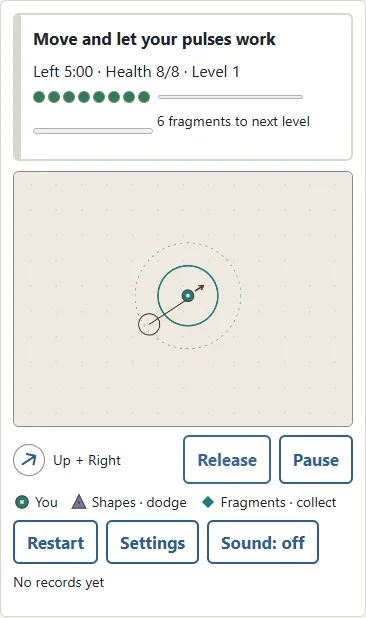
The direction arrow follows held keys or your drag. Release stops movement without pausing; lifting your finger also stops it. Space or Escape pauses and clears held movement. Each upgrade is applied with one press; its icon and current-to-next values show what changes.
How to start and choose a difficulty
Choose Easy, Normal or Hard in Settings, then press Start. Easy gives you more health and a slower approaching swarm, making it a useful place to learn the distance your pulses cover. Normal asks you to plan a route and pay closer attention to faster triangles. Hard gives you less room for mistakes, with fewer health points and a denser, faster swarm. All three difficulties use the same controls, upgrade types and five minute target. The timer counts active play only. Reading an upgrade choice or taking a pause does not use up your survival time. You can therefore think about an upgrade without worrying about a shape reaching you while you read.
| Difficulty | Health | Feel |
|---|---|---|
| Easy | 8 | Slower; learn the controls |
| Normal | 7 | Find open routes |
| Hard | 5 | Navigate a faster swarm |
Keyboard controls and touch dragging
On a computer, use the arrow keys or W, A, S and D to move. Up means the top of the screen. Hold two directions together to travel diagonally; diagonal movement does not give you extra speed. Space or Escape pauses and resumes play when the arena has focus. If you have selected a button or a settings field, that control keeps its usual keyboard behavior. Click the arena to return to movement. On a phone or tablet, touch anywhere inside the arena and drag in the direction you want to travel. Your first touch is the center of that gesture. A short drag produces slower movement and a longer drag reaches full speed. Lift your finger to stop. You do not have to grab the player itself, and touching a new place does not teleport the player. You can lift and touch again whenever you need a more comfortable starting position.
How automatic pulses work
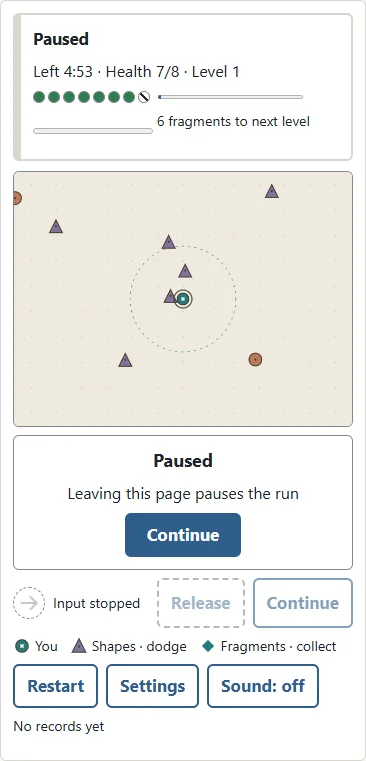
The dashed circle around your player shows the reach of a pulse. At regular intervals a stronger ring appears and affects every shape within that reach. It does not cover the entire arena, so distant shapes continue approaching. At the starting power, circles and triangles need two hits to disappear, while squares need three. Triangles travel faster. Squares are slower but take longer to clear. Upgrading pulse power reduces the number of hits needed. You still need to move: automatic attacks cannot protect a player who stays inside a crowded group forever. Try to keep a shape near the outside of your pulse range rather than walking straight into its center. A wider pulse gives more space to do that.
Collecting fragments and leveling up
A cleared shape leaves a small teal diamond. Move close enough and the fragment is drawn toward you; move closer still to collect it. Fragments far away stay where they are, so you must choose a route that brings you near them. Your first upgrade needs six fragments. Each later upgrade needs four more than the previous one. The progress bar above the arena tells you how many are left before the next choice. Fragments disappear after about forty five seconds, but that is not a reason to rush into a swarm. Collect the ones on an open route first. When the upgrade panel opens, movement, approaching shapes and the timer all stop. Read the available choices and select one. Play resumes immediately afterward, so also think about your next direction before you press the button.

Choosing useful upgrades
Pulse power adds one point of strength to each pulse. Pulse tempo shortens the gap between pulses. Movement speed adds fourteen units to your movement speed. Pulse reach adds eighteen units to the pulse radius and slightly increases fragment attraction distance. Restore health gives back three health points, up to the maximum for your difficulty. Health recovery can appear when you have lost health. Other upgrades can be increased up to level six. A choice contains up to three available upgrades, and their order can change from run to run. There is no need to force the same build every time. Power and tempo help clear a nearby group. Reach supports a route that keeps some distance from shapes. Speed helps you go around a gathering swarm. Recovery can be the best choice when another contact would put your run at risk. Look at your current problem and choose the tool that addresses it.

Health, brief protection and the finish
Contact with a shape removes one health point. You then have a short period of protection, shown by a small outer ring around the player. Use that time to leave the overlapping shapes. Protection is temporary; remaining in the same crowded spot can cost another health point when it ends. When health reaches zero, the run ends. When the clock reaches five minutes, you clear the run immediately. You do not have to remove every remaining shape or collect every fragment. The result shows your survival time, the number of shapes cleared and your upgrade level. Each difficulty has its own best time, completed run count and clear count. An unfinished run that you replace with a new one does not count as a finished result.
Six practical survival tips
First, look at the open space ahead rather than only at the nearest shape. Shapes enter from every edge, so traveling too close to a boundary can remove an escape route. Turn before you reach it. Second, use broad curves when there is room. A smooth route can gather much of the swarm behind you, while sudden reversals may send you back into shapes you just passed. Third, check faster triangles before committing to a route. A slow square may be easy to avoid, but a triangle approaching from the side can change the situation quickly. Fourth, treat low health as a reason to change your plan. Recovery can give you more useful breathing room than another offensive upgrade. Fifth, collect fragments along your escape route. You do not have to separate collecting from surviving; a route through scattered fragments can do both. Finally, when only a little time remains, choose open space over an extra pickup. Finishing the timer is the goal, and an uncollected diamond does not prevent a clear.

Pause, continue and restart
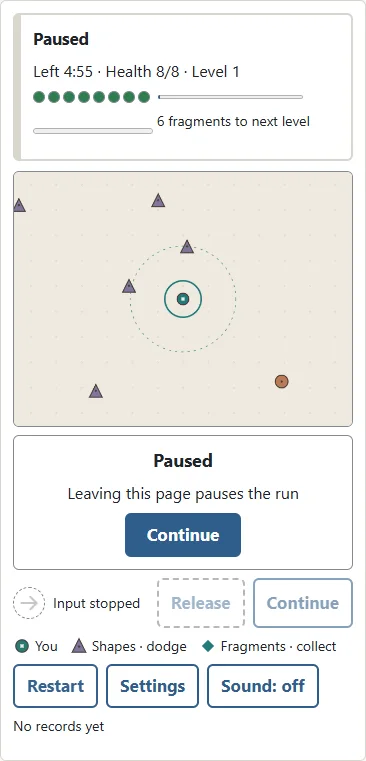
Press Pause when you need a break. Changing tabs or leaving the page pauses the run too. Returning does not automatically start the swarm again; press Continue when you are ready. The game saves an unfinished run in this browser. On reopening the page, Continue lets you return to it. A restored run begins paused, giving you time to inspect your position. If you left during an upgrade choice, the same choices are shown again. Settings pauses the current run and opens the difficulty options. Continue returns to that run with its original difficulty. Start begins a new run with the selected setting. Restart asks for confirmation before replacing the current run. Canceling that confirmation keeps your progress. Play again begins a fresh run after a result.
Frequently asked questions
Do I need to aim or hold an attack key? No. Pulses happen automatically and affect shapes in their range. Does the clock continue during an upgrade choice? No. You can read and decide at your own pace. Is sound required? No. Sound starts off, and you can switch it on with the sound button. The shapes and rings provide the visual information needed to play. Can I transfer my save to another device? Saves belong to this browser on this device. There is no account or cloud synchronization. Clearing browser data removes the saved run and records. In a private session, or when browser storage is blocked, play can work without keeping a save for your next visit. Is this a game against a computer opponent? It is a solo survival challenge. The approaching shapes are moving obstacles, not another player making strategic moves. Can I win by clearing the arena early? No. The five minute clock is the finish condition.
Understanding the format
Automatic attack survival games combine direct movement with choices about how your abilities grow. They let you concentrate on positioning while regular attacks happen for you. In this version the challenge is represented by geometric shapes and pulses. Each run gives you a chance to try a different balance of movement, reach, power and recovery. If one route or upgrade combination worked well, try it again on the next difficulty, or change one part and see how that affects the run. Start with a comfortable difficulty and learn the feel of dragging or keyboard movement before trying to make every choice quickly. A steady route and a little space around your player are often more useful than chasing one last fragment.