 Yorimichi Games

How to use these online coloring pages
Coloring is about as relaxing as a pastime gets: a picture made of outlines, a set of colors and all the time you want. On these online coloring pages you pick a color and then tap an area of the picture; everything inside that outline fills in at once. You can’t go over the lines, so even tiny, intricate patterns are easy to color on a phone. There is no score, no timer and no wrong answer – use any colors you like, in any order, and take it slowly.
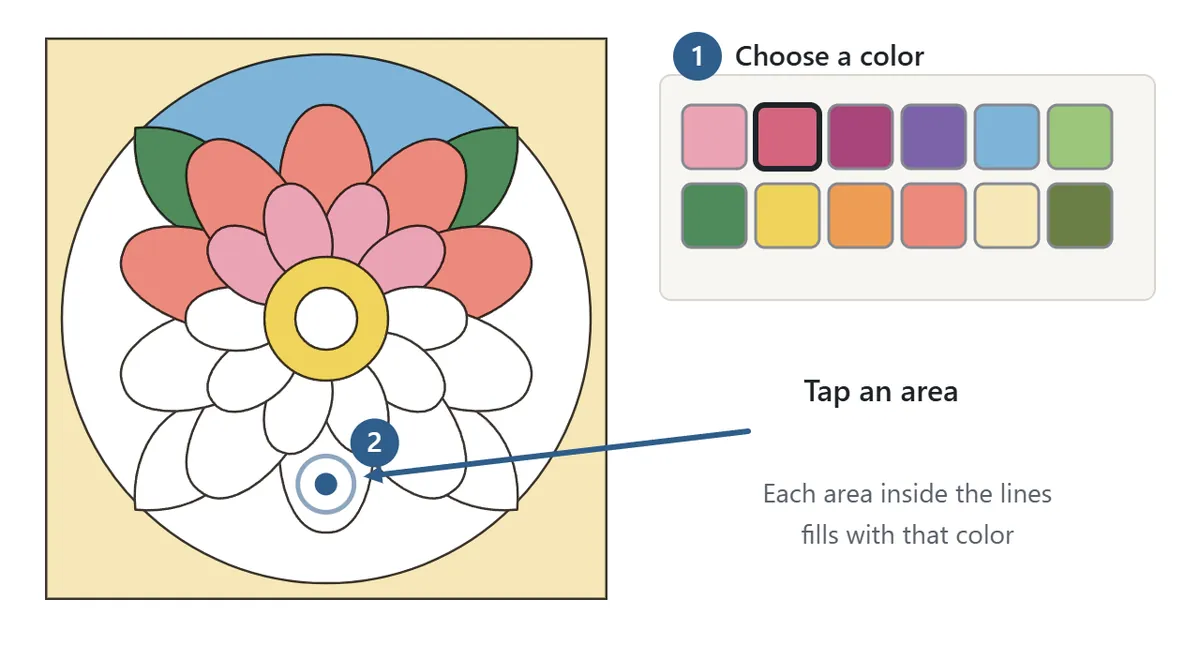
Press “Start” and the picture you chose opens. The colors sit under the picture (to the right of it on a wide screen). Tap a color to select it, then tap the area you want to fill. The name of the selected color appears above the swatches. To change an area, simply tap it again with a different color. The bar above the picture shows how many areas you have colored out of the total.
Pick a color, then tap an area
There are six color sets – Japanese colors, Muted, Forest & sea, Flowers, Dusk and Monotone – with twelve colors each. All of them are soft, calm shades, so they combine well however you mix them. Press “Custom color” to mix any color you want; the custom colors you use are lined up next to the button so you can pick them again later.
Eraser, pick color and undo

Switch to “Eraser” and any area you tap goes back to white. Switch to “Pick color” and tap a colored area to select that exact color – you are then returned to painting, which is handy when you want the same color somewhere far away. “Undo” takes you back one step at a time, and “Redo” puts back what you undid.
Soft shading with gradients
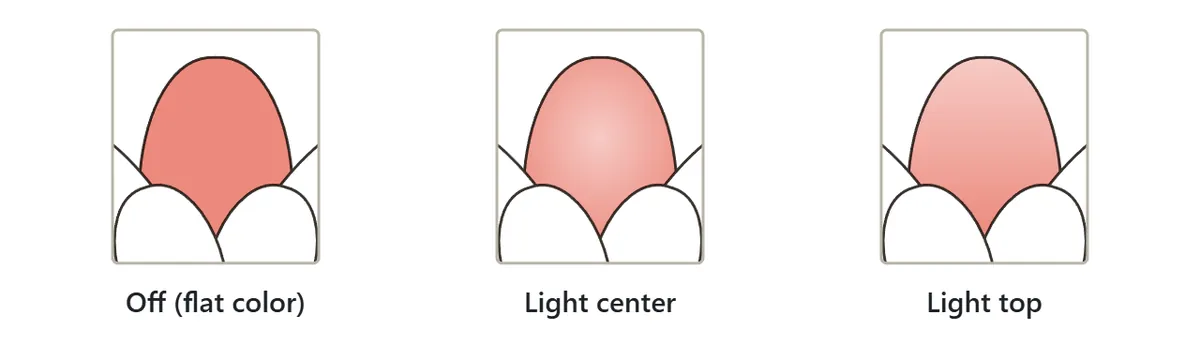
Each press of the “Gradient” button cycles through Off, Light center and Light top. With a gradient on, the area fades smoothly from your color to a paler version of it. Use Light center on petals and round shapes and Light top on skies and water to get a sense of light and depth. Gradients look best as an accent on a few areas rather than on everything.
Zoom in on the small areas
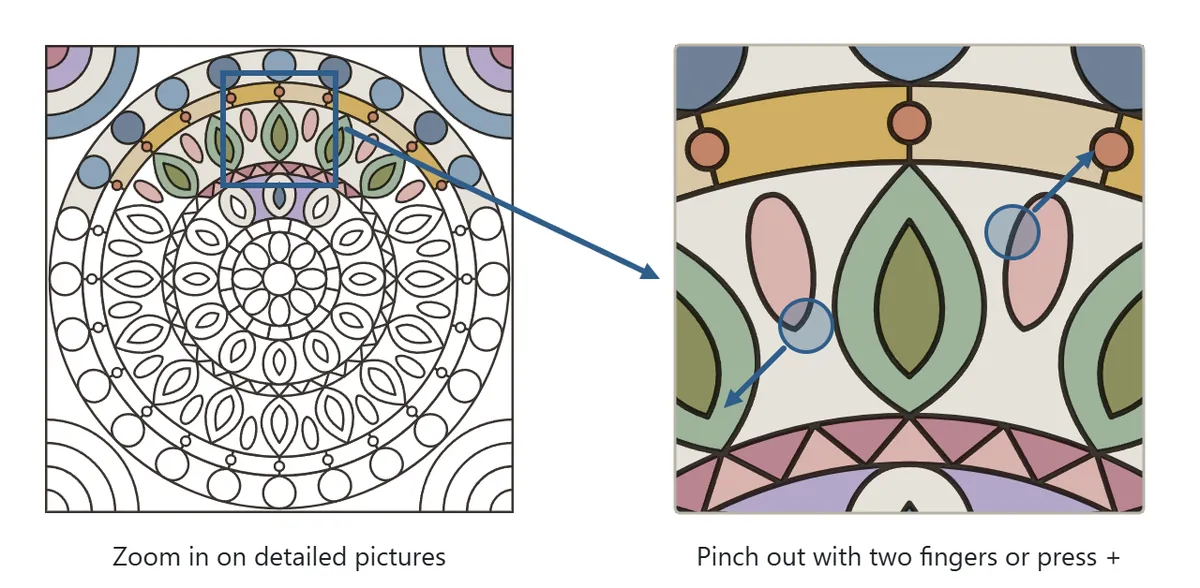
On pictures with small areas, zooming in keeps you from tapping the wrong spot. On a phone or tablet, pinch out with two fingers; on a computer, hold Ctrl and scroll. The + and − buttons to the right of the color set also change the zoom, and the square button shows the whole picture again. While zoomed in, drag with one finger (or the mouse) to move around.
Coloring pages for every mood: types and difficulty
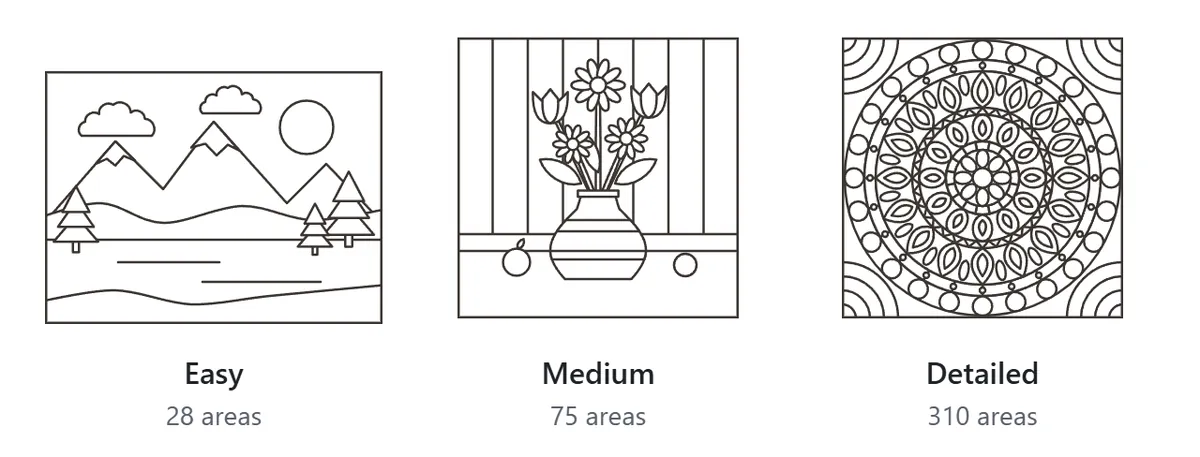
There are 27 pictures, all original line art drawn for this game. Difficulty depends on the number of areas: Easy pictures have up to 45, Medium up to 130 and Detailed pictures have more. Use “Filter pictures” in the settings to browse by type and difficulty.
| Type | Pictures |
|---|---|
| Mandala | Flower Mandala, Snowflake, Star Mandala, Lotus Mandala, Intricate Mandala – shapes repeating in rings around a center |
| Japanese patterns | Uroko (scales), Yagasuri (arrow feathers), Fans and Flowing Water, Kagome (woven basket), Kikko (tortoiseshell), Shippo (linked circles), Asanoha (hemp leaf), Seigaiha (waves) |
| Geometric | Stained Glass, Spiraling Squares, Triangle Mosaic, Eight Stars, Intricate Stained Glass |
| Flowers | Big Blossom, Flower Vase, Flower Wreath, Cherry Blossoms and Stream |
| Landscapes | Mountain Lake, Hot Air Balloons, Lighthouse at Sunset, Forest Path, Town at Night |
The Japanese patterns are traditional designs you will find on kimono fabric, wrapping cloths and ceramics. Seigaiha is a pattern of overlapping waves, Asanoha is a six-pointed star built from hemp leaves, and Kikko is a honeycomb of tortoiseshell hexagons. Their repeating shapes make them wonderfully meditative to color.
Save, gallery and printable coloring pages
Your work in progress is saved on this device every time you color an area. Close the page, and next time you can pick up exactly where you left off with “Continue”. The “Gallery” lists everything you have colored on this device, newest first; tap a picture to keep working on it. To color the same picture again with a different color scheme, press “New page” – your earlier version stays in the gallery.
“Save image” downloads your picture as a PNG file you can use as a phone wallpaper or print and put on the wall. If you can’t decide on colors, press “Sample” to see one suggested color scheme, and “Fill the rest with sample colors” fills every area that is still white.
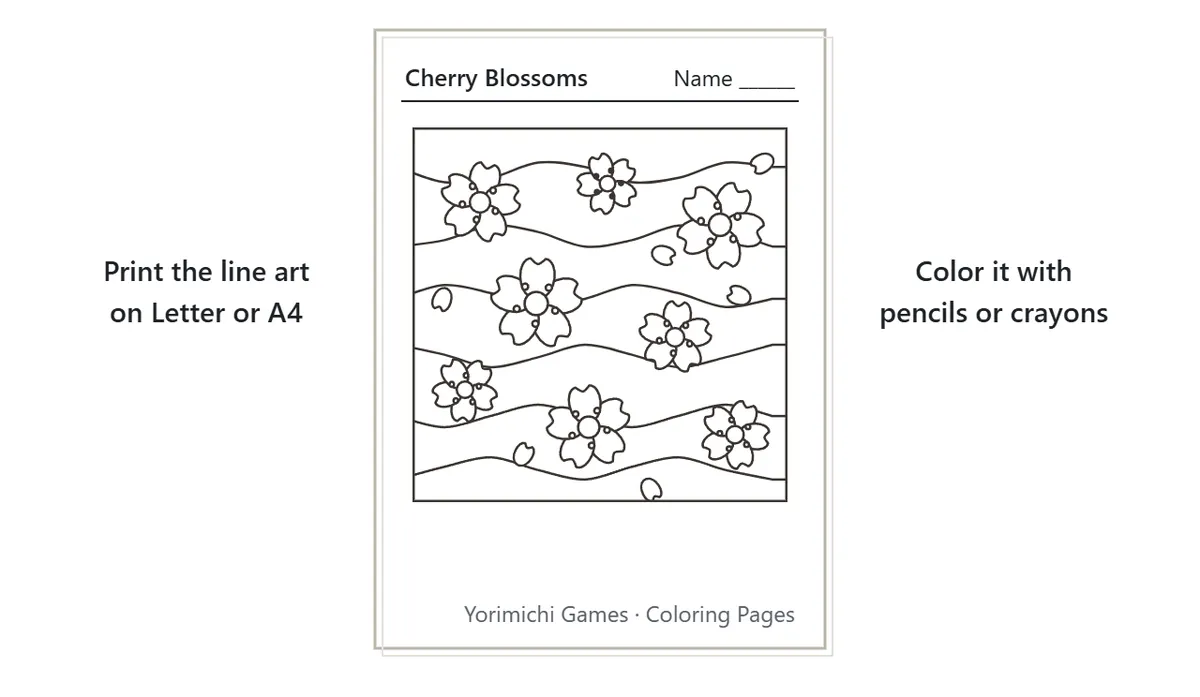
Prefer paper? Press “Print” (or open the printable coloring pages) to print the line art on US Letter or A4 paper. If you are coloring with pencils or crayons, choose “Thick lines” so the outlines are easier to see and stay inside.
Coloring tips: how to choose colors
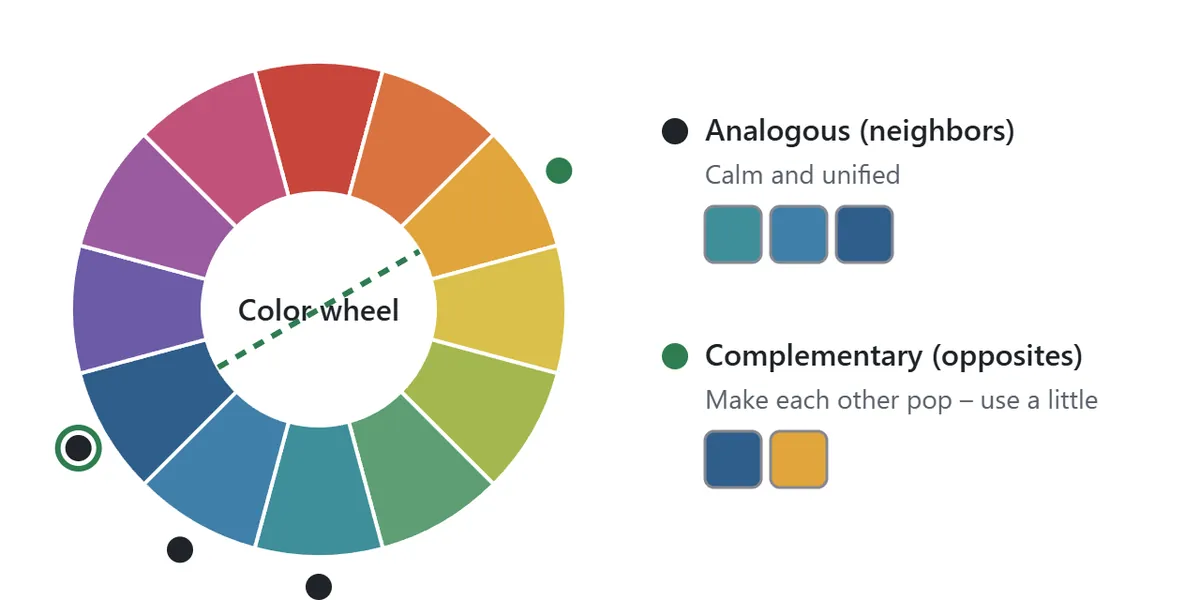
1. Use analogous colors for a calm picture
When colors are arranged in a ring, the ones next to each other – blue and blue-green, yellow and orange – are called analogous colors. Used together they feel unified and calm. Decide on a family first, such as “the blues” or “the greens”, and the whole picture will hold together.
2. Add a complementary color, just a little
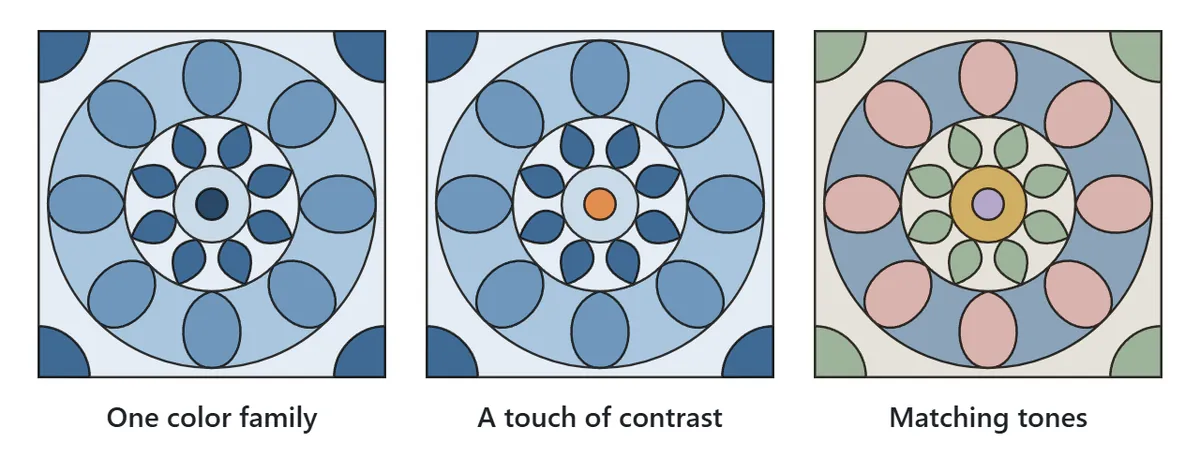
Colors on opposite sides of the wheel – blue and yellow, purple and yellow-green – are complementary. Side by side they make each other stand out, but in equal amounts they can feel loud. Use a complementary color as an accent: a small yellow or orange center in a mostly blue picture draws the eye beautifully.
3. Match brightness and saturation
If your colors share the same lightness and intensity, even many different hues look calm together. The Muted set collects soft colors with a touch of gray, so any combination from it stays in harmony. Lots of strong, saturated colors, on the other hand, make a lively, busy picture.
4. Start with the large areas
Backgrounds and outer rings set the mood of the whole picture. Fill the large areas first, in a quiet color, and choosing colors for the small details becomes much easier. A dark background makes light-colored patterns pop.
5. Give neighboring areas different brightness
Two neighboring areas of similar brightness blur into each other and the shapes get lost. Put light colors next to dark ones and the pattern becomes crisp. In mandalas, alternating light and dark from ring to ring brings out the repetition.
6. Same shape, same color
In mandalas and Japanese patterns, where one shape repeats many times, coloring every copy of a shape the same way makes the pattern shine. “Pick color” lets you reselect a color you used earlier in one tap. Changing the color of just one spot on purpose is a fun way to create a focal point.
Coloring pages FAQ
Where is my artwork saved?
Pictures in progress and finished pictures are kept in the browser you are using now. They don’t move to other devices or browsers, and clearing your browser data deletes them, so use “Save image” for anything you want to keep for good.
Can the color go over the lines?
No. Only the inside of the area you tap is filled, and color never leaks through a gap into the next area.
What if I color the wrong area?
Press “Undo” to go back a step – as many times as you like. To clear just one area, use the eraser; to change it, tap it again with the new color.
What happens when every area is colored?
You’ll see “Finished!”. You can still recolor anything afterward, save the picture as an image, or move on with “Next picture”.
Is there sound?
The game starts muted. Press “Sound: off” to hear soft sound effects when you color.
A short history of coloring pages
Pictures printed as outlines to be filled in with color became popular as books in 19th-century Europe and America, when drawing and painting were being encouraged as part of children’s education. By the 1880s, coloring books based on the work of well-known picture-book illustrators were being published in Britain. The arrival of affordable crayons in the early 20th century made coloring a household pastime around the world, including in Japan, where coloring sheets became hugely popular after the war. From the mid-2000s, books of intricate flowers and patterns meant for grown-ups to color with pencils took off, and many people now color simply to unwind. These online coloring pages keep that same quiet pleasure – just pick a picture and start filling it in.