 Yorimichi Games
How to Play Nonograms
A nonogram is a picture logic puzzle. You start with an empty grid that has numbers written beside each row and above each column. Those numbers tell you which squares to fill in, and when every row and column matches its numbers, a hidden picture appears. You never have to guess: each square can be worked out by reading the clues carefully and ruling out what is impossible. This page has 100 original nonograms to play online for free, from tiny 5×5 pictures to big 20×20 ones. When you finish a puzzle, the black squares turn into a colored picture and you find out what you have been drawing.
Nonogram rules: what the numbers mean
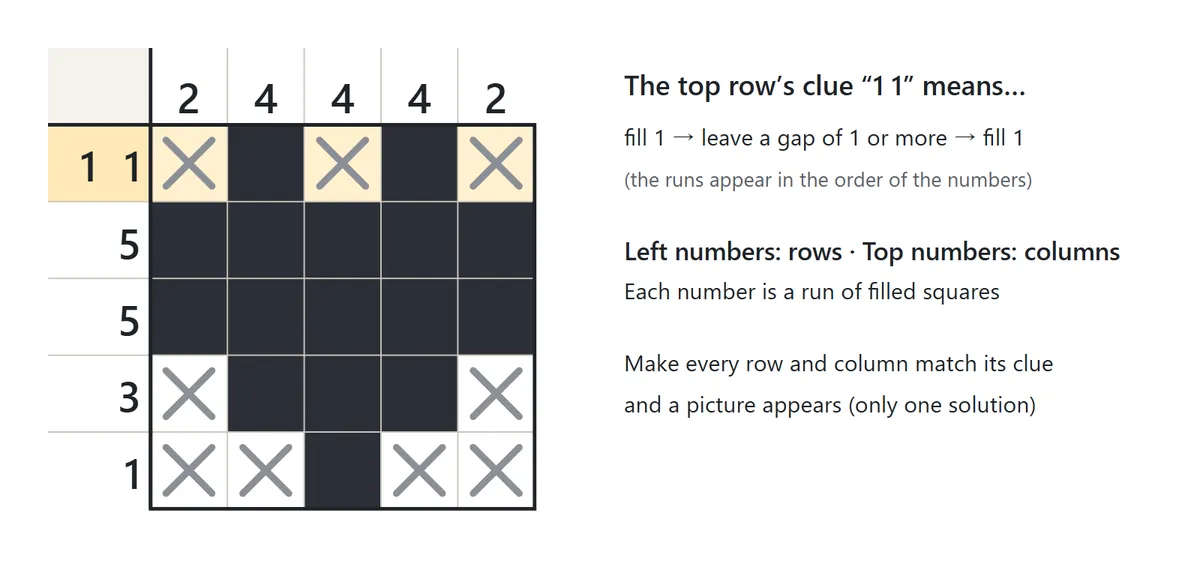
The numbers on the left are clues for the rows, and the numbers on top are clues for the columns. Each number is the length of a run of consecutive filled squares in that line. A clue of 3 means that somewhere in the row there are exactly three filled squares next to each other, and every other square in that row stays empty.
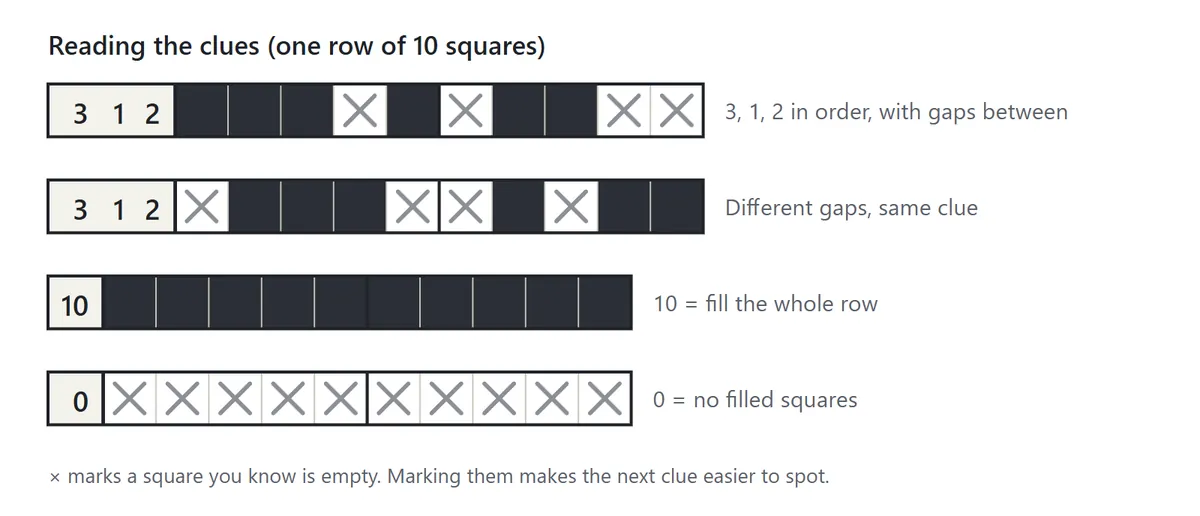
When a line has more than one number, the runs appear in the same order as the numbers – left to right for rows, top to bottom for columns – and there is at least one empty square between neighboring runs. So “3 1 2” means a run of three, then a single square, then a run of two. The clue does not say how big the gaps are or where the first run begins; working that out by comparing rows with columns is the whole puzzle. A line with the clue 0 has no filled squares at all.
The puzzle is solved when every row and every column matches its clue. All puzzles in this game have exactly one solution, and every one of them can be solved by looking at one row or column at a time – no trial and error is ever needed.
Using the game screen
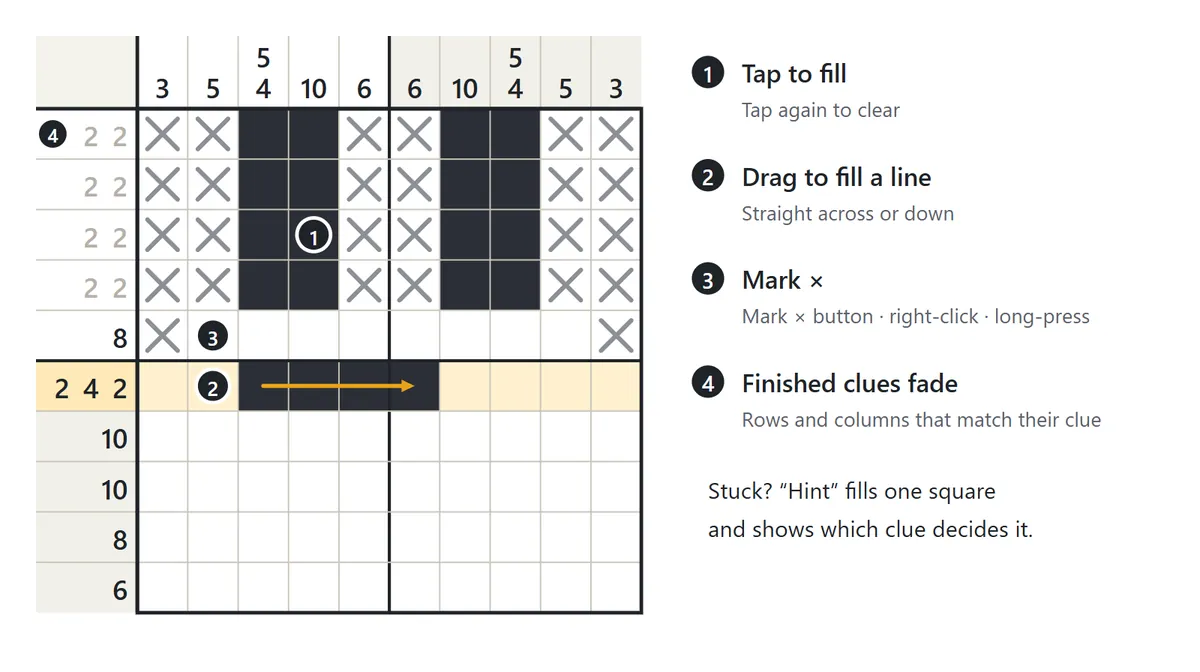
Click or tap a square to fill it, and press a filled square again to clear it. Hold and drag across a row or down a column to fill several squares at once; the stroke goes straight in the direction you first move. Switch to “Mark ×” to put an × on squares you know must stay empty. With a mouse you can also right-click, and on a phone or tablet you can long-press to place an ×. A square with an × can’t be filled by accident, which protects you from slips on big puzzles.
When a row or column matches its clue, its numbers fade (you can turn this off in the settings). The small box in the top-left corner shows a tiny preview of what you have filled so far, which helps you see the overall shape. On a phone, the 15×15 and 20×20 puzzles show a “Zoom” button: it makes the squares bigger and lets you scroll inside the grid, while the clue numbers stay pinned to the edges so you always know which line you are in.
You can also play with a keyboard: arrow keys move between squares, Space or F fills, X places an ×, Backspace clears, T switches between Fill and Mark ×, Z undoes and H asks for a hint.
Hints and mistake check
Stuck? Press “Hint”. The game finds the next square that can be decided from what you already know, fills it in (or marks it with an ×), and highlights the row or column whose clue decides it. Try every way that clue could fit in the line and you will see why that square is forced. If you have filled a square that should be empty, the hint shows the wrong square in red first.
With “Mistake check” turned on, filling a square that should be empty – or marking a square that should be filled – is corrected straight away and shown in red. It is handy while you are learning the rules. Turn it off when you want to solve puzzles entirely on your own.
Puzzle Sizes and Difficulty
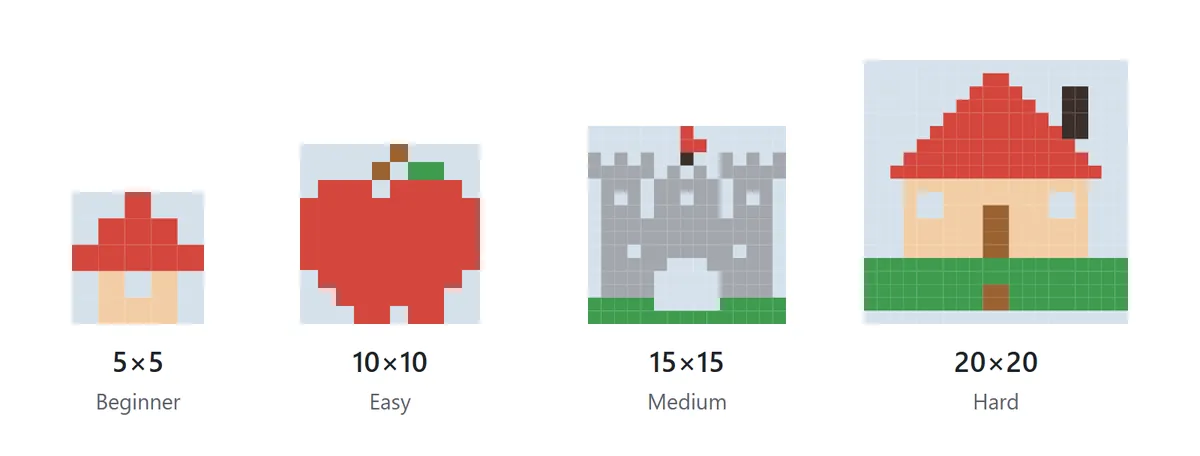
| Size | Puzzles | Good for |
|---|---|---|
| 5×5 (Beginner) | 20 | Your first nonogram – learn how the clues work |
| 10×10 (Easy) | 40 | You know the rules; more lines have two or more numbers |
| 15×15 (Medium) | 25 | You are comfortable with overlaps and working from the edges |
| 20×20 (Hard) | 15 | Longer sessions – × marks make a big difference here |
Choose a size and the game gives you the puzzles in that size that you haven’t solved yet, one after another. Open the “Puzzle list” to pick any puzzle you like. Solved puzzles appear in the list with their picture and name, so your collection grows as you play. If you leave a puzzle halfway, your squares and time are kept on the same device, and you can continue later.
Nonogram Strategy: How to Solve Nonograms
1. Look for overlaps in big numbers
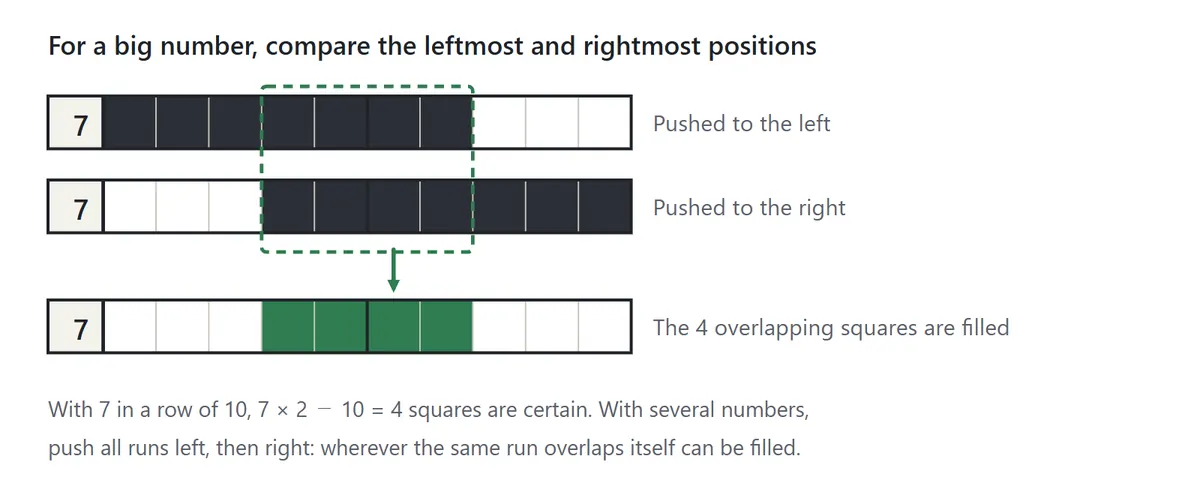
This is the first technique every nonogram solver learns. Imagine pushing the run as far left as it can go, then as far right as it can go. Any square that is filled in both positions must be filled. In a row of 10 with the clue 7, the four squares in the middle are certain. The same idea works with several numbers: slide all of the runs as far left as possible, then as far right as possible, and fill the squares where the same run overlaps itself. The closer the total of the clue (plus one gap between each pair of runs) is to the length of the line, the more squares you can fill.
2. Grow from the edges and from filled squares
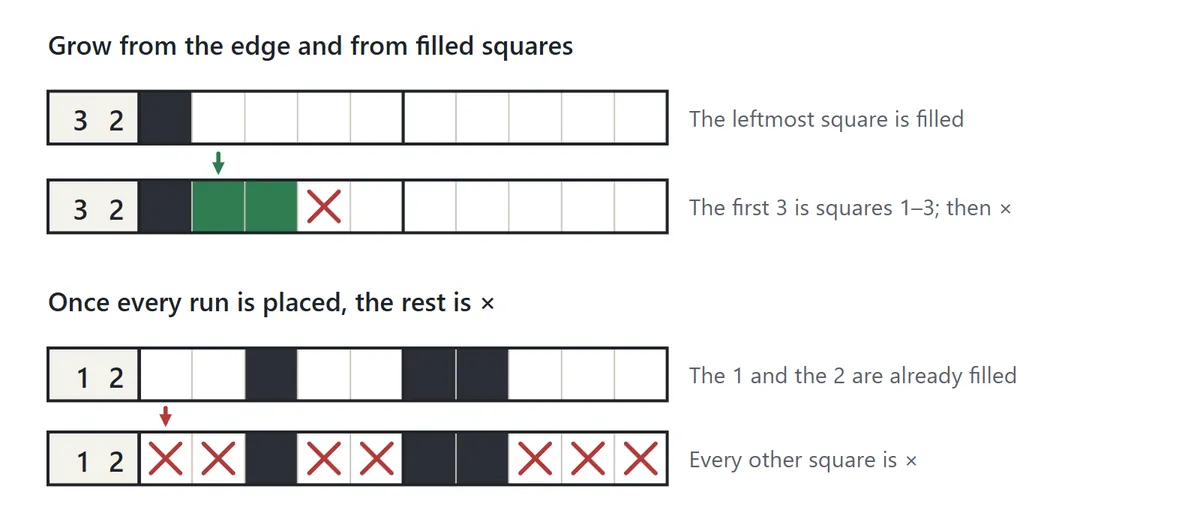
If the first square of a row is filled, that square must be the start of the first run. With the clue “3 2” you can fill the first three squares and put an × right after them. A filled square close to the edge often helps too, because a run can’t stick out past the end of the line – so it may have to extend in one direction.
3. Mark the rest once a line is complete
When all the runs of a line are in place, every remaining square in that line is empty. Mark them with an ×. Those × marks become clues for the crossing columns, telling them “not here”, and that often decides another line. Lines with the clue 0 can be marked right at the start.
4. Solve the lines that only fit one way
A clue that equals the length of the line (10 in a 10×10 grid), or a clue like “4 5” whose runs plus the gap exactly fill the line, can only be placed in one way. Find these first and fill them completely – they give the crossing lines a strong head start.
5. Switch between rows and columns
After you fill a row as far as it goes, look at the columns that pass through the squares you just decided. A new filled square or × narrows down how the column’s numbers can fit. Keep switching between rows and columns and the picture slowly comes into view. When nothing seems to work, go through the lines you haven’t checked yet, one at a time.
6. Don’t guess from the picture
Halfway through you may think “this looks like a cat’s ear” – but resist filling squares just because the shape seems right. A single wrong square throws off everything you work out after it. Giving every square a reason from the clues is the fastest way to the finish.
Daily Puzzle, Puzzle List and Printable Nonograms
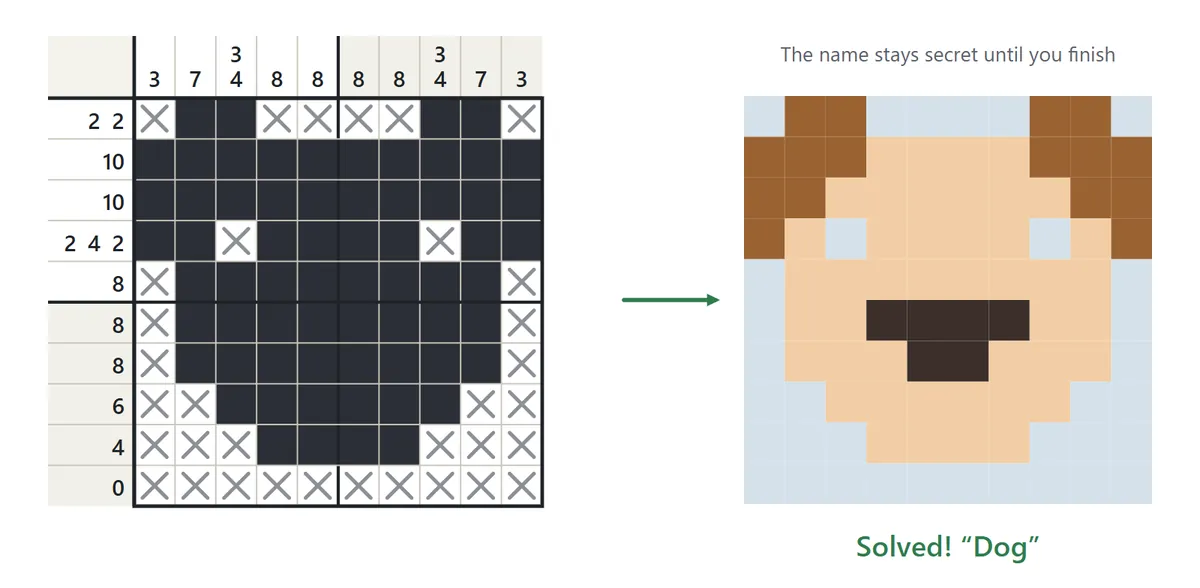
When every clue matches, the grid turns into a colored picture and the puzzle’s name appears. Names stay secret until you finish, so guessing what the picture will be is part of the fun.
The “Daily puzzle” is one 10×10 or 15×15 nonogram per day. Everyone gets the same puzzle on the same date, so you can compare times with friends and family, and solving it on consecutive days builds a streak.
“Printable” opens a clean black-and-white page of puzzles. Choose the size, the first puzzle, how many puzzles to put on a page and whether to add an answer page, then print on US Letter or A4 paper with your browser’s print dialog. The answer page shows each finished shape with its name, which makes it easy to check your work on paper.
Nonogram FAQ
Does every puzzle have only one solution?
Yes. Every puzzle here has been checked to have exactly one solution and to be solvable by reasoning about one row or column at a time, without trying things out.
Do I have to mark the empty squares with ×?
No. A puzzle counts as solved as soon as all the right squares are filled. On larger grids, though, × marks make the reasoning much easier.
How are my records saved?
The game records which puzzles you have solved and your fastest time for each one when you didn’t use hints. Records and unfinished puzzles are saved in your browser on this device only. The timer pauses while you are looking at another tab.
What happens if I press “Show answer”?
Press it twice in a row and the picture and its name are revealed. A puzzle whose answer you viewed doesn’t count as solved, so you can pick it again from the list later and try it yourself.
Is there sound?
Sound is off at first. Press “Sound: off” to hear a soft click when you fill squares and a chime when you finish a picture.
History of the Nonogram
Nonograms are generally said to have been invented in Japan in the late 1980s. Non Ishida, a graphic designer, and Tetsuya Nishio, a puzzle maker, are credited with coming up with very similar grid puzzles independently of each other. When the puzzles were introduced to newspaper readers in the United Kingdom around 1990, they were named “nonograms” after Non Ishida, and from there they spread around the world. Today they appear in puzzle magazines, newspapers and apps under many different names, but the rules are always the same: numbers on the edges, runs of filled squares, and a picture waiting to be discovered.