 Yorimichi Games


How to play Hit the Mole
Hit the Mole is a simple arcade-style reflex game. Moles pop out of a grid of holes one after another, and you have to hit each one before it ducks back down. Every mole you hit is worth 10 points. A round lasts 30 or 60 seconds, and your score when the clock runs out is what counts. That is really all there is to it, which is why anyone can pick it up in a few seconds. If you have ever swung a padded mallet at a mole game at a fair or an amusement arcade, you already know the feeling – here the mallet is your mouse, your finger or your keyboard.
Hit the moles as they pop up
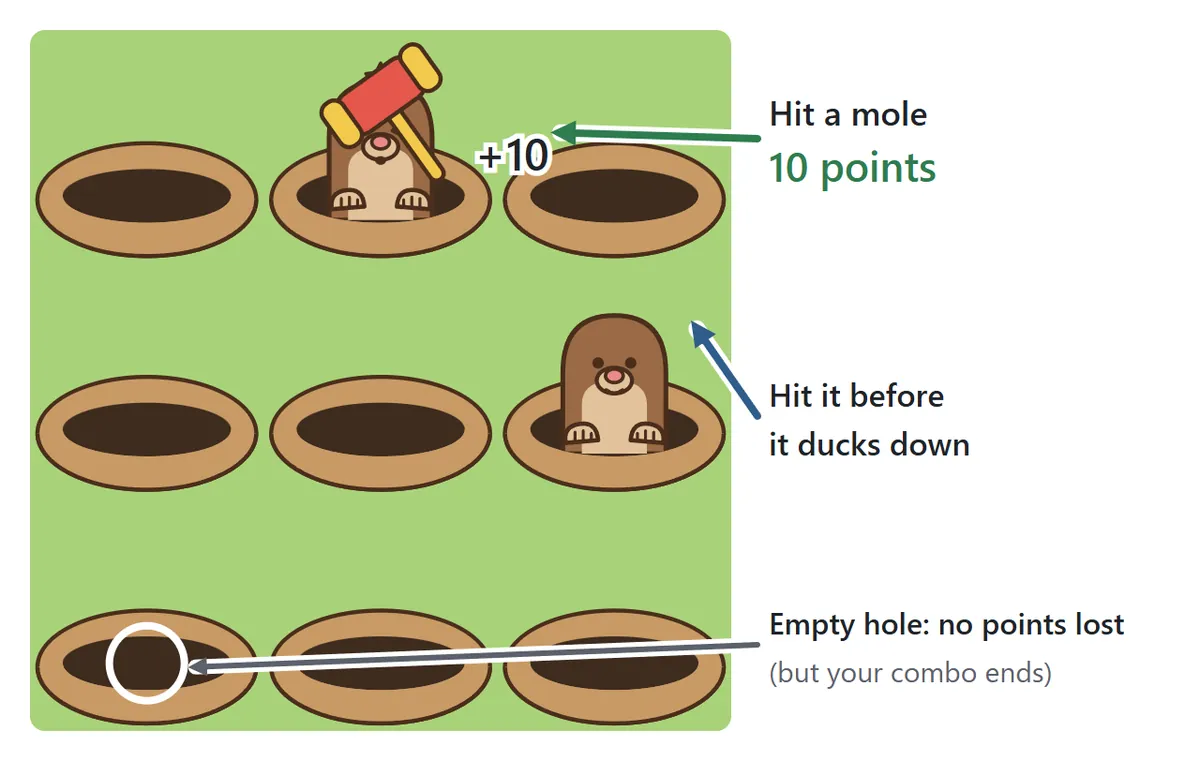
Press Start and the game counts down 3, 2, 1. Then the moles start appearing. Each mole pokes its head out, waits for a moment and drops back into its hole. Hit it while it is showing and you get 10 points – you can even hit it while it is still on the way up. On a computer, click the mole; on a phone or tablet, tap it. You can also play with the keyboard by pressing the key that matches each hole (see “Playing with the keyboard” below).
Hitting an empty hole does not cost you any points, but it does break your combo, which is explained a little further down.
Don’t hit the moles in helmets
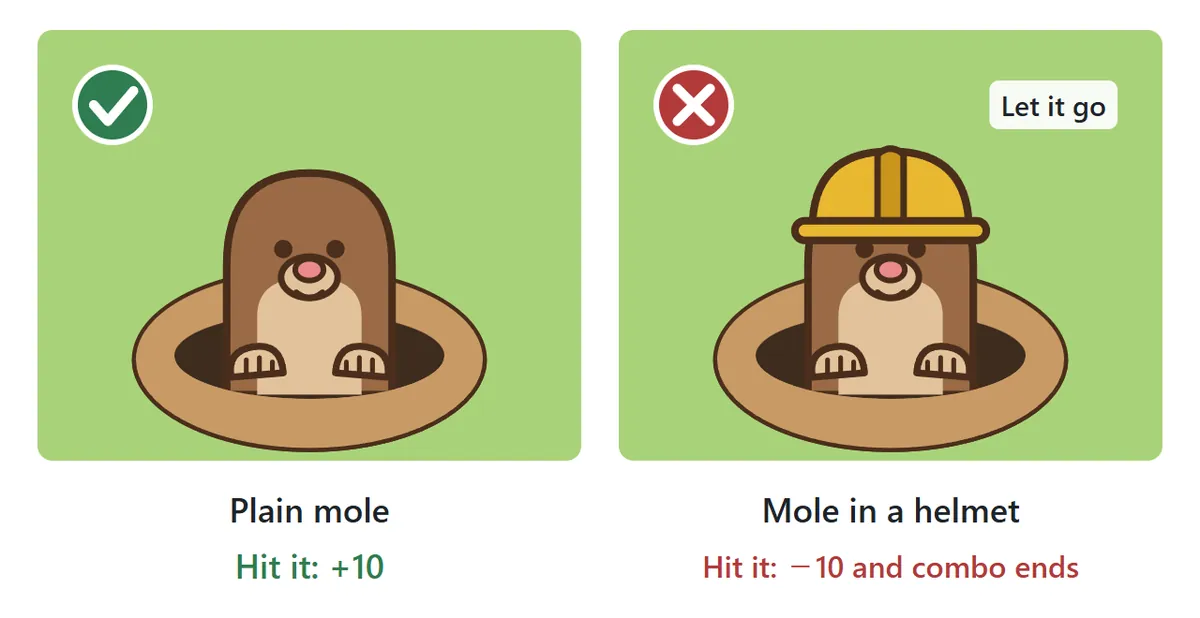
Every so often a mole pops up wearing a yellow hard hat. It is protected, so hitting it takes 10 points away from your score and breaks your combo. If you simply let it go back down, nothing happens at all. The trick is to look before you swing. If you would rather just practice hitting, set “Helmet moles” to Off in the settings and only plain moles will appear.
Combos: keep hitting for bonus points
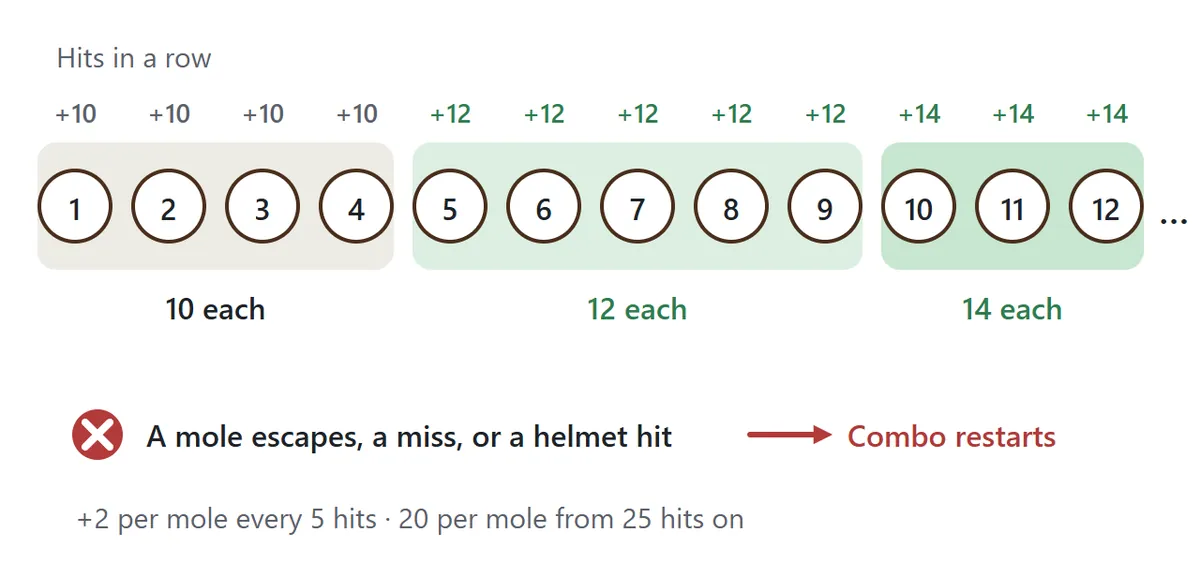
Hit mole after mole without letting any escape and without a single missed swing, and you build a combo. After 5 in a row each mole is worth 12 points, after 10 it is 14, and so on, rising by 2 points every 5 hits until each mole is worth 20 points from the 25th hit on. Your combo resets to zero when a mole gets away, when you hit an empty hole, or when you hit a mole in a helmet. The current combo is always shown at the top of the game, next to your score.
It gets faster as the clock runs down
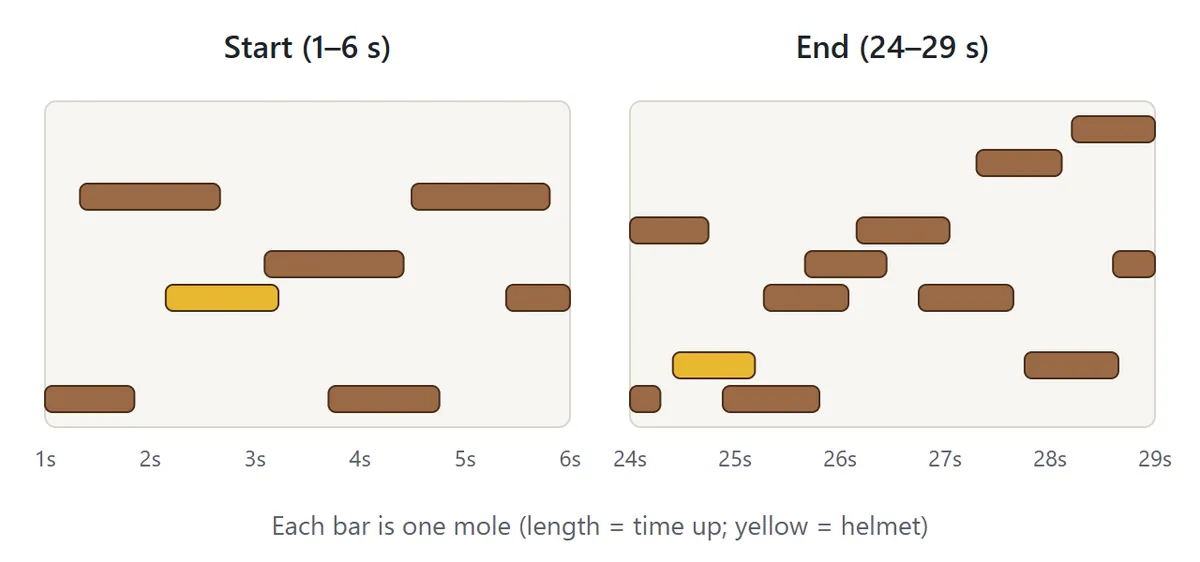
At the start the moles are slow and appear one or two at a time. As the round goes on they stay up for less time and more of them pop up together. The last few seconds are where big scores are made or lost, so try to keep something in reserve for the finish.
Playing with the keyboard
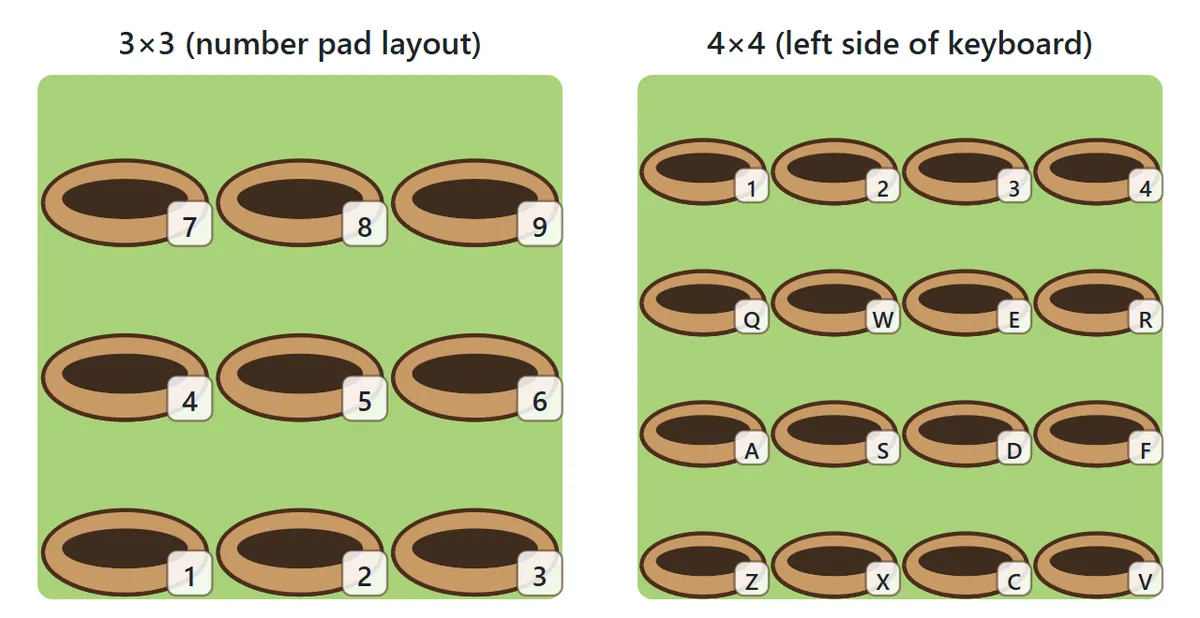
On the 3×3 grid the keys follow a number pad: the top-left hole is 7, the middle is 5 and the bottom-right is 3. If your laptop has no number pad, the number keys along the top row work too. On the 4×4 grid the 16 keys on the left side of the keyboard – 1234, QWER, ASDF and ZXCV – line up with the holes. On a computer, each hole shows its key in the bottom-right corner, so you don’t have to memorize anything. Press P or Esc to pause.
Choosing your settings
| Level | How the moles behave | Good for |
|---|---|---|
| Easy | They stay up longer and start one at a time | Your first games |
| Normal | Two or three pop up at once | Once you have the hang of it |
| Hard | They duck back fast and keep coming | Testing your reflexes |
Each level has a goal score, shown at the top of the game. Reach it and your result says “Goal reached!”. A good plan is to beat the goal on Easy first and then move up a level. For the board, 3×3 (9 holes) is the standard game; on 4×4 (16 holes) there is more ground to watch, so the moles stay up a little longer to make up for it. Choose 30 seconds for a quick game or 60 seconds for a longer run at a high score.
Daily Challenge is a special mode with a mole pattern that is the same for everyone playing on the same day. It is always Normal, 3×3, 30 seconds with helmet moles on. Because the pattern repeats all day, your score tends to climb the more you play, and it is a fair way to compare scores with friends or family on the same day.
Tips for a higher score
1. Watch the whole board
If you stare at one hole, you will be slow to notice moles popping up elsewhere. Rest your eyes on the middle of the board and take in the whole grid with a relaxed gaze. You will spot new moles faster wherever they appear.
2. Return to the center after each hit

When you play with a mouse or your finger, move back toward the middle of the board after each hit. From there, every hole is close. If you leave your pointer in a corner, a mole on the opposite side may be gone before you get there.
3. Hit the oldest mole first
When two or three moles are up at once, the one that appeared first will leave first. Hit them in the order they came up rather than going for the closest one, and fewer will get away.
4. Spot helmets by color
The helmets are bright yellow. Look for the color on top of the head rather than the shape of the mole and you will make fewer mistakes when things speed up. If you are not sure, let it go – skipping a helmet mole costs nothing and your combo carries on.
5. Protect your combo
Chasing a mole that is already sinking usually ends in a missed swing and a broken combo. Past a combo of 20, each mole is worth nearly double, so it pays to give up on moles you can’t reach and focus on the next one.
6. Set your hand on the keys
On a number pad, rest your middle finger on 5 with your index finger over 4 and your ring finger over 6. Reach up or down with the same finger for the top and bottom rows. With a fixed hand position you can keep your eyes on the screen the whole time.
Hit the Mole FAQ
Can I stop and continue later?
Yes. On the same device and browser, press “Continue” to pick up with the same time left, score and combo. After a 3, 2, 1 countdown the moles start coming again.
Can I pause the game?
Press the Pause button, or P or Esc on the keyboard. The game also pauses by itself if you switch to another tab or app, and no time is lost while it is paused.
Where are my scores saved?
Your high score and best combo are saved on this device for each mix of level, board size, time and helmet setting. For the Daily Challenge, your best score of the day is kept. There is no login or sign-up.
Is there sound?
Sound is off at first. Press “Sound: off” to turn it on and you will hear effects when you hit a mole and at the end of the round.
The page scrolls when I tap on my phone
Touching the game board does not scroll the page, and tapping quickly will not zoom in. To scroll, swipe outside the game area.
Is it free?
Yes. Hit the Mole is free to play in your browser as often as you like, on a computer, tablet or phone, with nothing to download.
Where the mole game comes from
Arcade machines where you hit moles popping out of holes with a mallet are generally said to have started in Japan in the mid-1970s. They were a hit, and soon there were many similar machines, versions with alligators and other animals, and small toy versions for playing at home. The idea spread around the world, and today mole-hitting games are a familiar sight at fairs, amusement parks and arcades. The game has even become a figure of speech: when problems keep popping up one after another and you deal with each in turn, people often compare it to hitting moles.