 Yorimichi Games

How to play Memory Training
Memory Training is a set of three short memory games. Something appears on the screen for a moment, disappears, and then you answer from memory. In Sequence Memory you repeat the order in which squares light up, in Visual Memory you pick out the squares that flashed at the same time, and in Number Memory you type back a string of digits. Every correct answer makes the next round one item longer. You can make three mistakes before a game ends, so it is an easy way to find out how much you can hold in your head today. It is a single-player game with nothing to install and no account to create. Sound starts switched off, and every game can be played with lights and text alone.
Sequence memory game
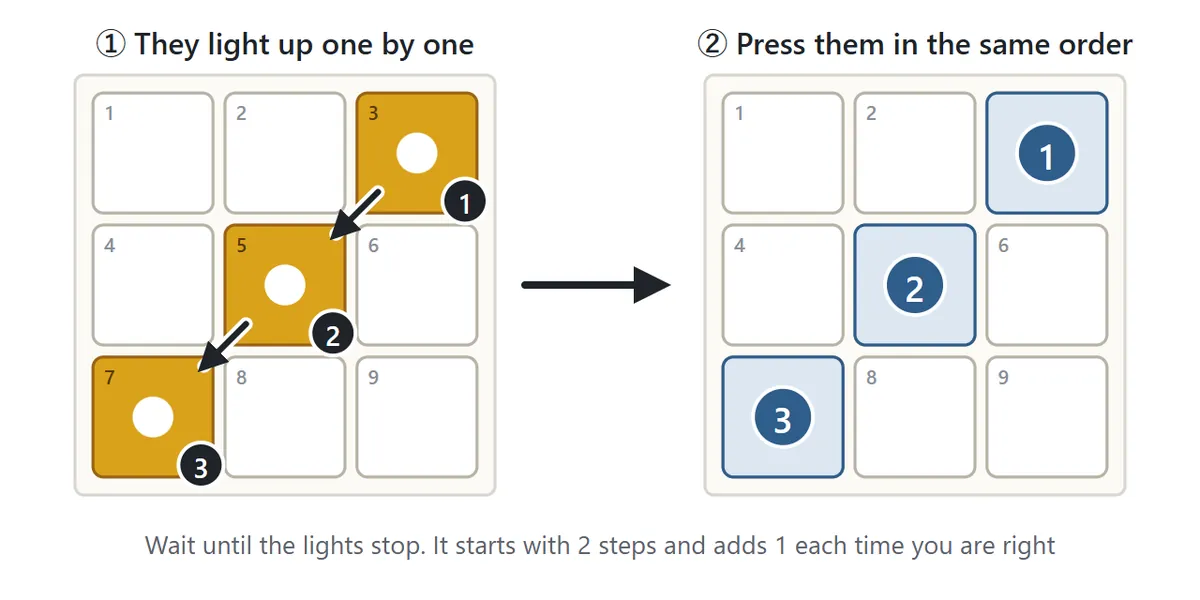
Squares on a 3×3 grid light up one after another. When the lights stop, press the squares in the same order. The first round has two steps; get it right and the next round has three, then four, and so on. The same square never lights twice in a row, but in longer sequences a square can come back after a gap.
The Sequence setting offers two ways to play. With Grows by one, each round repeats the previous sequence and adds one new step at the end, so you only need to learn one new square per round, which makes long sequences reachable. With New each time, every round is a completely new sequence. You have to memorize the whole thing from scratch every time, so the same length feels noticeably harder.
Visual memory game
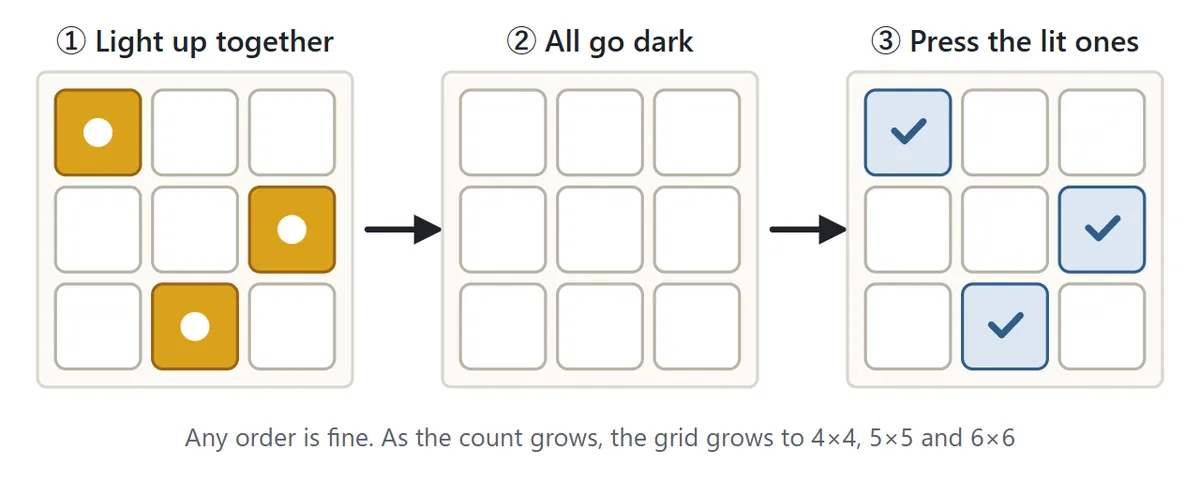
A few squares on the grid light up together and then all go dark. Now press every square that was lit, in any order you like. The game starts with three squares and adds one each time you succeed. As the number grows, the grid grows too, from 3×3 to 4×4, 5×5 and finally 6×6. Pressing a square twice does not count against you, so there is no penalty for double-checking, but pressing a square that was never lit is an instant mistake.
Number memory test
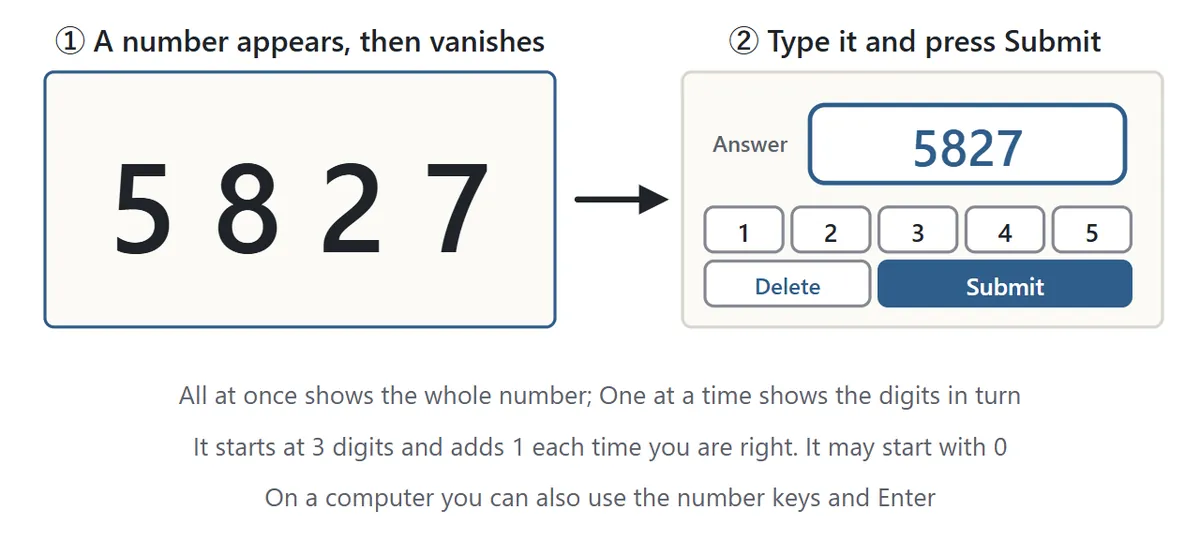
A number appears briefly and then vanishes. Type it back with the number buttons below the board (or the number keys on a keyboard) and press Submit. The first number has three digits, and each correct answer adds one more. Under Show digits, All at once shows the whole number together, while One at a time flashes the digits one after another. Numbers can start with 0, so do not forget to type it.
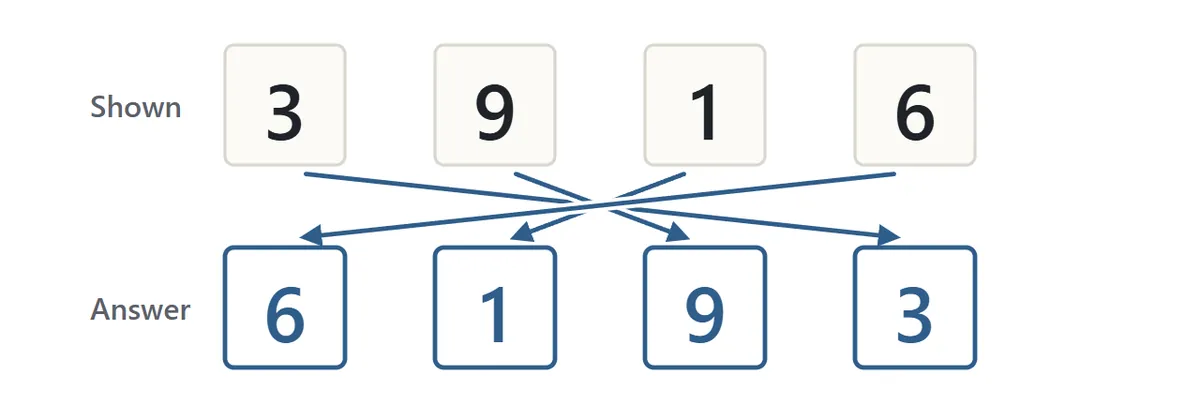
Set Answer to Backwards and you type the number in reverse: 3916 becomes 6193. Reordering the digits in your head takes extra effort, so the same length is harder than in the normal order.
Mistakes and scores
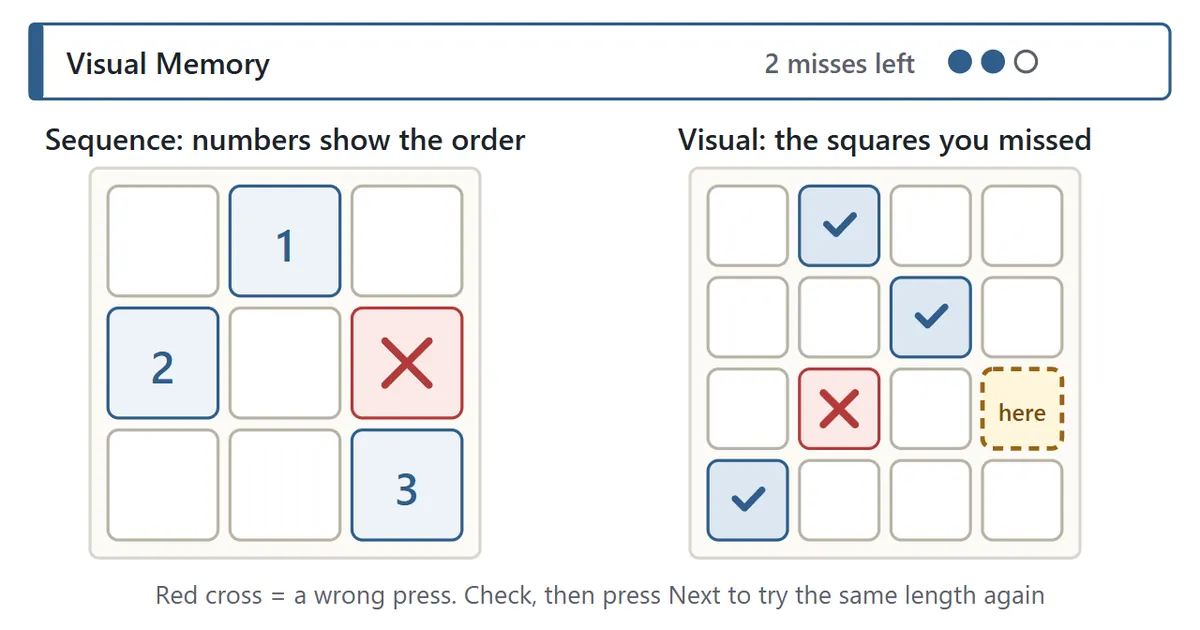
When you get something wrong, the game shows you exactly what happened: numbers on the squares for Sequence Memory, dotted outlines on the squares you missed for Visual Memory, or the correct digits for Number Memory. Take a look, press Next, and you get another try at the same length. The game counts misses, and the third one ends it. A mistake does not send you back, so if you get the next one right you keep climbing.
Your score for a game is the longest length you completed without a mistake. Scores are kept as personal bests for each game and setting, and the results screen compares your recent scores with bars. Everything is stored only on this device and is never sent anywhere.
Daily Challenge
The Daily Challenge runs all three games back to back at Normal speed and adds your three scores together. In each game, a single mistake moves you straight on to the next one. Everyone who plays on the same day gets the same sequence, the same squares and the same numbers, so you can compare totals with family or friends. The game remembers your first total of the day and how many days in a row you have played.
Settings
| Setting | Options | What changes |
|---|---|---|
| Speed | Slow / Normal / Fast | How long things stay lit or visible |
| Sequence | Grows by one / New each time | Build on the last sequence, or start fresh each round |
| Show digits | All at once / One at a time | The whole number together, or digit by digit |
| Answer | Same order / Backwards | Type the number as shown, or reversed |
Memory game tips
1. Repeat it silently
In Number Memory, saying the digits over and over in your head keeps them from fading after they disappear. Use whatever rhythm feels natural, like "five-eight, two-seven", and keep repeating until you have typed the last digit.
2. Break it into chunks

Once you reach seven digits or more, try splitting the number into groups the way you would read a phone number: 381, 59, 26. A few chunks are easier to hold on to than a long row of single digits. The same idea works in Visual Memory: instead of remembering separate squares, see a shape, such as an L, a diagonal line or two squares in the right-hand column.
3. Remember the sequence as a path
In Sequence Memory, picture the order as a route your finger traces from square to square. "Across the top, then down to the middle" is easier to keep in mind than a list of positions. If you play with the 1–9 keys, you can also remember the sequence as a number.
4. Start slow
Begin on Slow to get a feel for how much you can remember. Once you can clear the same length several times in a row, move up to Normal and then Fast.
5. Take breaks
Concentration fades if you keep going for a long time, and you will start slipping at shorter lengths than usual. Each game is short, so stop for a rest after a few rounds. Scores naturally go up and down from day to day.
Memory game FAQ
How many items can most people remember?
There is a limit to how much anyone can keep in mind at once. For digits, adults are often said to manage around seven, and for positions or shapes seen at a glance, usually fewer. It changes a lot with how you feel that day, how familiar you are with the game and the tricks you use, so comparing with your own earlier scores is more fun than comparing with other people.
Will playing every day improve my memory?
This is a game for seeing how much you can remember right now and for trying out ways to push your score higher. It makes no claims about school, work or health. Scores do tend to rise as you get used to a particular game, so enjoy watching that happen.
Can I play without sound?
Yes. Sound is off to begin with. In Sequence Memory, turning sound on gives each square its own tone so you can use both sight and hearing, but the lights alone are enough. Use the Sound button below the board to switch.
Can I play with just a keyboard?
Yes. In Sequence Memory and in Visual Memory on the 3×3 grid, the number keys 1 to 9 match the squares (1 2 3 on the top row, 4 5 6 in the middle, 7 8 9 at the bottom). On bigger grids, move the highlight with the arrow keys and press Enter or Space. In Number Memory, type with the number keys and press Enter to submit.
Can I stop and continue later?
Progress is saved after every round, so you can close the page and press Continue to pick up where you left off. If you close it while a pattern is being shown, that pattern is shown again from the start.
About these games
Copying a sequence, pointing to where something flashed and repeating a string of digits are old and familiar games, and psychologists have long used similar tasks to study how much people can hold in mind over a short time. Repeating digits in the same or reverse order is a particularly well-known version. The grid sizes, speeds and step-by-step lengths in these games were chosen for fun and ease of play; they are games, not a test or assessment.