 Yorimichi Games
How to Play Mine Finder
Mine Finder is a one-player logic puzzle played on a grid of covered cells. Somewhere under those cells, a set number of mines is hidden. Your job is to uncover every cell that does not hold a mine, without ever uncovering one that does. You get only one kind of clue: every safe cell you open shows how many mines are touching it. Read those numbers carefully and you can work out, step by step, which cells are safe and which ones to leave alone. The rules take a minute to learn, yet a good board keeps you thinking all the way to the last cell.
What the numbers mean
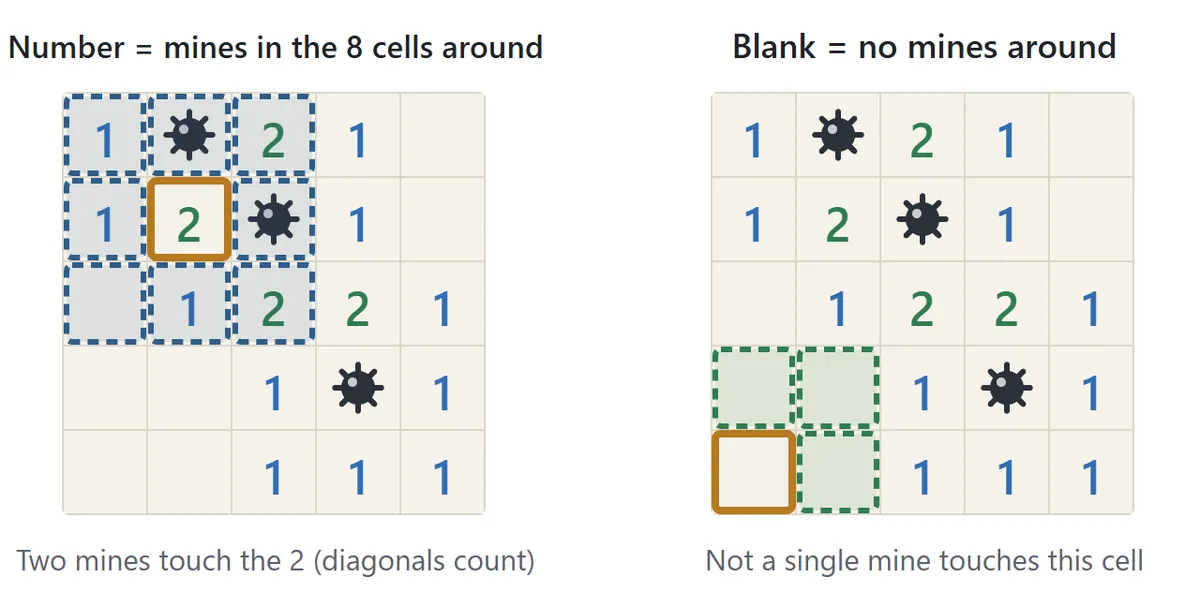
When you open a cell, you see either a number from 1 to 8 or an empty square. The number is the count of mines in the eight cells that surround it – above, below, left, right and the four diagonals. A 2 means exactly two of those neighbors are mines; it does not tell you which two. An empty cell means that none of its neighbors is a mine. Cells on an edge have only five neighbors, and cells in a corner only three, so a number there is counted among fewer cells, which often makes edge clues easier to use.
Opening cells
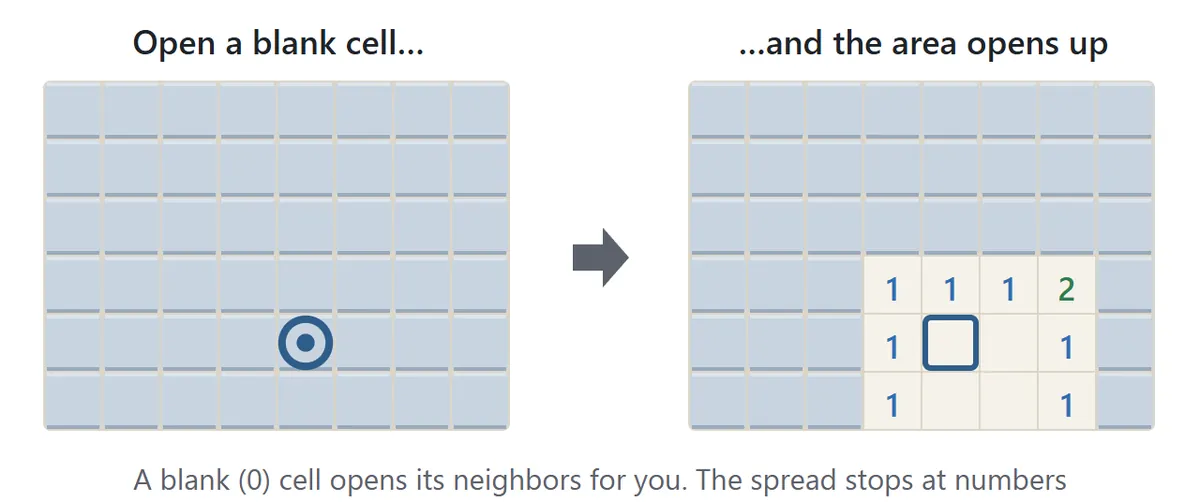
Click or tap a covered cell to open it. If the cell turns out to be empty, all of its neighbors must be safe, so the game opens them for you, and keeps spreading until it reaches cells with numbers. That is why one click can sometimes clear a large patch of the board. In this game, the first cell you open and the eight cells around it never contain a mine. You can’t lose on the first click, and the first click almost always opens a comfortable area to start reasoning from.
Placing flags
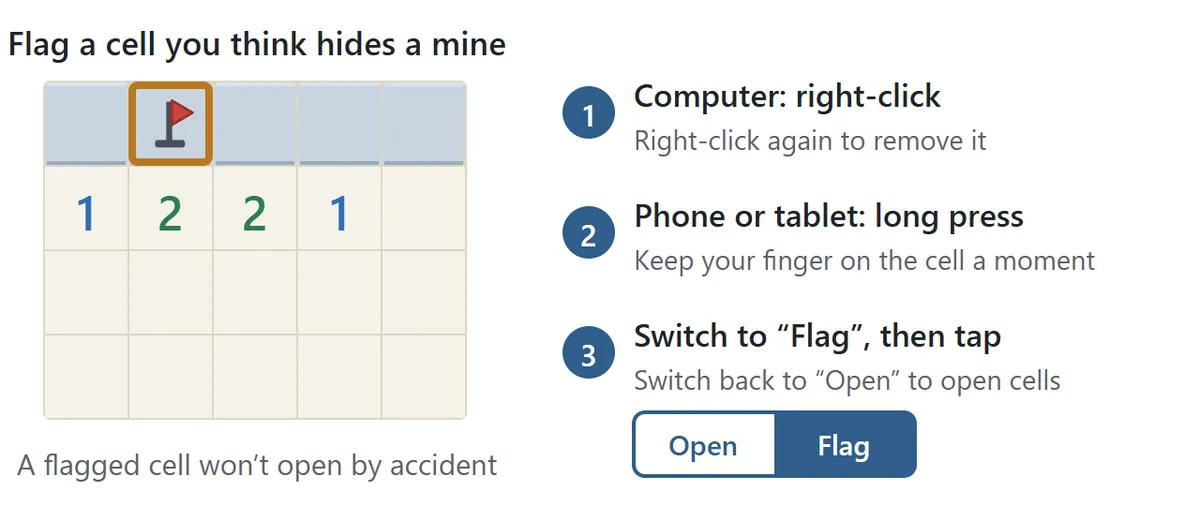
When you are sure a cell hides a mine, mark it with a flag. A flagged cell can’t be opened by accident, which is handy when you are clicking quickly. Do the same action again to remove a flag. The counter at the top of the board shows the number of mines minus the number of flags you have placed. Flags are only notes for yourself: you win by opening every safe cell, whether or not you flag the mines.
Clicking a number to open its neighbors
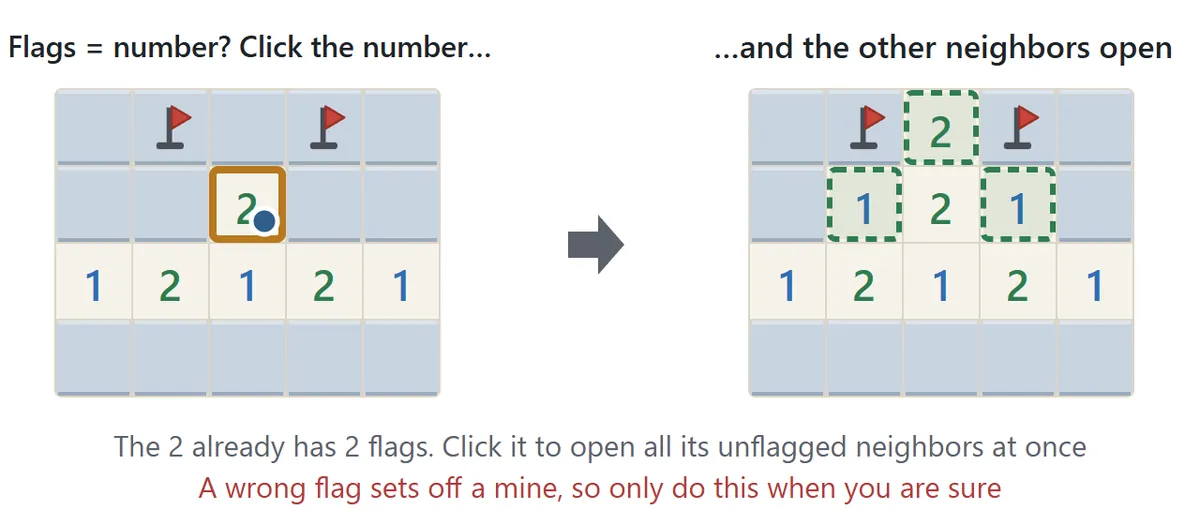
Once a number has exactly as many flags around it as its value, click the number itself: every unflagged neighbor opens in one go. Experienced players use this shortcut all the time because it saves a lot of single clicks. Be careful, though. If one of those flags is in the wrong place, the shortcut opens a mine. If the flag count doesn’t match the number, nothing opens and the game tells you why.
Winning and losing
You win when every cell without a mine is open. The clock starts with your first move. Open a mine and the round is over: every mine on the board is revealed, the one you hit is shown in red, and any flag that was on a safe cell is crossed out. If you want to keep going, press “Take it back” to return to the board as it was just before that move. A round in which you took a move back still counts as a clear, but it isn’t used for your personal best.
Beginner, Intermediate and Expert: Board Sizes and Board Types
| Size | Board | Good for |
|---|---|---|
| Beginner | 9×9, 10 mines | Your first games – a round takes a few minutes |
| Intermediate | 16×16, 40 mines | Once the basic patterns feel natural |
| Expert | 30×16, 99 mines | A long, demanding test of skill |
| Custom | 5–30 wide, 5–24 high, 1 mine or more | Tiny practice boards or extra-dense challenges |
These three sizes and mine counts have been the usual steps in this kind of puzzle for decades, so your times are easy to compare with other players. On a phone, Intermediate and Expert keep the cells big enough to tap comfortably and let you drag the board around; you can also change the cell size with the “−” and “+” buttons.
You can also choose the type of board. A No-guess board is built so that every mine can be found by reasoning alone. You will never reach a point where the only option is to pick one of two cells and hope, so it is the best choice while you learn and whenever you want a pure logic puzzle. A Random board places the mines completely at random. The first click is still safe, but near the end you may meet a genuine 50/50 that no amount of thinking can settle – just like the classic versions of the game. The Daily puzzle is a new no-guess board every day: everyone who plays on the same date gets the same board for each size, and it starts with the first area already opened, so you can compare times with friends and family.
Mine Finder Strategy and Tips
1. When the covered cells equal the number, they are all mines

Almost everything in this puzzle comes from two simple rules. First: if a number has exactly as many covered neighbors as its value, every one of those covered cells is a mine. Second: if all the mines around a number have already been found, every other neighbor of that number is safe. Flag the mines you are sure of, then look at the neighboring numbers to see which cells have become safe, and repeat. This loop alone will carry you through most of a Beginner board.
2. Learn the 1-2-1 and 1-2-2-1 patterns
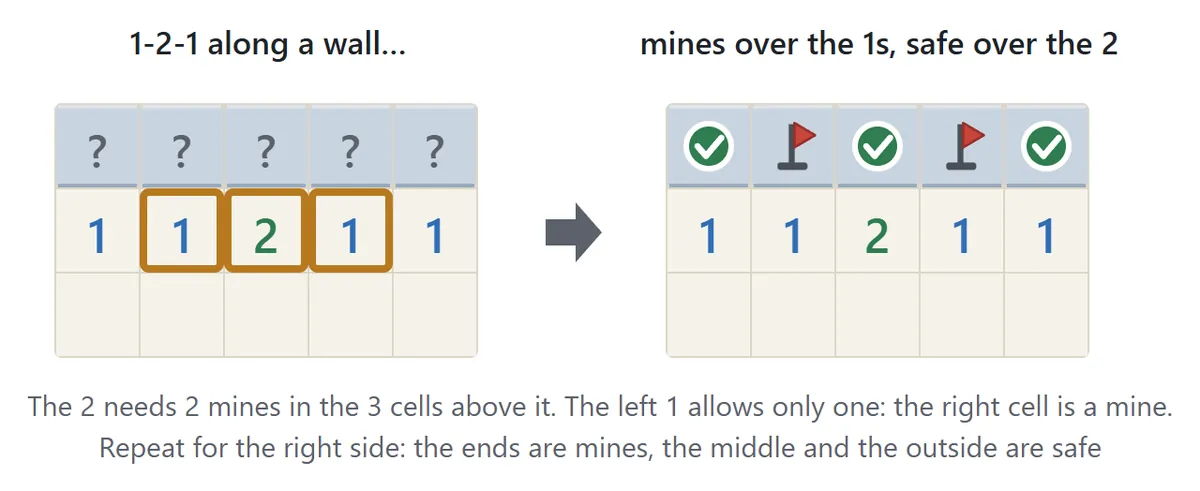
When a single number isn’t enough, compare two numbers that sit side by side. The best-known case is a row of numbers reading 1-2-1 along a straight edge of covered cells: the two cells above the 1s are mines, and the cell above the 2 is safe. A 1-2-2-1 works in a similar way – the mines are above the two 2s. Other common shapes include a 1-1 starting at a wall, where the third cell along is safe, and a 1-2 at a wall, where the cell beyond the 2 is a mine. Once these shapes jump out at you, you spend far less time staring at the board.
3. Start near the middle
Because the first cell is always safe, any first click works, but a cell near the middle tends to open a wider area with more clues on every side. Once the first area is open, scan its edges for 1s. A 1 with just one covered neighbor gives away a mine immediately, and that mine usually unlocks the numbers around it.
4. Use the mine counter near the end
As the board fills up, keep an eye on the number of mines left. If only one mine remains and there are several places it could be, combining that count with the nearby numbers often settles the question. The counter is only reliable if your flags are correct, which is one more reason to flag only what you are certain about.
5. For faster times, combine flags and number clicks
Speed players rely on a rhythm: flag a mine, click the number next to it to open its other neighbors, and move on. It is much faster than opening cells one at a time. The catch is that a single wrong flag turns that shortcut into a lost game. In the long run, only using it when you are certain is the quickest path to a good time.
6. Forced guesses and the hint button
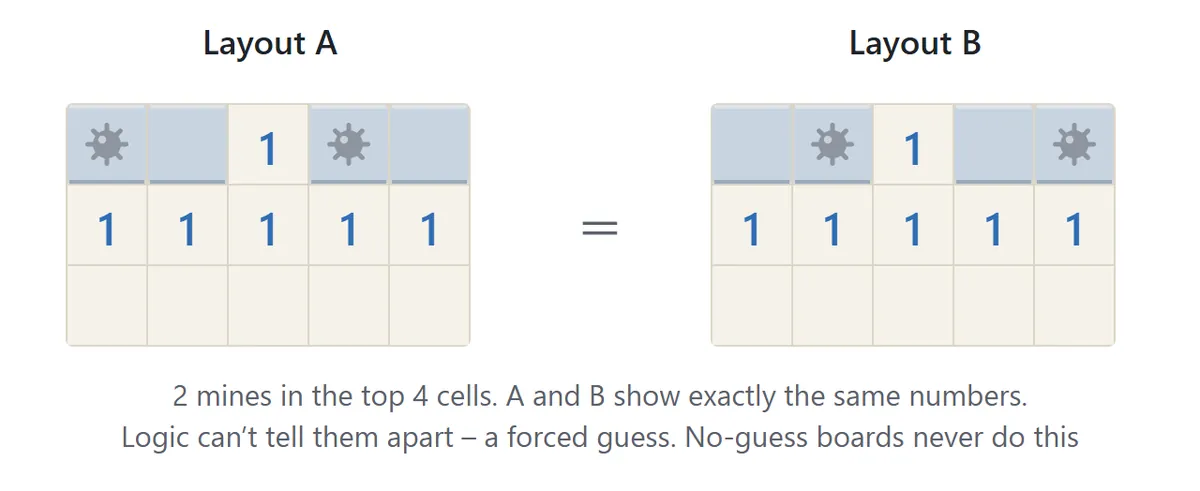
On a Random board you can reach a position where two different mine layouts would show exactly the same numbers. No amount of reasoning can tell them apart, and your only option is to open a cell and trust your luck. No-guess boards and the Daily puzzle never do this. If you get stuck, press “Hint”: the game points out one cell that is definitely safe or definitely a mine, frames the numbers that prove it, and explains the reasoning. Press “Hint” again and the game opens or flags that cell for you. Rounds where you used a hint count as clears but are not used for your personal best.
Mine Finder FAQ
Can I lose on the first click?
No. The first cell you open and the eight cells around it never contain a mine, so your first click always opens an empty cell and a patch of the board around it.
Will I ever have to guess?
Not on No-guess boards or the Daily puzzle – each of these boards is checked before you play to make sure it can be solved to the end using the numbers alone. On Random boards, a 50/50 guess can come up near the end.
Do I have to flag every mine to win?
No. The game is won the moment every safe cell is open. Flags are there to help you keep track of what you have worked out.
Does everyone get the same daily puzzle?
Yes. On the same date, everyone gets the same board for each size. The date comes from the device you are playing on, and clearing the daily puzzle on consecutive days builds up a streak.
Can I play with a keyboard?
Yes. Use the arrow keys to move the frame, Space or Enter to open a cell (or to open around a number), F to place or remove a flag, and H for a hint.
Can I stop and continue later? Is my record saved?
If you come back on the same device and browser, press “Continue” in the settings to pick up with your opened cells, flags and time intact. Your best time and number of clears are saved on this device for each size and board type. The game starts with sound off; press “Sound: off” to hear a small sound when you open cells or clear a board.
Where the Mines Puzzle Comes From
Games about crossing a field of hidden mines using number clues began to appear on home computers in the early 1980s, and one British game from 1983 is often named as the first of the kind. The version that most people know today – a grid of cells where each opened cell shows how many mines touch it – spread around the world from about 1990 onward, when it came preinstalled on personal computers. Since then it has been rebuilt on almost every platform, from graphing calculators to phones. It has also caught the attention of mathematicians and computer scientists: deciding whether a given set of numbers can be consistent with some layout of mines turns out to be one of the classic “hard” problems in computer science. That is part of its charm – behind a very plain grid lies a genuinely deep logic puzzle.