 Yorimichi Games
How to play Three-Flower Garden
Collect water drops and grow three potted plants from seeds into flowers. This is a small, single-player idle clicker with a clear destination: when all three flowers bloom, the garden is complete. Press Water to collect drops, or let the automatic collector gather them over time. Spend the drops on a better watering can, a better collector, or the next growth stage of a plant. Each pot passes through sprout, bud and bloom after its starting seed stage. There is no time limit, and plants do not wither while you take a break. You can finish one flower as a small milestone, save the garden and return to the others later. Choose Easy for your first garden so that growth and upgrades need fewer drops. The goal is to make a few comfortable choices over a short session, rather than keep clicking without an endpoint.
Garden clicker controls on phone and computer
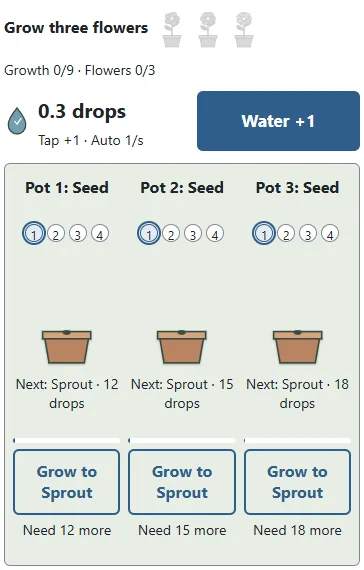
On a phone or tablet, tap Water, a tool upgrade, or Grow below a pot. The same buttons work with a mouse. On a keyboard, Space collects water, C upgrades the can, and A upgrades the automatic collector. Use 1, 2 and 3 to grow the left, middle and right pot. P pauses or continues the garden. Tab moves between controls, and Enter activates the focused button. Holding a key does not repeatedly collect water. Release it and press again, or simply let automatic collection do the work. This is not a reaction-speed challenge, so you can stop and read the next cost before deciding. The three pots are numbered as well as drawn in different shapes and colours. A short growth movement and the new plant shape show which pot changed. You do not need to recognise a colour alone to follow your progress.
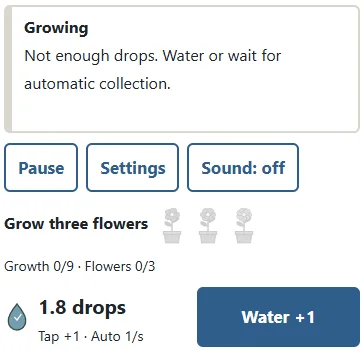
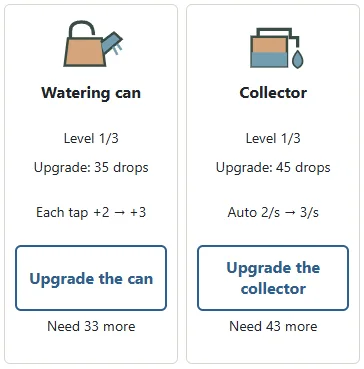
The three small flowers mark completed pots. Markers 1, 2, 3 and 4 on each pot mean seed, sprout, bud and bloom; the outline marks the current stage. Compare the next growth cost, its progress bar and the “Need more” label with your stored drops. “Ready” means you can afford that purchase. Press its next-stage button to grow only that pot.
Manual water and automatic collection
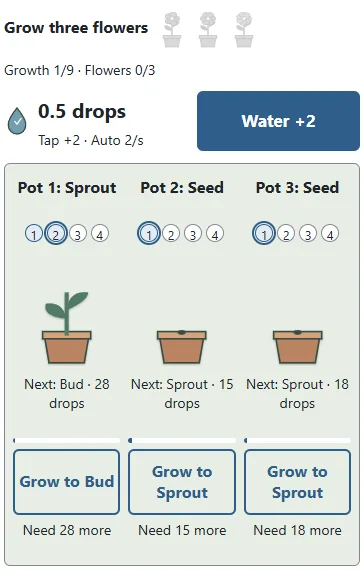
At the beginning, pressing Water gives one drop. Each watering-can upgrade adds one more drop per press, up to four at level three. Automatic collection starts at one drop per second. Each collector upgrade adds one drop per second, up to four at level three. Manual and automatic collection work together, but you can also wait for enough drops without clicking at all. The income display shows the current amount per press and the amount collected each second. Storage holds at most one thousand drops. A full store does not keep growing, but nothing is lost from your plants and there is no penalty for leaving it full. Spend some drops when you want to grow a plant, and collection can fill the available space again. Water drops are only a resource inside this garden. They are not money, vouchers or items that can be exchanged outside the game.
Upgrading tools or growing a flower
A tool upgrade helps you gather drops during the rest of the garden, but it uses some of the drops you already have. Growing a plant instead brings you closer to a visible flower right away. The collector is useful when you prefer waiting between decisions. The watering can is useful when you want to collect some drops yourself. Both tools have three upgrade levels, and neither must be fully upgraded to finish. Growth has three purchases per pot: turn the seed into a sprout, the sprout into a bud, and the bud into a flower. A purchase changes only that pot by one stage. You cannot skip directly from seed to bloom, and a button cannot spend drops you do not have. A completed flower stays in the garden without further maintenance. Move on to another pot rather than feeding the same flower again. Your choice between tools and growth can change the length of a session, but it cannot create an irreversible losing position.
Small milestones and the completed garden
You can set a small goal before aiming for all three flowers: reveal the first sprout, make a bud, or finish one pot. The growth counter has nine steps in total, while the flower counter shows how many of the three pots are fully in bloom. You may complete one pot before starting the others, or advance them gradually together. The left pot needs fewer drops, with the middle and right pots costing progressively more. Starting on the left makes the full sequence easy to see. When the third flower opens, collection and purchases stop. The completed garden stays visible, and you can leave it there as the end of the session. There is no extra ladder of larger totals or requirement to erase the garden for a multiplier. Choose New garden to open settings, then Start only when you want a fresh attempt. Finishing a garden is a stopping point, not an instruction to keep playing.
Easy, Normal and Hard growth costs
Difficulty changes the drops required for plant growth and tool upgrades. Easy has lower costs, Normal has moderate costs, and Hard requires more drops. The initial collection amounts, upgrade effects and three-flower goal are identical. Hard does not add withering, a countdown or a demand to click more quickly. It gives you more time to consider how much to invest in tools before paying for the flowers. The next cost is printed beside each relevant control, so you can compare it with the store rather than guess. If a purchase is not yet affordable, wait for automatic drops or add a little water yourself. You can recover from any ordinary choice simply by gathering more drops. To change difficulty, begin a new garden. A saved garden keeps its original costs instead of switching midway through its growth. Pick the pace that feels useful for your session rather than treating the labels as an obligation.
Saved progress and time away
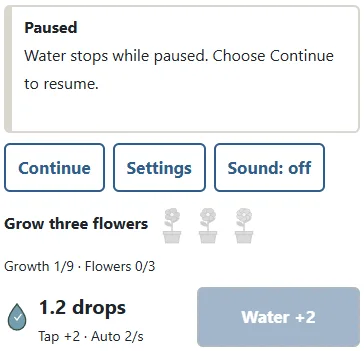
The current plants, tool levels and drop store are saved in this browser when storage is available. Reopen the page and use Continue to resume the garden. If you left while collection was running, up to two minutes of automatic collection can be added when you return. Longer absences do not require a longer wait or produce a larger award. The returned amount is applied once; repeatedly reloading does not award the same absence again. The garden stops while you review the starting settings. Pause and the settings screen also stop automatic collection, including time-away collection. Use Pause when you want the whole garden to stop. If browser storage is blocked, you may still play on the current page, but closing it will not preserve progress or collect drops while away. Clearing browser data can remove a garden. Saves are local to the current browser, not transferred automatically to another device. Use one tab for a garden so that two pages do not compete to save different choices.
Tips for a relaxed garden session
First, check the next growth cost before spending drops elsewhere. Second, consider a collector upgrade if you prefer to take your hands off the controls between decisions. Third, improve the can when you plan to do some manual watering. Fourth, near the finish, growing the remaining flowers may be more useful than buying another tool level. Fifth, complete one pot as a clear small milestone instead of watching only the store total. Sixth, pause whenever you want a full break. No streak or bonus is lost by stopping. On a later garden you can try a different spending order and compare how the plants develop. There is no need to make every possible purchase, fill the store before leaving, or return on a schedule. The garden remains yours to continue when it suits you. Your completed flowers, rather than a constantly increasing number, are the visible outcome of the session.
Idle garden FAQ and the clicker format
Must I keep tapping to finish? No. Automatic collection can supply every growth purchase. Can plants die while I am away? No. Do I have to buy every upgrade? No. The flowers can bloom with the starting tools. What is the time-away limit? At most two minutes of automatic collection per absence, subject to the drop storage limit. Does Pause count as time away? No. It stops collection. Do I need sound? No. Sound starts off and the controls and results are visible. What happens after the last flower? The garden stops with all three blooms on display. Can I get real money or prizes? No. Drops are only part of this game. Clicker, idle and incremental are broad names for games where inputs or elapsed time create resources that can be used for growth. Some versions continue indefinitely, but Three-Flower Garden is an original, finite interpretation with three pots, small milestones and a clear end. Its rules describe this garden rather than a universal rule book for every idle game.
Idle garden pace guide
| Pace | Growth and tool costs |
|---|---|
| Easy | Lower |
| Normal | Moderate |
| Hard | Higher |