 Yorimichi Games
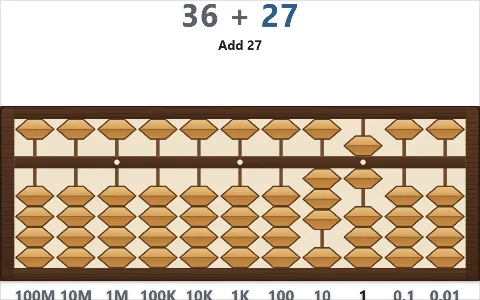
How to play Quick Sum
Quick Sum is a mental math game built around one simple exercise: numbers appear on the screen one at a time, at a steady pace, and when the last one has gone you type in the total. There is no paper and no scrolling back. You keep a running total in your head, update it each time a new number appears, and let the old numbers go. It is a single-player game that runs in your browser, with nothing to download and no account to create.
You choose how hard each round is. Numbers can have one, two or three digits; a round can show 3, 5, 7, 10 or 15 numbers; there are four speeds; and you can mix in subtraction if you want an extra challenge. A practice round has five problems, so a session takes only a few minutes.
The game screen
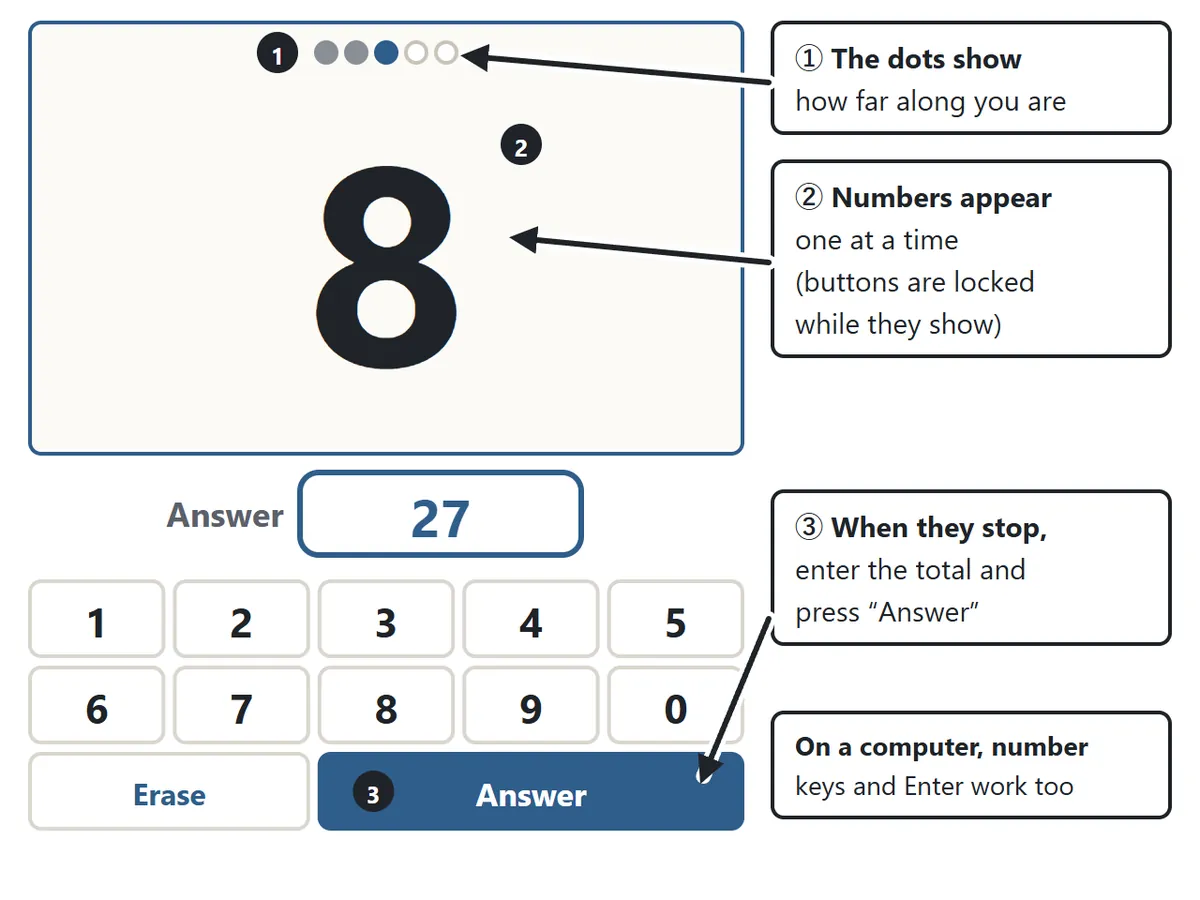
Press Start and the word “Ready” appears, followed by the numbers, one at a time. While the numbers are showing, the number buttons and the settings are locked so that a stray tap cannot interrupt the sequence. The small dots above the display tell you how far through the sequence you are. When the last number has gone, the screen asks “Total?”. Type the sum with the on-screen number pad and press Answer. On a computer you can use the number keys and Enter instead; on a phone or tablet, the Keyboard button brings up your device’s own number pad.
How the numbers appear
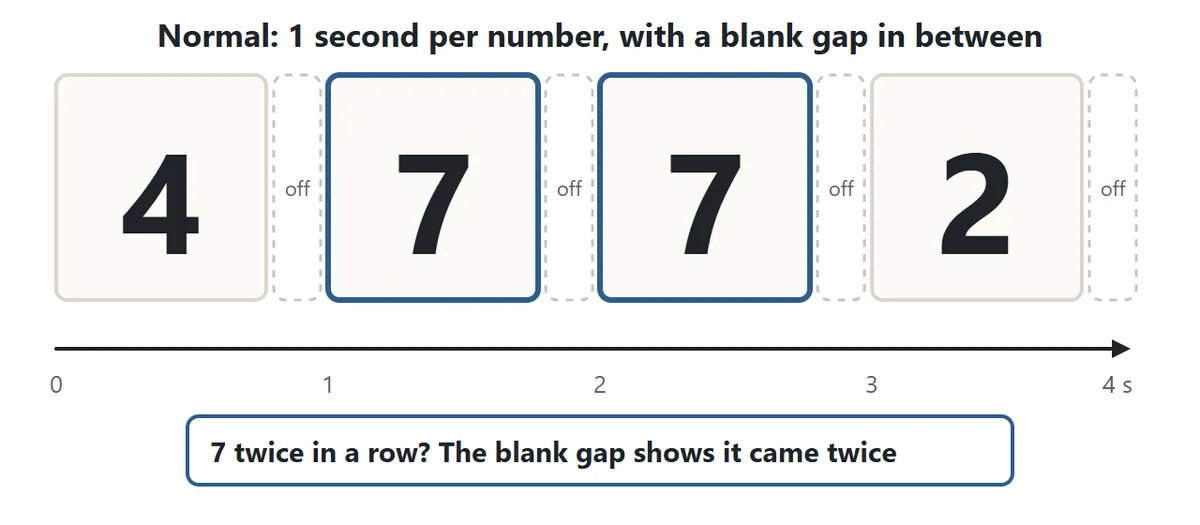
The numbers come at an even rhythm. Each one gets 1.5 seconds on Slow, 1 second on Normal, 0.7 seconds on Fast and 0.5 seconds on Very fast. At every speed, part of that time is a short blank gap before the next number. The gap matters: if a 7 is followed by another 7, the screen clears and then shows 7 again, so you can see that it appeared twice and add it twice. The same number never appears three times in a row.
The list and the sum after each answer
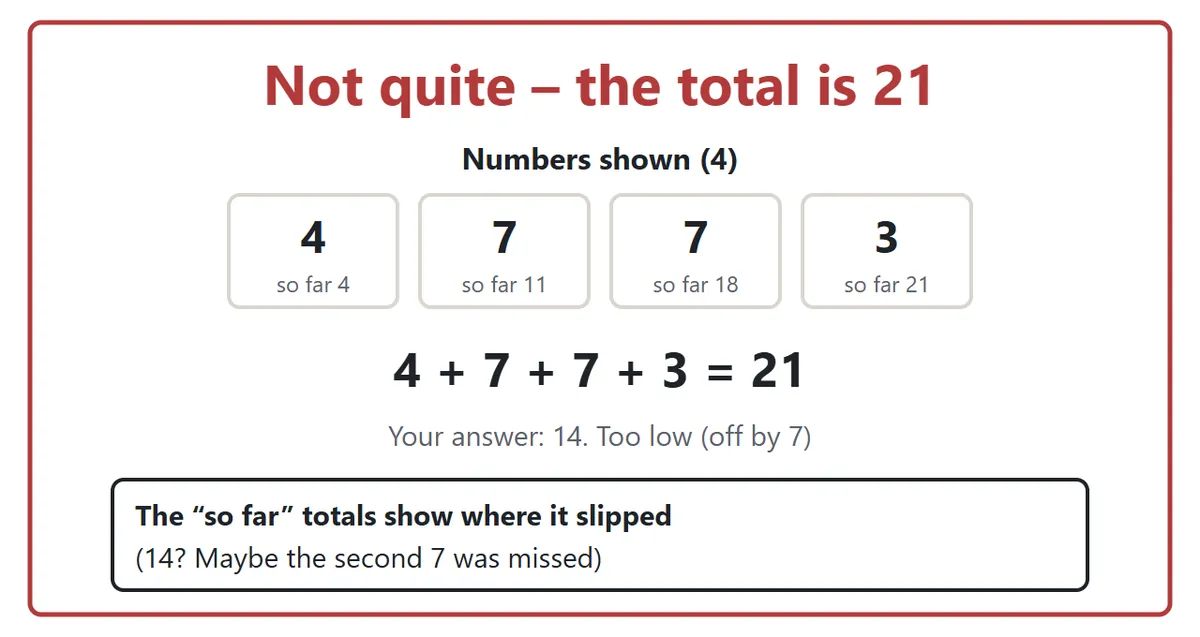
Whether you are right or wrong, every answer is followed by the full list of numbers that appeared and the written-out sum. Under each number you also see the running total “so far”. If your answer was wrong, compare these running totals with the ones you had in your head and you can usually find the exact step where things slipped. When you are done, press Next (or Enter) to move on to the next problem.
Mental math practice modes
| Mode | What you do | What is recorded |
|---|---|---|
| Practice | Pick the digits, how many numbers, the speed and subtraction yourself. Five problems. | For each setting: rounds played and your best score |
| Rank challenge | Work up through the ranks from 15 to 1. Get all three problems right to pass and unlock the next rank. | The highest rank you have passed |
| Daily | Five problems, easiest first. Everyone gets the same numbers on the same day. | Your first score each day and your daily streak |
| Weak spots | Settings you missed before (digits, count and speed), with fresh numbers. | How many weak spots are left |
In Practice and Weak spots you can press Watch again before you answer to see the same numbers once more. A problem you watched twice does not count as “right first time”, and its setting goes into your weak spots. Rank challenge and Daily do not allow a second look. In every mode the game also keeps your streak: the number of problems in a row you got right on the first try.
Quick Sum ranks
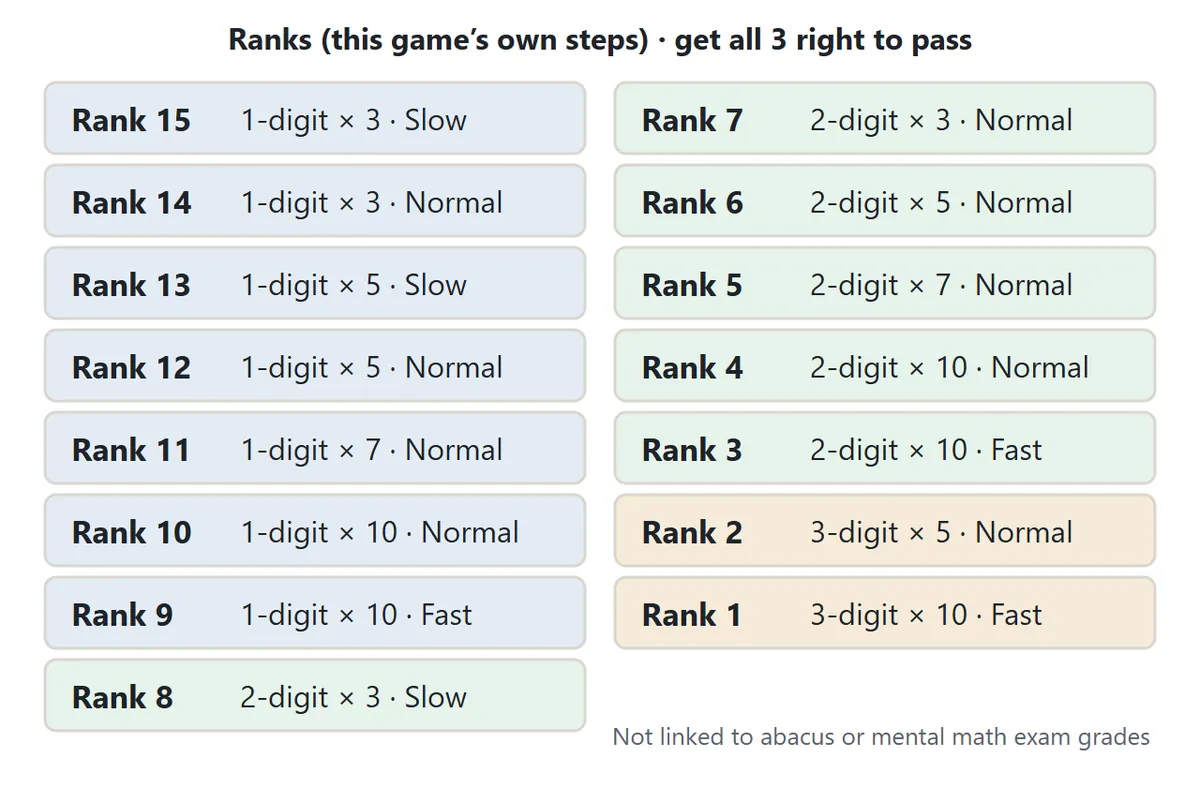
The ranks line up fifteen steps, from three 1-digit numbers at a slow pace up to ten 3-digit numbers at a fast pace. Rank 15 is the easiest and Rank 1 is the hardest. Each rank changes only one thing at a time – a few more numbers, a faster pace, or one more digit – so the climb feels steady rather than sudden. These ranks belong to this game only. They are not linked to any abacus school, mental math exam or grading system, and passing one here does not mean you hold a rank anywhere else. Treat them as a suggested order for practice.
Mental addition tips
1. Start slow, with only three numbers
If you jump straight to a fast setting, simply reading the numbers takes all your attention and there is nothing left for adding. Begin with three 1-digit numbers on Slow and make sure you can get them all right. Then raise the count, and only after that raise the speed. Changing one thing at a time is the quickest way to improve, and it is exactly the order the ranks follow.
2. Hold only the running total
Trying to remember every number that appeared works for three or four numbers and then falls apart. Instead, update your total the moment each new number appears and forget the number itself. At any point there should be just one number in your head: the total so far. This keeps your memory free for the next number, however long the sequence is.
3. Make tens
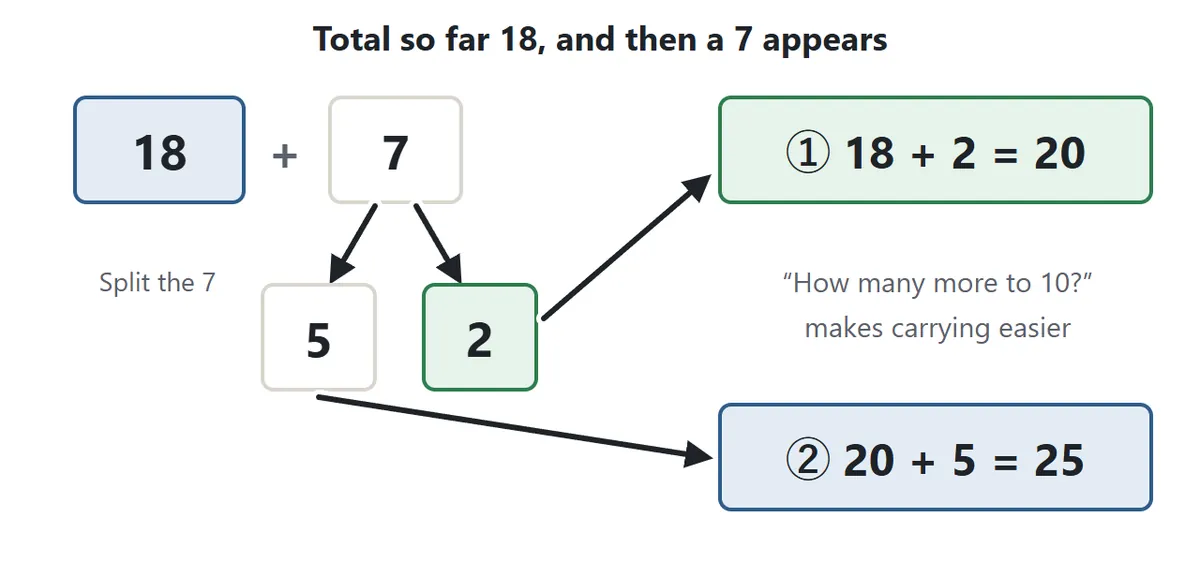
Carrying is where most mistakes happen. One reliable trick is to “make ten”: if your total is 18 and a 7 appears, notice that 18 needs 2 more to reach 20, split the 7 into 2 and 5, and you get 20 and then 25. With two-digit numbers, add the tens first and then the ones – for 46 + 38, think 46 + 30 = 76, then 76 + 8 = 84. Both habits turn one awkward step into two easy ones.
4. Watch for the minus sign
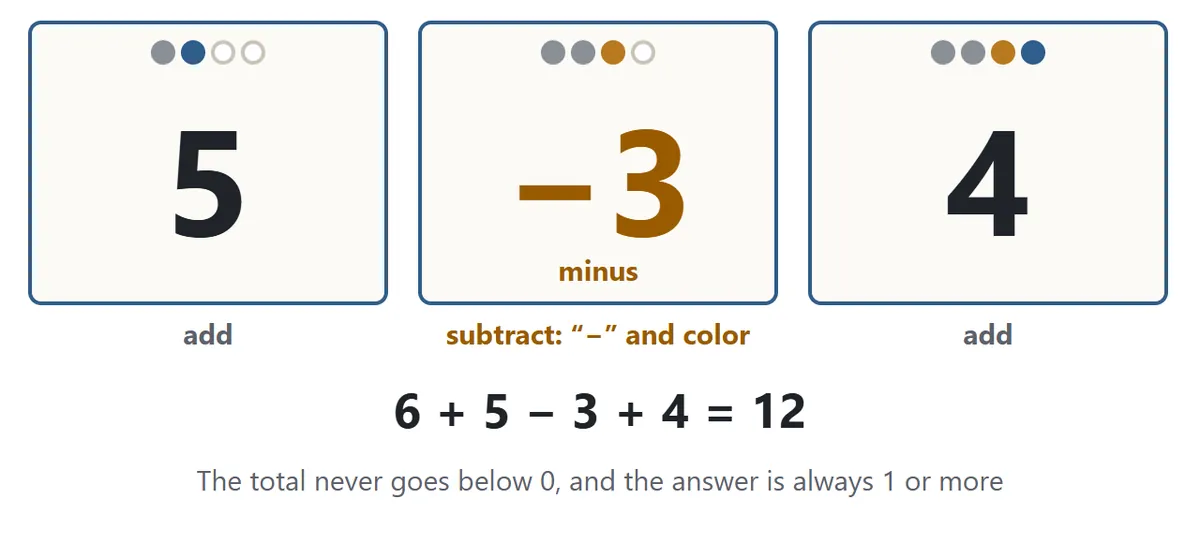
When subtraction is set to Mixed in, some numbers are taken away instead of added. They appear with a minus sign in front, such as −3, in a different color, with the word “minus” underneath. The first number is always added, the running total never drops below zero, and the final answer is always 1 or more, so you never have to deal with negative numbers.
5. After a miss, read the running totals
The list after each answer is the most useful part of the game. Checking where your total first went wrong reveals your habits: maybe you tend to slip when carrying, or you add a repeated number only once, or subtraction catches you out. Missed settings stay in Weak spots, so you can come back and drill exactly those later.
6. Keep sessions short
Staring at a screen and concentrating hard is tiring for the eyes. Each round ends after five problems (three in Rank challenge) for that reason. Play a few rounds, then take a break; short, regular practice works better than one long sitting.
Quick Sum FAQ
Which settings should I start with?
If you are new to this kind of practice, start with 1 digit, 3 numbers and Slow, or simply begin at Rank 15. Adding single digits, including carrying, needs only basic arithmetic. Two- and three-digit numbers and long sequences make a solid mental workout for experienced players, and the Fast and Very fast speeds are a real test of focus.
Do I need to know how to use an abacus?
No. People trained on the abacus often picture the beads in their mind while they calculate, but this game does not expect any particular method. Use whatever works for you: column addition in your head, making tens, or anything else.
Are the ranks the same as abacus or mental math exam grades?
No. The ranks are this game’s own steps, set out in an order that is comfortable to practice. They have nothing to do with the format or standards of any exam.
Where is my progress saved?
Your rank, streak, daily results and weak spots are saved only in the browser on your device. There is no sign-up and no login. On the same device and browser you can also use Continue to resume a round you left halfway through.
Is there sound?
Sound is off when you first open the game. Press Sound: off below the game to turn it on: a soft tick then plays with each number, and short sounds mark right and wrong answers. The tick can help you keep count of how many numbers have appeared.
I switched tabs and the problem started again
If you switch tabs or turn off the screen while the numbers are showing, the browser pauses the page and the numbers can no longer be shown at an even pace. To keep things fair, the game restarts that problem from the beginning with the same numbers.
About this kind of mental math practice
Adding a stream of numbers in your head has a long history in abacus training. In Japan, students of the soroban (the Japanese abacus) learn to calculate on an imagined abacus, moving the beads in their mind instead of with their fingers. Traditional drills include adding columns of printed numbers and adding numbers read aloud one after another, some with addition only and some with subtraction mixed in. Showing the numbers one at a time on a screen is a newer form of the same exercise: it is said to have been developed in the late 1970s as a computer-based drill, and it is now used in abacus schools and competitions. Quick Sum borrows that simple format so that anyone can practice adding on the fly, whether or not they have ever touched an abacus.
Comments
Write a comment
No comments yet.