 Yorimichi Games
How to play Math Grid
Math Grid is a quick arithmetic drill built on a simple table. A row of numbers runs along the top edge, a column of numbers runs down the left edge, and every square inside the table is a small problem: you write in the answer you get when you combine the top number and the left number for that square. You can practice addition, subtraction or multiplication on a 10×10 grid (100 problems), a 5×5 grid (25 problems) or a 3×3 grid (9 problems). It is a single-player game that runs in your browser, with nothing to download and no account to create. The game times you from the first square to the last and counts your mistakes, so every round gives you something to compare with next time.
Using the game screen
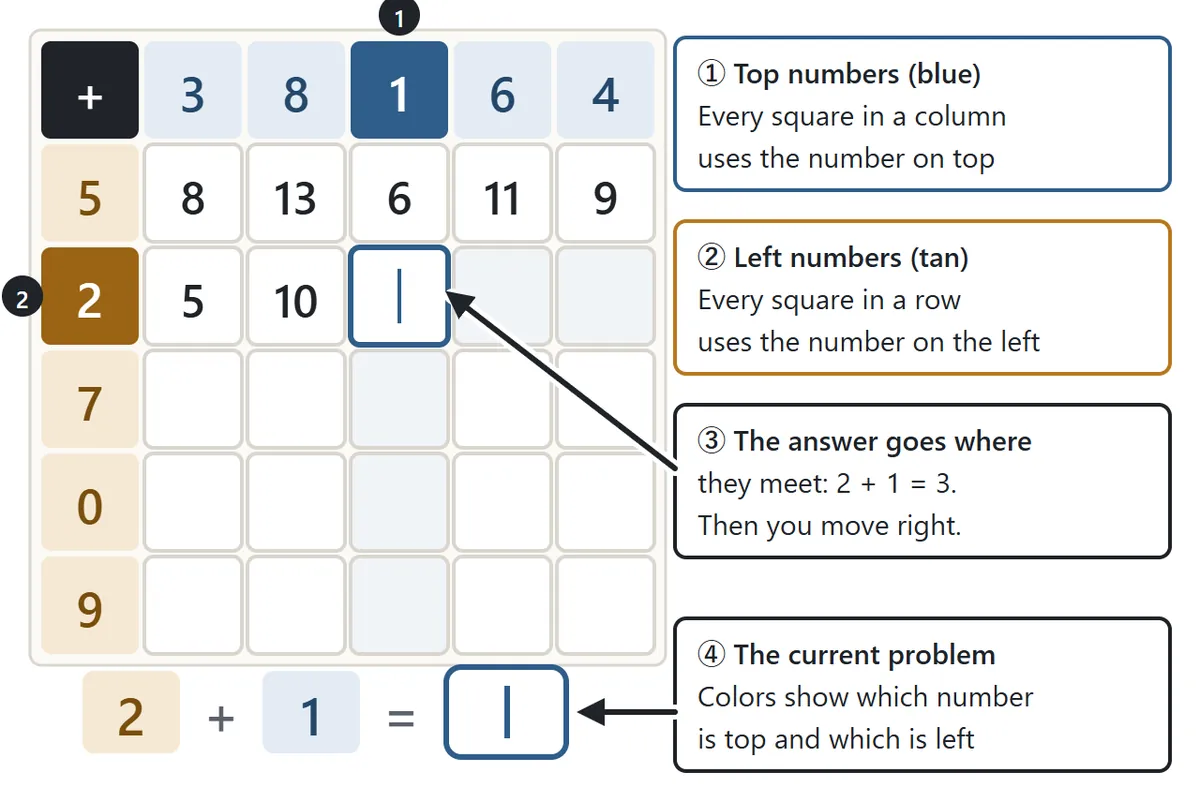
The numbers along the top are shown in blue and the numbers down the left side in tan. The square you are working on has a blue outline, and the top number and the left number it uses are highlighted in a darker shade. Under the grid you will also see the current problem written out, such as “2 + 1 =”. The numbers in that line use the same colors as the edges, so you can always tell which number comes from the top and which comes from the left.
Type your answers with the large number buttons under the grid. As soon as you have entered every digit of the answer, the game moves on to the next square by itself. If the answer is 12, it moves on after you press 1 and then 2; if the answer is 7, it moves on as soon as you press 7. On a computer you can use the number keys instead, and on a phone or tablet the “Keyboard” button brings up your device’s own number pad. To jump to a particular square, just press it.
Addition, subtraction and multiplication grids
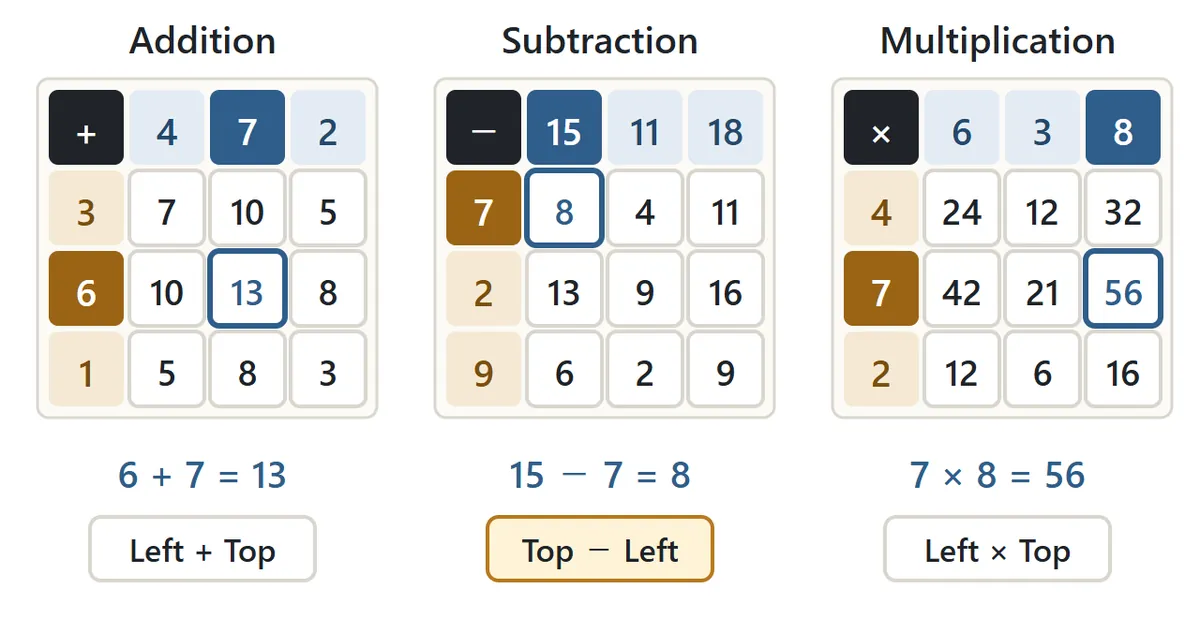
In the addition and multiplication grids, both edges hold the numbers 0 to 9. Each answer is “left number + top number” or “left number × top number”. Because the order does not change the result for these two operations, you can think of the pair either way round. In the multiplication grid it can help to read the left number as the times table you are practicing: the row that starts with 7 is the 7 times table.
In the subtraction grid, the top edge holds the numbers 10 to 19 and the left edge holds 0 to 9, and you subtract the left number from the top number. That way, no answer is ever negative. Printed grid worksheets do not all agree on this – some subtract top from left instead – so if you are used to a different layout, glance at the problem under the grid to confirm the direction.
Under “Numbers”, choosing “1–9 (no 0)” keeps zero off the grid. A 10×10 grid needs ten numbers on each edge, so with only 1 to 9 available, one of them appears twice.
Moving across or down
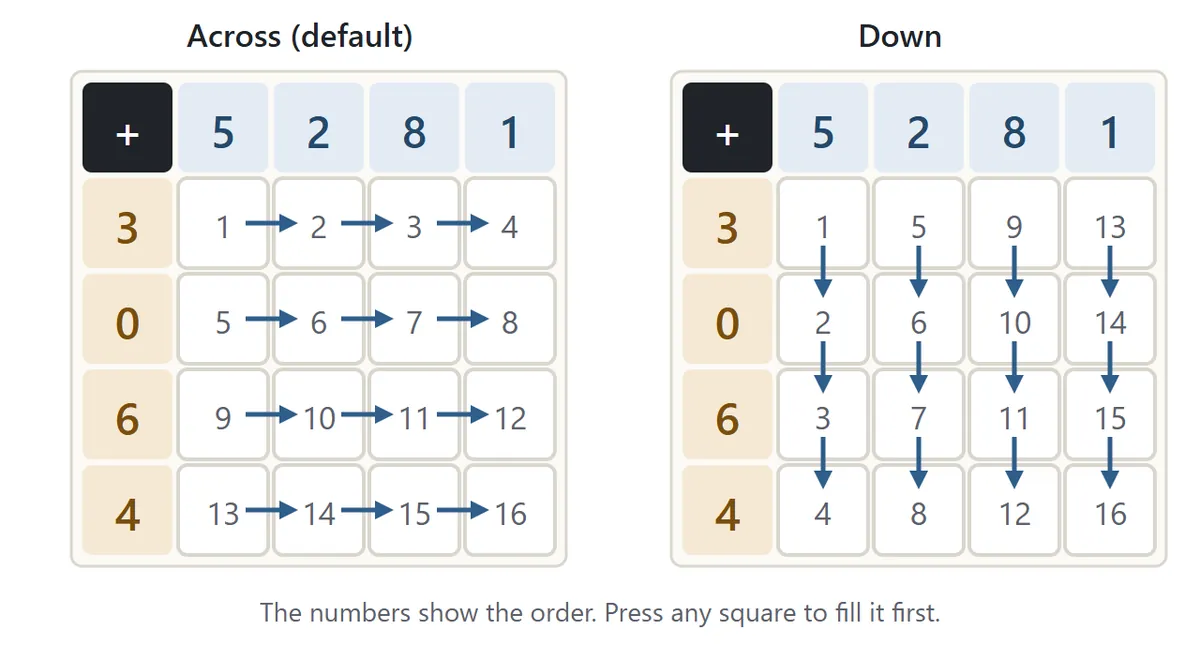
By default you start in the top-left square and work to the right. When a row is finished, you drop to the start of the next row. Every square in a row uses the same left number, so you can keep that one number in mind and only look up at the top edge as you go. If you choose “Down”, you work from top to bottom instead and move one column to the right each time a column is finished. In that order, it is the top number that stays the same.
Two ways to check your answers
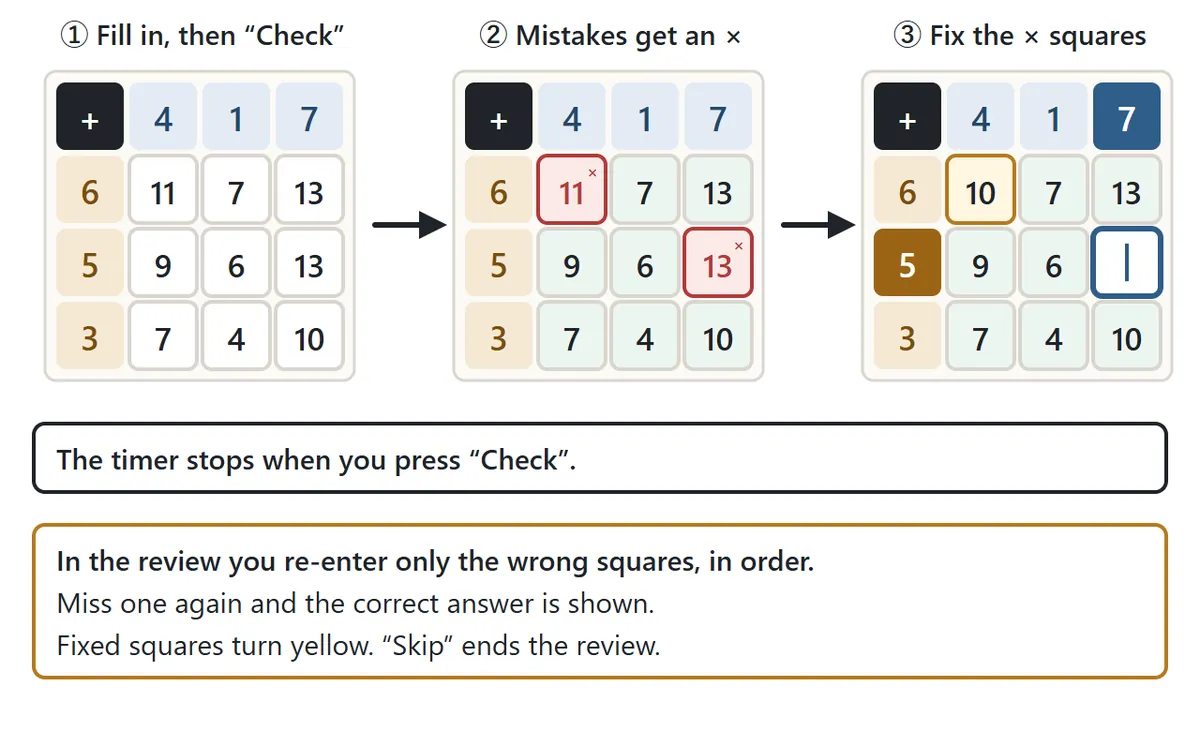
With “All at the end” (the default), you fill in every square and then press “Check”. The timer stops at that moment, and any wrong answers are marked with a red ×. If you made mistakes, the game goes into a review: you re-enter only the squares you got wrong, one after another. Miss one again during the review and the correct answer is shown so that you can type it in and move on. Squares you fix turn yellow, and “Skip” ends the review and takes you straight to your results. Until you press “Check”, you can always press a square and change what you wrote.
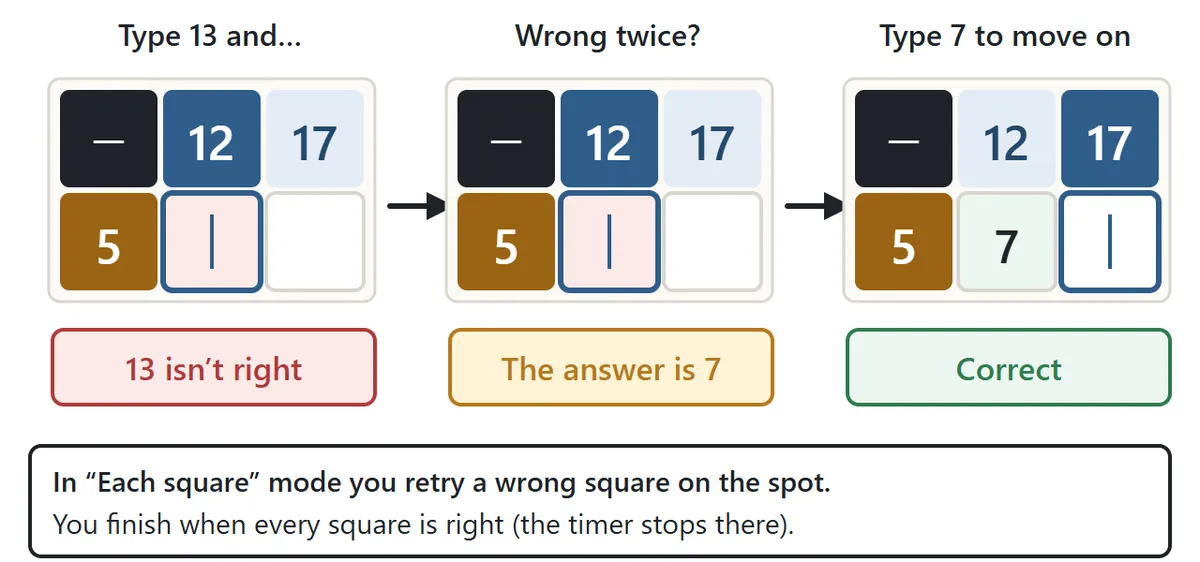
With “Each square”, every answer is checked the moment you enter it. A wrong answer stays in place for another try, and after two wrong tries the correct answer is shown. The timer stops when every square on the grid is correct. A good way to use the two modes is to start with “Each square” while a set of number facts still feels new, then move to “All at the end” once you are confident and want a proper timed run.
Settings and records
| Setting | Options |
|---|---|
| Operation | Addition, subtraction or multiplication |
| Grid size | 10×10 (100 squares), 5×5 (25 squares) or 3×3 (9 squares) |
| Numbers | 0–9, or 1–9 without zero. In subtraction this applies to the left number (the one you subtract) |
| Direction | Across (left to right) or Down (top to bottom) |
| Checking | All at the end, or each square as you go |
| Problems | Practice (a new grid every time) or the daily grid (the same grid for everyone who picks the same settings that day) |
Records are kept separately for each combination of operation, grid size and number range. For each one, the game remembers how many times you have played, your fewest mistakes and your last five times. A best time is saved only when you finish with zero mistakes, so rushing and making errors will not earn a new record – accuracy comes first, then speed. The daily grid is handy when you want to race a friend or a family member on exactly the same numbers.
Math grid tips
1. Start small with 3×3 or 5×5
A full 100-square grid takes real concentration, and it is easy to lose focus halfway through. A 3×3 grid takes well under a minute, which makes it a good warm-up or a gentle way back into arithmetic after a long break. Once you can finish a 5×5 grid with few or no mistakes, step up to 10×10.
2. Hold the left number in mind and go across
When you work across a row, every square uses the same left number. In the 7 row of an addition grid, the only question for each square is “7 plus what?”, so you do not need to look back at the left edge every time. Less eye movement means a calmer, steadier rhythm.
3. The 0 and 1 rows follow a pattern
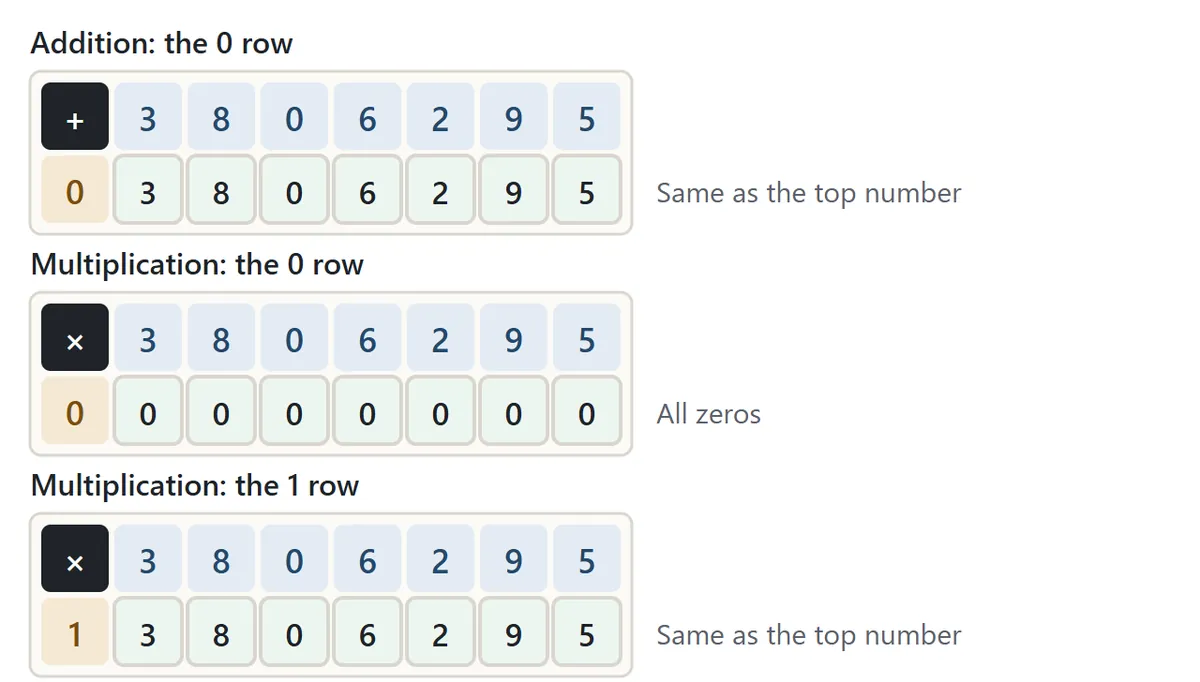
Adding 0 leaves the top number unchanged. Multiplying by 0 always gives 0, and multiplying by 1 gives the top number back. Spotting rules like these speeds you up and also helps you catch slips when you look over your work. If you would rather leave the zero facts out and stick to the 1 to 9 times tables, set “Numbers” to “1–9”.
4. Split subtraction into “10 and something”
For a problem like 15 − 7, where the ones digit is too small to take 7 from, break 15 into 10 and 5. Take 7 from 10 to get 3, then add the 5 back to get 8. For a problem like 17 − 3, where the ones digits work on their own, keep the ten as it is and just work out 7 − 3. Because the top numbers run from 10 to 19, both kinds of problem turn up in every subtraction grid.
5. Look at the problems you missed
The results screen lists every problem you got wrong. If the same few keep appearing round after round, those are your weak spots. For addition, it often helps to think about how far each number is from 10; for multiplication, say the times table for that row slowly and check each step.
6. Build speed gradually
It is best to aim for zero mistakes first, even if that means going slowly. The results screen shows your last five times, so rather than worrying about whether one round was fast or slow, look at how your times change over several rounds.
Difficulty: what each grid practices
| Grid | What it practices |
|---|---|
| Addition, 0–9 | All one-digit addition facts, with sums from 0 to 18 |
| Subtraction | Taking 0–9 away from 10–19, both with regrouping (15 − 7) and without it (17 − 3) |
| Multiplication, 1–9 | The times tables from 1 × 1 to 9 × 9 |
| Multiplication, 0–9 | The times tables plus the zero facts (0 × 5, 5 × 0) |
The smallest step up is the grid size: a 3×3 grid of addition is an easy start, while a 10×10 grid of multiplication with zeros asks for steady focus over a hundred problems. Subtraction usually feels harder than addition at first because of the problems that cross ten. Division is not included. In a grid like this, many pairs of numbers do not divide evenly, and a division with a remainder has two answers (the quotient and the remainder), which do not fit in a single square. Division facts are usually practiced as a separate list of problems rather than as a grid.
Math Grid FAQ
Who is Math Grid for?
Anyone who wants short, focused practice with basic number facts. You can use it to brush up on mental arithmetic, to keep your times tables sharp, as a timed challenge against your own best, or simply as a few minutes of exercise for your brain. The 3×3 grid suits a quick warm-up, and the 10×10 grid is a proper workout.
Which number is subtracted from which?
In this game, you always subtract the number on the left edge (0–9) from the number on the top edge (10–19). Some printed worksheets use the opposite direction, so if you are not sure, check the problem shown under the grid.
Can I stop and continue later?
Yes. Your answers and the time so far are saved automatically in your browser. Open the page again on the same device and the same browser, and a “Continue” button appears on the settings screen. A daily grid that you leave unfinished is replaced with a new one when the date changes.
Where are my records stored?
Only in the browser on the device you are using. There is no sign-up or login, and your records do not carry over to another device or browser.
Does the game make any sound?
Sound is off at first. Press “Sound: off” under the game to turn on short sound effects for button presses and for checking answers.
Does it work on phones, tablets and Chromebooks?
Yes. The game runs entirely in the browser, so it works on Chromebooks, iPads, Android tablets and phones. On a device with a keyboard you can play with just the number keys and the arrow keys, and on a touch screen the big number buttons make entering answers easy.
Why is there no division grid?
Many number pairs in a grid do not divide evenly, and a division with a remainder has two parts to its answer, which do not fit in one square. That is why the game sticks to addition, subtraction and multiplication.
About grid arithmetic drills
Writing numbers across the top and down the side of a table and filling in the squares where they meet is a practice method that has been used in Japanese elementary school classrooms for a long time. It is said to have spread from teachers’ classroom practice around the 1960s, and it later became widely known through workbooks and home-study materials. Its great strength is that the format never changes: because you fill in the same kind of table again and again, it is easy to see your own time improve. A multiplication table is built the same way – the product of each row number and column number sits where they cross – so the two look very similar. This game keeps the paper version’s flow of filling everything in and then checking it all at once, and adds what a screen makes easy: checking one square at a time, and going back over only the squares you missed.
Comments
Write a comment
No comments yet.