 Yorimichi Games
How to play FreeCell
FreeCell is a solitaire card game played with one standard 52-card deck (no jokers). Unlike most solitaire games, every card is dealt face up at the start, so you can see exactly where everything is from the first move. Luck plays very little part: almost every deal can be solved if you plan carefully, which is why FreeCell is often described as a puzzle made of playing cards.
The goal is to move all 52 cards onto the four foundations, one pile per suit, in order from ace to king. To dig out the cards you need, you rearrange the eight columns and use four free cells, small parking spaces that each hold one card.
The layout
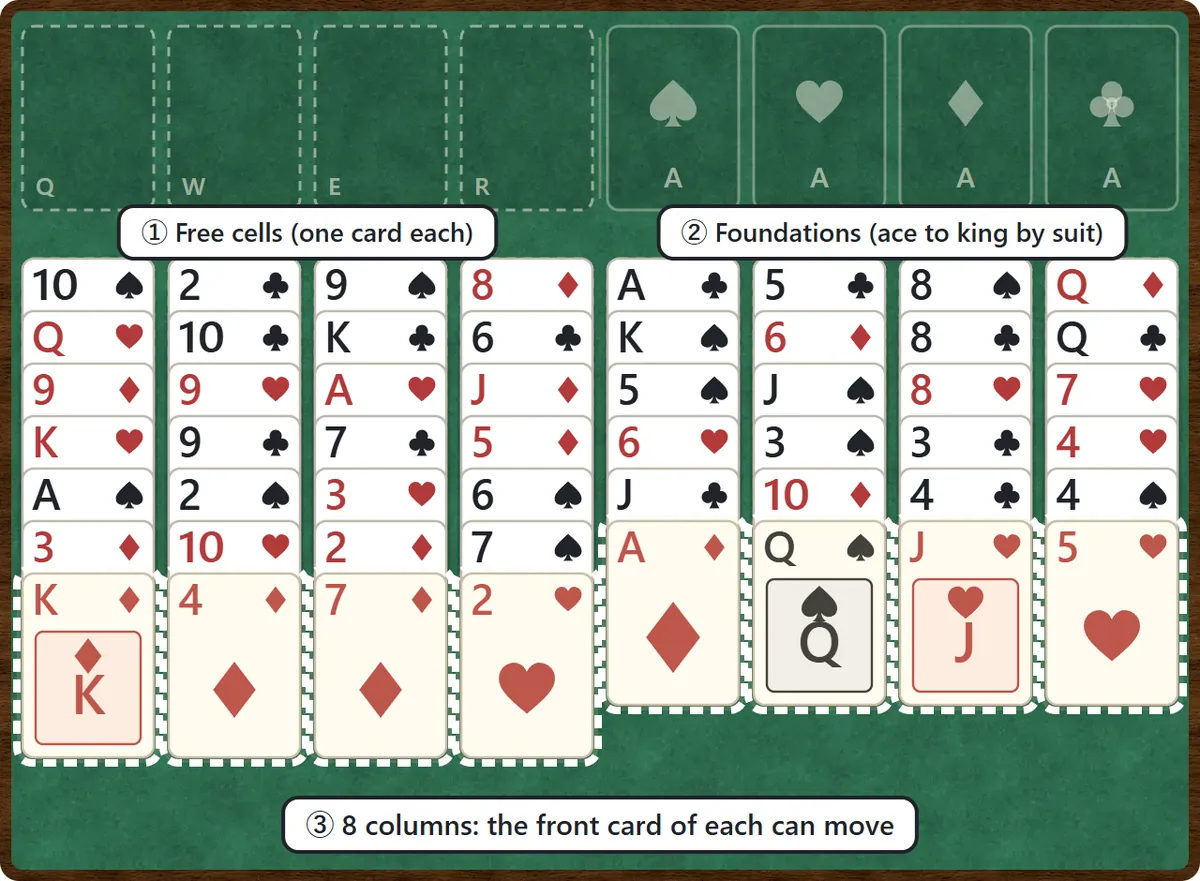
All 52 cards are dealt face up into eight columns: the four columns on the left get seven cards and the four on the right get six. The four spaces at the top left are the free cells, where you can park any single card. The four spaces at the top right are the foundations, where each suit is built up from ace to king. When all four foundations reach the king, you have solved the deal.
Build down in alternating colors
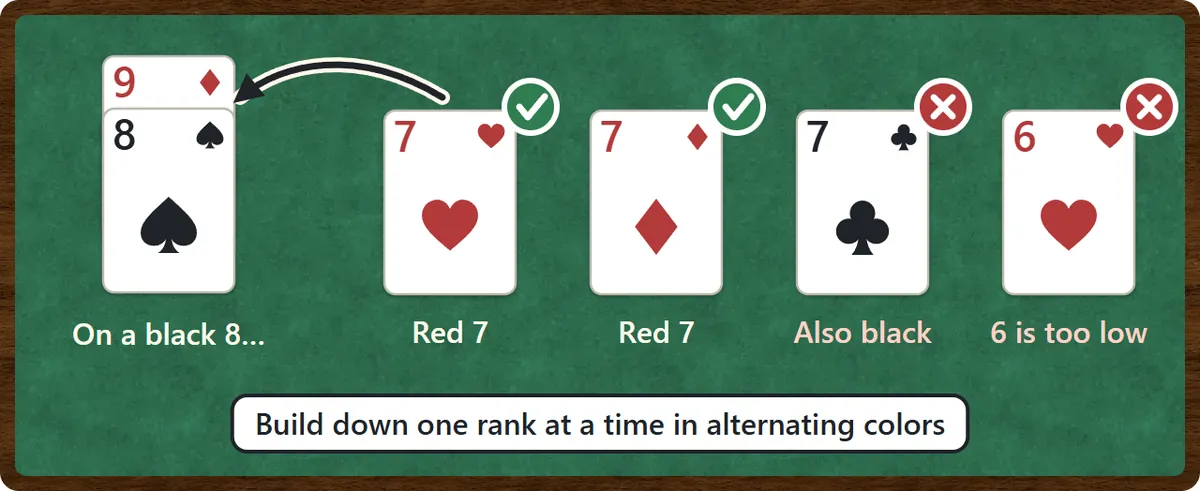
You can move the front card of any column and any card in a free cell. To place a card on a column, it must be one rank lower and the opposite color (red on black or black on red). On the 8 of spades you can play the 7 of hearts or the 7 of diamonds, but not the 7 of clubs (also black) or the 6 of hearts (two ranks lower). Nothing can be placed on an ace.
Use the free cells to dig out buried cards
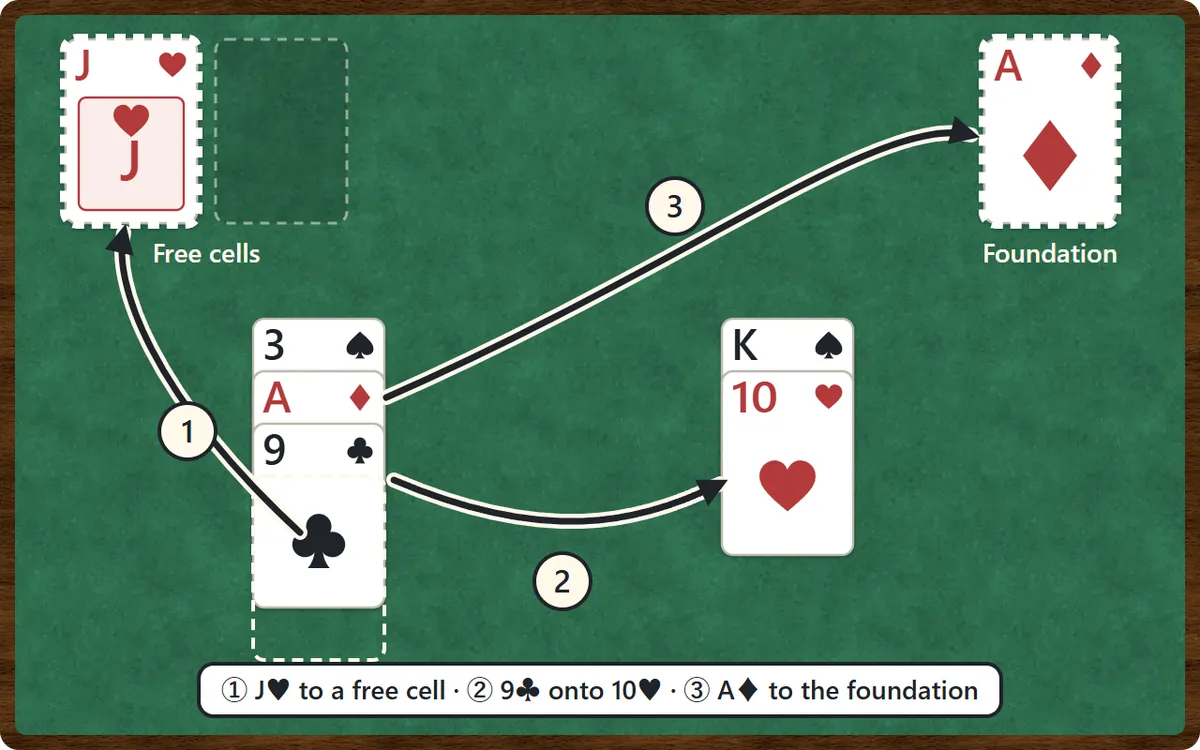
When the card you want is buried in a column, move the cards on top of it out of the way. If one of them fits on another column, put it there; if not, park it in a free cell. There are only four free cells, and every card you park there leaves you less room to maneuver, so the best cards to park are the ones you know you’ll be able to play again soon.
Moving several cards at once
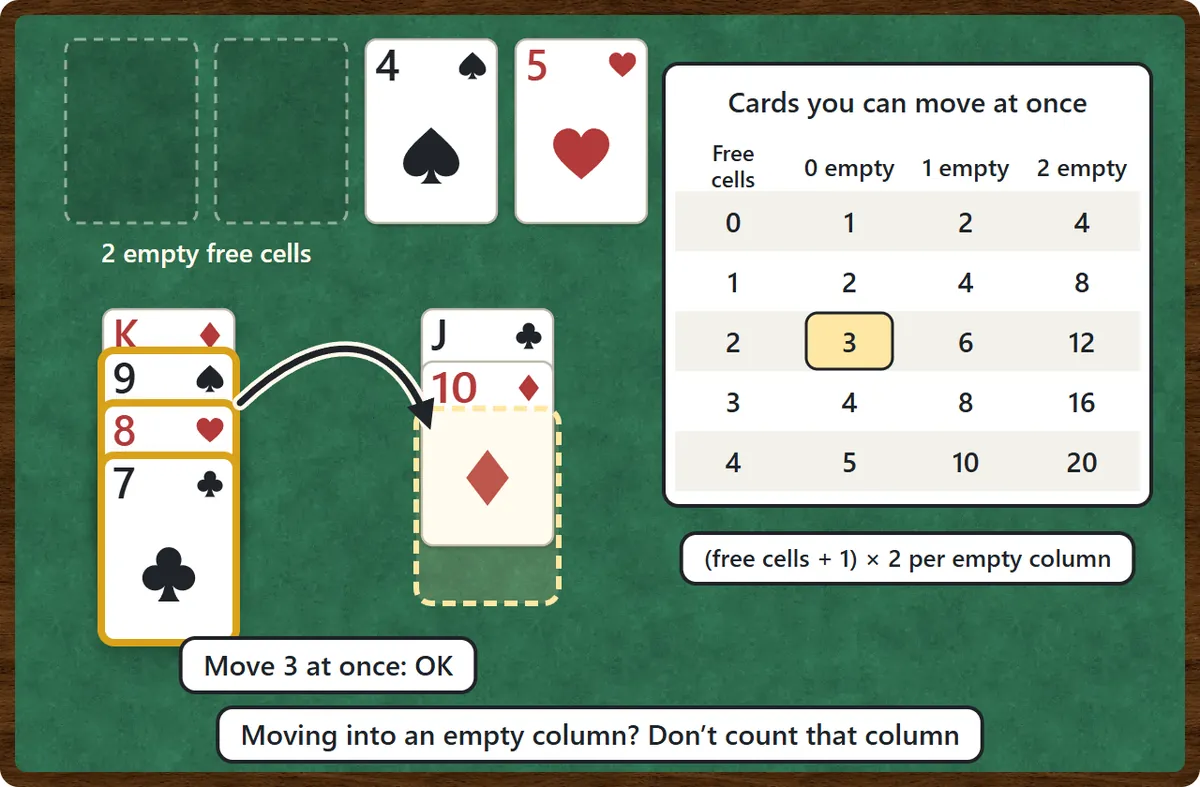
Strictly speaking, FreeCell moves one card at a time. But a run of cards in alternating colors, each one lower than the last, can be carried across one card at a time through empty free cells and empty columns, and this game does that shuffling for you in a single move. The number of cards you can move together is (empty free cells + 1), doubled for each empty column. With two empty free cells you can move three cards; add one empty column and it becomes six. When the destination is itself an empty column, that column doesn’t count, so the limit is halved.
Any card can go in an empty column
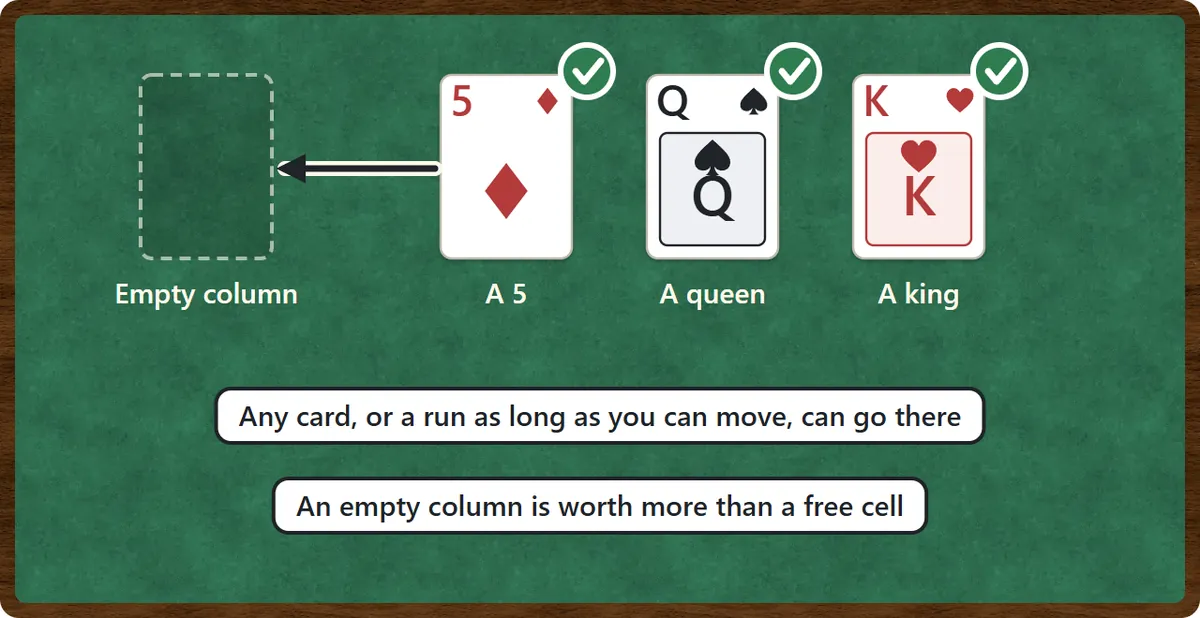
When you clear every card out of a column, you can put any card there, not just a king. An empty column can hold a whole run instead of a single card, so it is worth far more than a free cell.
Foundations and safe cards
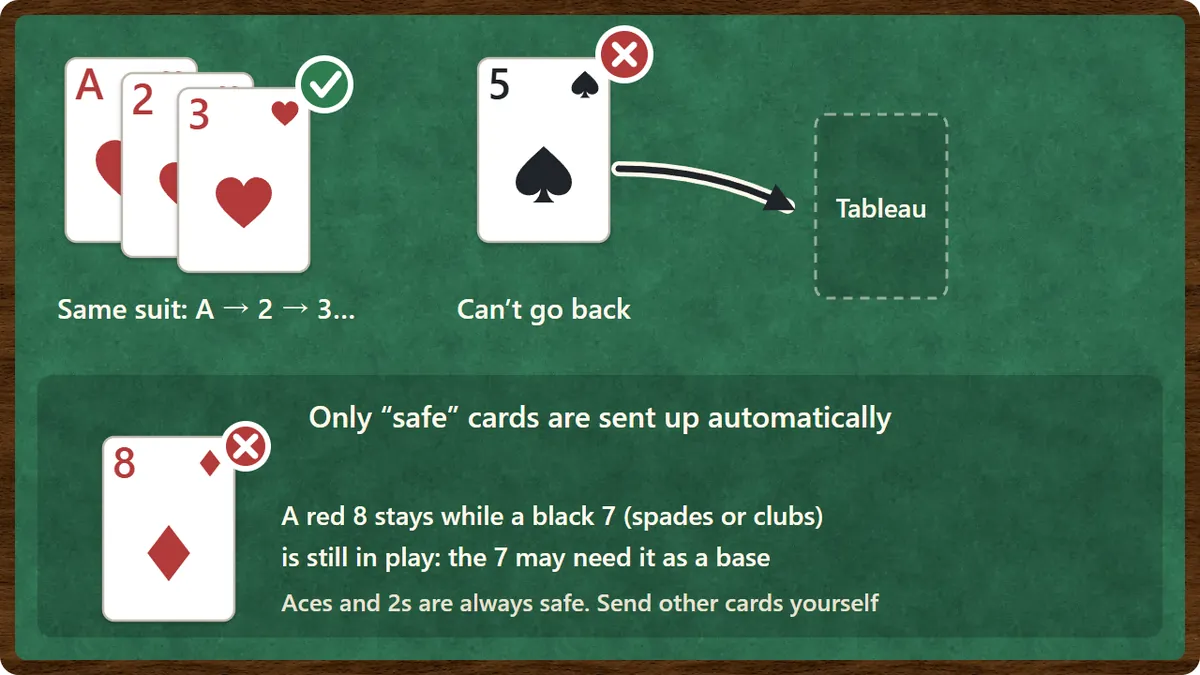
Each foundation takes one suit, one card at a time, starting with the ace. In standard FreeCell a card on a foundation can’t be moved back to the tableau. If you turn on “Automatically move safe cards to the foundations,” the game sends up only cards you will never need again: aces, 2s, and any card whose lower opposite-colored cards are already on the foundations. A red 8, for example, stays in play until both black 7s have gone up, because a black 7 might still need it as a base. The option is off at first; double-tap a card or press Collect to send cards up yourself.
How to use this game
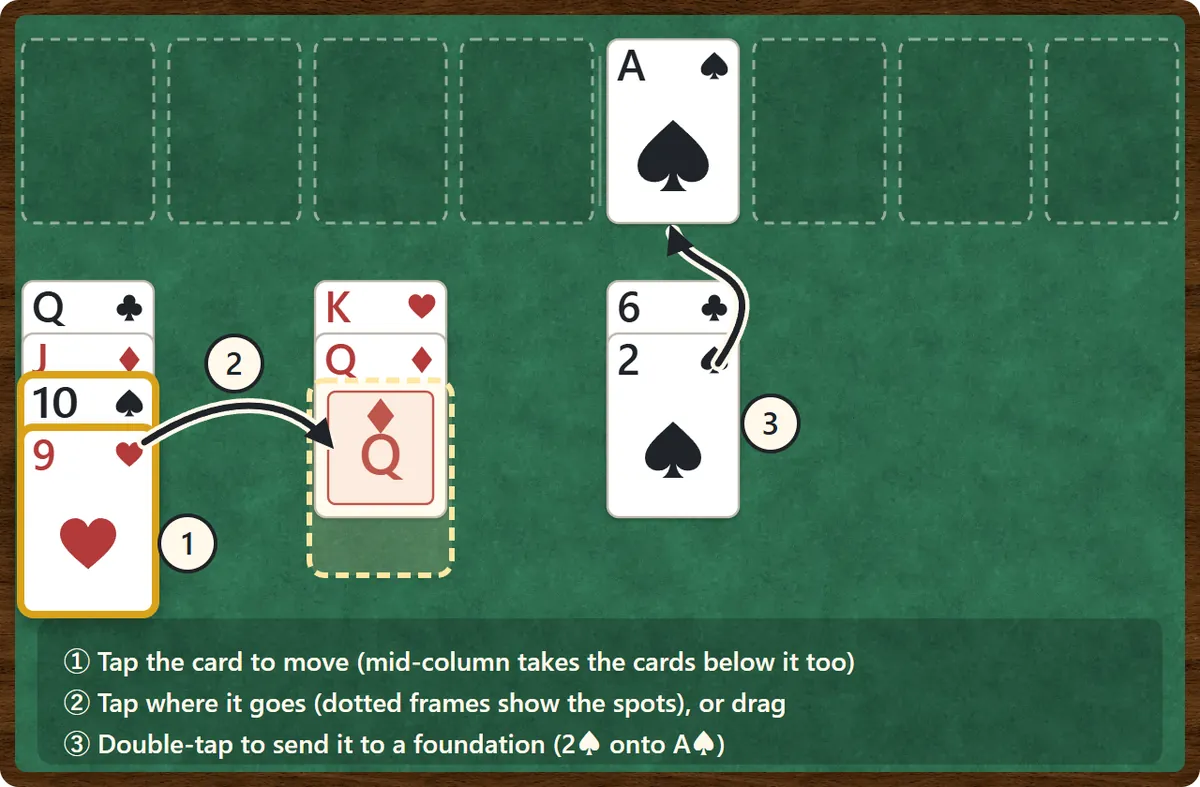
Click or tap a card to pick it up, and dotted frames show where it can go. Click a frame to move it there. Tapping a card in the middle of a column picks up that card and everything below it. You can also drag cards, and a quick double-tap sends a card to its foundation. If you try a move that isn’t allowed, the game tells you why, for example “Only a red (hearts or diamonds) 9 can go on the 10 of clubs.”
Undo takes back as many moves as you like, and Hint shows a good next move with an arrow. If the position can no longer be solved, Hint tells you how many moves to undo to get back to one that can. On a keyboard, press 1–8 for a column, Q, W, E or R for a free cell, Enter to send a card to its foundation, Z to undo and H for a hint.
FreeCell difficulty levels and game types
Every deal in this game has been checked by a solver to be solvable. Nearly all FreeCell deals can be solved, but a very small number can’t, and those are never dealt. Difficulty is based on how many free cells a deal needs.
| Level | What kind of deal |
|---|---|
| Easy | Solvable with just one free cell. You still get all four, so you have room to spare. |
| Normal | Needs two free cells. This is the most common kind of deal. |
| Hard | Needs three or more free cells. Keeping cells open is the whole game. |
| Game | What it is |
|---|---|
| By difficulty | A deal at the level you choose. Your wins, streak, and best moves and time are recorded. |
| Daily Deal | One Normal deal for each date. Everyone gets the same deal on the same day, so you can compare moves with friends and family. |
| Deal by number | Pick a deal from 1 to 30000. The same number always gives the same deal. |
FreeCell strategy: tips to solve more deals
1. Look over the whole table first
Everything is visible from the start, so use that. Before you move, find the four aces and the 2s and note how deep they are buried. Freeing the shallowest aces first gets the foundations growing early, which opens up space on the table.
2. Keep your free cells empty
Free cells are handy, but each one you fill cuts the number of cards you can move together and makes you less flexible. Only park a card when you can see when and where it will come back out. When three or more cells are full, you are in danger.
3. Aim to empty a column
An empty column is more powerful than any free cell. Look for a short column, or one full of cards that are easy to move, and work on clearing it. One empty column doubles the number of cards you can move at once.
4. Don’t rush a king into an empty column
Once a king goes into an empty column, that column is no longer free. Only do it when you can see a long run building down from that king. More often, an empty column is most useful as temporary space.
5. Don’t build runs too long too early
A long run in alternating colors looks tidy, but if low cards are buried beneath it, digging them out gets hard, because the number of cards you can move at once is limited. Before extending a run, check what is sleeping at the bottom of that column.
6. Undo and try again
FreeCell rewards thinking a few moves ahead. When you get stuck, undo a few moves and try another plan. Hint tells you whether the current position can still be solved, and if not, how far back you need to go.
FreeCell win rate: is every game winnable?
Almost, but not quite. FreeCell has an unusually high win rate for a solitaire game because all the cards are visible. In the classic set of 32,000 numbered deals that made the game famous on home computers, exactly one deal, #11982, is known to be impossible. Computer searches over millions of random deals have found that only a tiny fraction, well under one in a thousand, can’t be solved.
For people, the win rate depends on patience more than luck. Many players win most of the deals they try once they learn to keep free cells open and to plan for empty columns. In this game you never have to wonder whether a deal is possible: every deal has been solved by a computer first, so if you get stuck, a way through exists.
FreeCell FAQ
Is FreeCell harder than Klondike?
It is different rather than harder. Klondike hides cards face down, so luck decides many games. In FreeCell you can see everything, so nearly every deal can be solved, but you have to plan more carefully to do it.
Are the deal numbers the same as in other FreeCell games?
No. This game uses its own numbering, so deal #1 here is not the same as deal #1 elsewhere. Within this game, the same number always gives the same deal.
Can I move a card back from a foundation?
Not in standard FreeCell rules. If you sent a card up by mistake, use Undo to go back to before the move.
How are moves counted?
The count is the number of times you move cards yourself. Moving a run of cards together counts as one move. Cards sent to the foundations aren’t counted, so the automatic option doesn’t change your move count. Your best moves and time are recorded only for deals solved without a hint.
Can I stop and continue later?
Yes. Open the game again on the same device and browser and press Continue in the settings. Your Undo history is saved too. Sound is off at first; press “Sound: off” to hear effects when you move cards.
Does it work on a phone, tablet or Chromebook?
Yes. It runs in any modern browser with no download or account, and works with touch, a mouse or a keyboard.
Where FreeCell comes from
FreeCell is credited to Paul Alfille, who programmed it in 1978 on an educational computer system. He based it on an older game called Baker’s Game, in which cards are built down in the same suit; changing that to alternating colors is what makes nearly every deal solvable. The game spread around the world in the 1990s when it came preinstalled on personal computers, and it has been a favorite ever since. Seeing every card from the start, and knowing that careful thinking rather than luck will get you through, is a big part of its lasting appeal.